
How to Set Up the Wyze Window Bird Cam and Bird Watch
Official Wyze Window Bird Cam setup steps, box contents, and the difference between free camera features and the Bird Watch plan. The official product page, checked 2026-11-29T01:38:19Z, listed a regular price of $69.98. Every camera includes three months of Bird Watch, then official billing is $6.99 per month per camera unless you change or cancel the plan.
Disclosure: This page may contain affiliate links. They do not influence our editorial conclusions. Read the disclosure.
Our pick
- See price at Wyze
Top pick
Wyze
Wyze (Wyze Labs, Inc.) sells smart home cameras, video doorbells, locks, lighting, and related devices on its official U.S. store, wyze.com. Official pages chec...
Steps in this guide
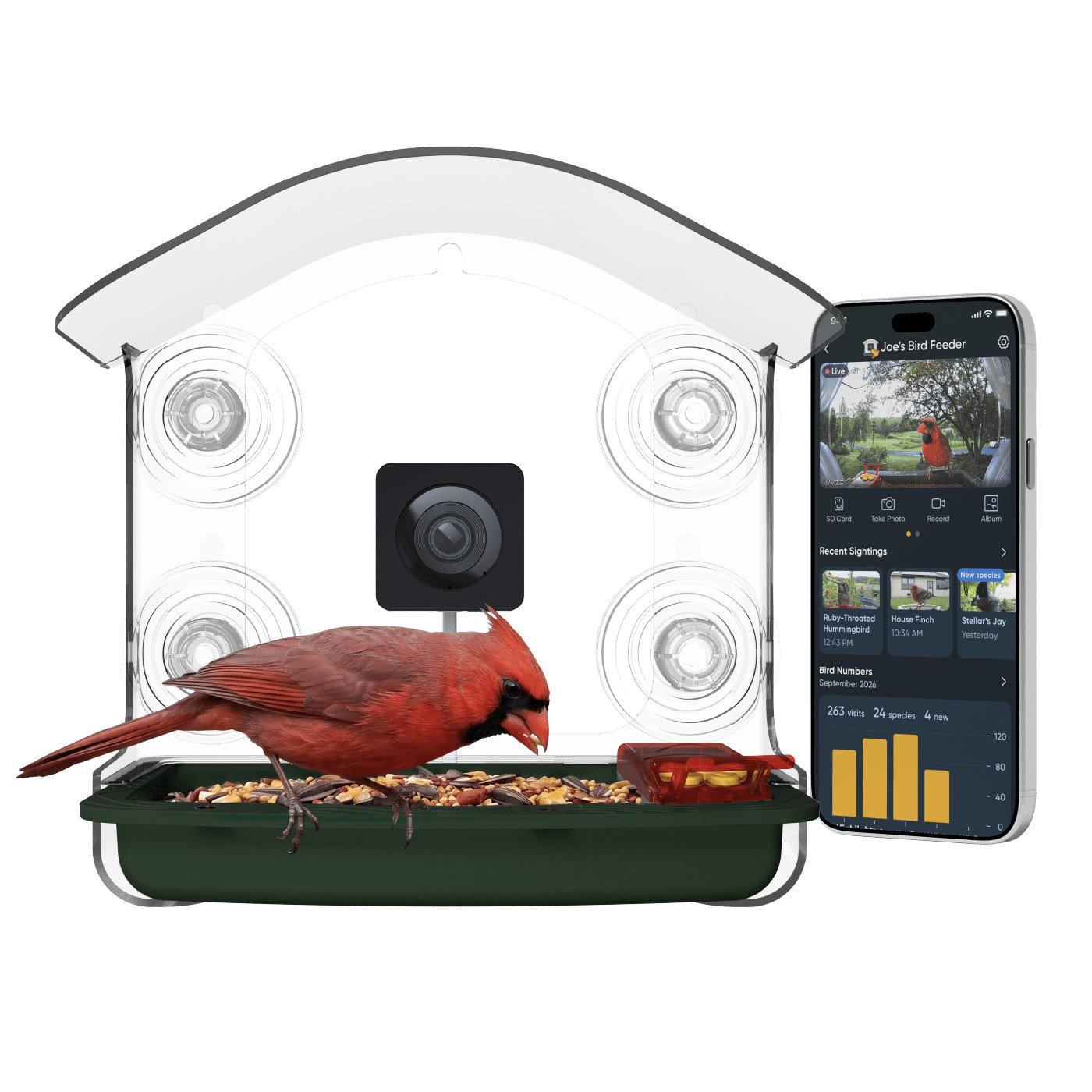
The official Wyze Window Bird Cam is a window-mounted camera and feeder kit. Wyze's official blog, dated November 24, 2026, names that date as launch day, lists an MSRP of $69.98, and says units ship immediately upon launch. The official product page, checked at 2026-11-29T01:38:19Z (09:38:19 Asia/Shanghai), showed the same regular price of $69.98 and structured availability as InStock, with no reduced compare-at price at that check. This guide follows official product-page specs, the official FAQ, and that official blog post. It is not a hands-on test.
The news summary of the launch and official price is Wyze Window Bird Cam Launches at $69.98 With a Three-Month Bird Watch Trial.

What you get in the box
Official product-page contents are:
- Wyze Window Bird Cam
- Window bird feeder with a built-in seed tray and hummingbird nectar pod
- 10-foot (3 m / 9.8 ft) USB-A to USB-C cable
- Indoor power adapter
- Four twist-lock suction cups
- Two mounting stickers (hook-and-loop camera mounts)
- Four cable clips
- Camera positioning template
- Quick Start Guide
An optional perch attachment is sold separately. Official copy says that perch attaches to the seed tray and adds landing space in front of the lens, with additional spaces described for suet, fruit, and jelly. A microSD card is also sold separately if you want local recording.
Choose a window that meets the official requirements
Official FAQ advice is to pick a clear, screen-free pane you can reach for refills. A window screen, official copy says, will block the camera's view and prevent the feeder's suction cups from sealing against the glass. The included 3 m (9.8 ft) cable must reach an indoor outlet. The camera uses 2.4 GHz Wi-Fi, so official guidance is to choose a window with a reliable signal from your router.
Official placement language is unambiguous: the camera mounts inside, facing out; the feeder mounts outside, directly opposite it. That keeps the electronics indoors on always-on USB-C power (5V DC, 1A) while birds feed on the outdoor tray. Official weather-resistance language on the product page is listed as indoor for the camera. The official blog explains the design choice to skip infrared night vision: IR LEDs can bounce off window glass and wash out the picture, and the camera is intended for daylight and dawn/dusk activity. Official specs also say the camera has no microphone, speaker, or siren, so it does not record birdsong.
Before you press the feeder onto the glass, official FAQ steps say to pair the camera in the Wyze app first, hold it at the spot you have in mind, and check the live view. Official app compatibility on the product page is Android 9.0+ and iOS 16.0+.

Follow the official three-step mount
The official product page summarizes installation as three steps that do not require tools:
- Place the camera inside, facing out.
- Press the feeder to the outside glass, then twist to lock.
- Fill the tray with seed or nectar.
Official copy describes four heavy-duty twist-lock suction cups and a camera positioning template, plus mounting stickers for the indoor camera. After the feeder is on the glass, official FAQ language says you can leave it mounted and slide out the seed tray to rinse or refill it. Drainage holes in the tray are meant to let rainwater out. The side pod holds nectar for hummingbirds and is removable. Official advice is to clean the tray and nectar pod regularly and let the seed tray dry before refilling.
Official video specs on the product page are 1080p (1920 × 1080) at up to 30 fps, with an F1.6 aperture, a 4–8 inch (10–20 cm) near-focus range, and a 147-degree diagonal field of view (124-degree horizontal, 66.8-degree vertical). Official item size is 9.02 × 8.43 × 5.51 inches and 1.12 pounds, and the listed operating range is 14°F to 113°F (−10°C to 45°C). Official connectivity is 2.4 GHz Wi-Fi (802.11 b/g/n, with official compatibility language for Wi-Fi 4/5/6) and IFTTT.
Decide whether you will use only the free features or Bird Watch
Every Window Bird Cam includes three months of Bird Watch, whether or not you already have a Wyze plan. Official product-page language says that after those three months, the membership automatically converts to a paid subscription at $6.99 per month per camera, and that you will be charged. If you do not want the paid plan, change or cancel it in your account before that conversion, following Wyze's official account and billing screens.
You do not need the paid plan to use the camera. Official FAQ and comparison tables say that out of the box you can use live view, bird detection, bird alerts (with a 5-minute cooldown on the free tier), unlimited user sharing, and 24/7 local recording if you add a microSD card. The official blog, dated November 24, 2026, describes Bird Watch as adding AI species identification for 3,000+ bird species, 60-day cloud video storage, full-length event clips, and zero notification cooldowns. Official tables also list Bird Facts and Wiki, full monthly highlights, and the full Bird Log and Numbers tools as Bird Watch features. Official footnotes say local recording requires a microSD card sold separately, and that Bird Watch is a standalone subscription that is not included with Cam Plus, Cam Unlimited, or Cam Unlimited Pro.

Official storage details: a microSD card up to 512 GB in exFAT or FAT32 can record continuously or for events only, with or without Bird Watch. Bird Watch, official copy says, stores full visit videos in the cloud for up to 60 days even if the card slot is empty. Official advice is to download a favorite clip to your phone before that 60-day window ends if you want your own copy.
Alerts, sharing, and official limits
Official FAQ language distinguishes the two alert styles. With the camera alone, alerts tell you a bird was detected, with a cooldown between notifications. With Bird Watch, back-to-back visits can each trigger a species alert. You can turn off alerts for that camera under Settings → Notifications in the Wyze app and still open the live view, or snooze all Wyze notifications from the Home tab bell.
To share live feeder access, official instructions are Account → Sharing → Share With New User, then enter the email the other person uses for Wyze, select the Bird Cam, and send the invitation. Official copy says there are no extra guest fees. Sharing a single recorded visit is a separate Share action from a Bird Watch clip; official FAQ language says that is not the same as a live-camera invitation.
The official blog also lists retail availability at Amazon, Walmart.com, and The Home Depot in addition to the official Wyze store. If you buy anywhere other than wyze.com, confirm that the listing is for the official WYZE_WBDC Window Bird Cam (official GTIN 810083476902 on the product page) and recheck the seller's current price and return policy. The official product page states 30-day returns for purchases from Wyze.

Recheck the official product page for the current price, stock, and Bird Watch billing terms before you purchase or before the included three-month trial ends.
References
- Wyze Window Bird Cam — official Wyze product page, accessed 2026-11-29T01:38:19Z.
- Meet the New Wyze Window Bird Cam — official Wyze blog post dated November 24, 2026, accessed 2026-11-29T01:38:19Z.
Meet your guide
Lipeiguan
author
What to read next
Wyze Window Bird Cam Launches at $69.98 With a Three-Month Bird Watch Trial Wyze's official November 24, 2026 blog post names that date as launch day for the Window Bird Cam at an MSRP of $69.98. The official product page, checked 2026-11-29T01:38:19Z, lis...  Apple Store Black Friday Event 2026: Gift Cards up to $300 Through November 30 Official Apple Store Black Friday Event terms, checked 2026-11-29T01:38:19Z, run from November 27, 2026, at 12:00 a.m. PT through November 30, 2026, at 11:59 p.m. PT in the United... How to Shop the Apple Store Black Friday Event 2026 Gift Card Offers Official Apple Store Black Friday Event terms, checked 2026-11-29T01:38:19Z, run from November 27, 2026, at 12:00 a.m. PT through November 30, 2026, at 11:59 p.m. PT in the United...