
How to Turn On Garmin LiveTrack Waze Cycling Alerts: Compatible Devices and Setup
Step-by-step guide to sharing your Garmin LiveTrack location with Waze drivers: which Edge computers and watches work, the four setup steps, what drivers see, privacy, and troubleshooting.
Disclosure: This page may contain affiliate links. They do not influence our editorial conclusions. Read the disclosure.
Our pick
- See price at Garmin
Top pick
Garmin
Garmin makes GPS smartwatches, Edge bike computers, outdoor navigators, Varia cycling radars and lights, and automotive and marine electronics, sold on garmin.c...
What this guide covers
Since November 10, 2026, Garmin cyclists can choose to appear in the Waze driving app as a moving cyclist icon, and drivers nearby get an alert to slow down and watch for riders. The feature, which Waze calls Live Cycling Alerts, is built on Garmin LiveTrack, the free live-location feature already on Garmin Edge bike computers and smartwatches. This guide explains which devices work, how to switch it on, what drivers actually see, and what to check if it does not seem to be working. It is based on Garmin's and Waze's announcements, Garmin's regional setup notes and published reporting; we have not tested it on the road ourselves.

How the Garmin and Waze feature works
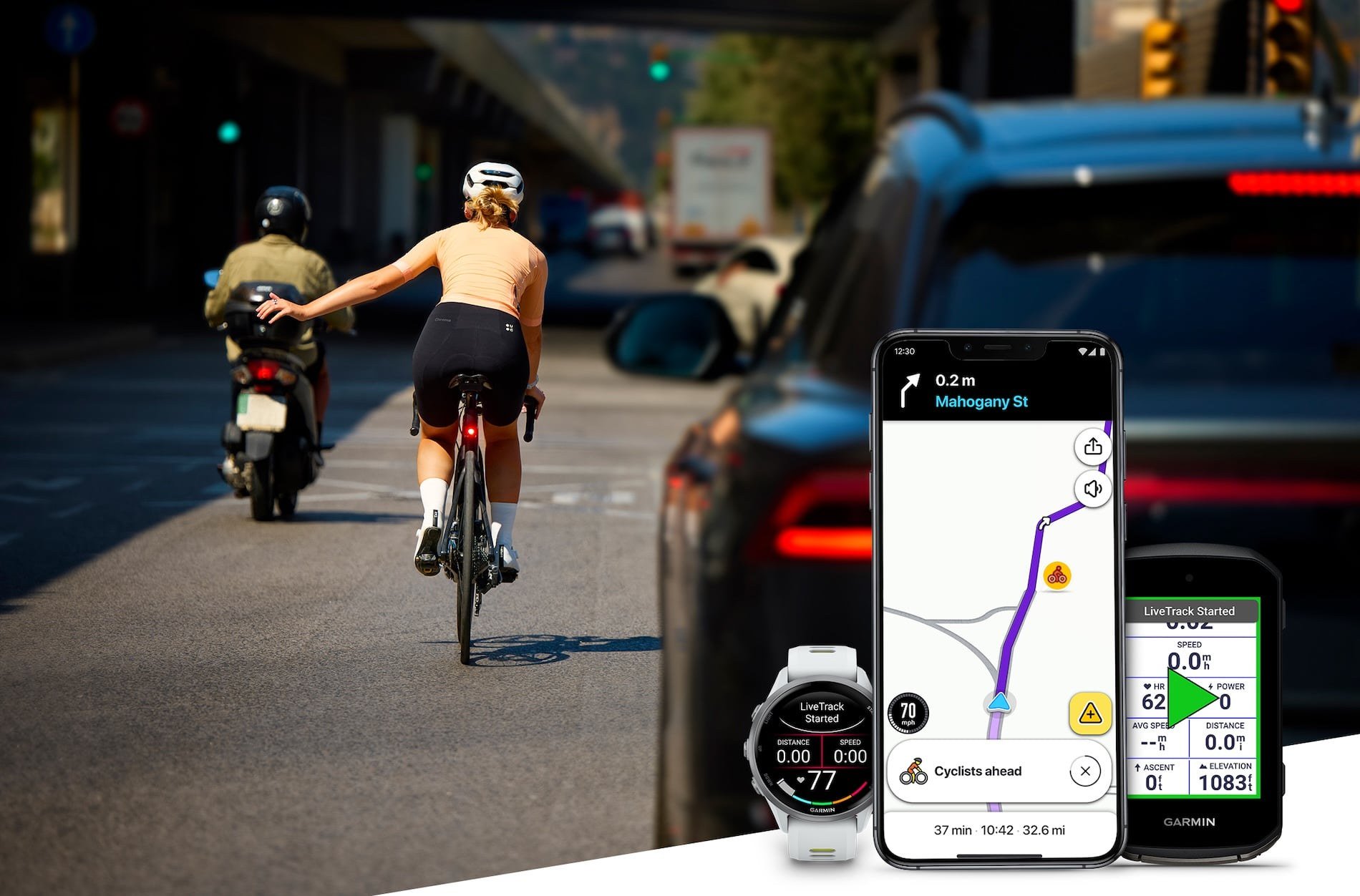
When you start an outdoor cycling activity with LiveTrack running, your Garmin device shares your location through the Garmin Connect app on your phone. If you have opted in to Waze sharing, Waze receives that location and shows you to drivers as a real-time, moving cyclist icon. Drivers who are near you also get a notification reminding them that a cyclist is close.
Garmin says location sharing is temporary and session-based, and that your personal information is not shared or shown in Waze. Waze says drivers only see a temporary alert that a cyclist is nearby, never details about a specific cyclist or route, and that the alerts switch off as soon as you end the ride on your Garmin device. Waze says the alerts are rolling out globally on Android and iOS, and Garmin says Waze has about 200 million drivers.
What you need
- A Garmin device with LiveTrack. Garmin says any compatible Edge bike computer or Garmin smartwatch that supports LiveTrack works. That includes current models such as the Edge 1060 and the Edge Explore 3 series, which list LiveTrack in their specifications.
- A paired smartphone with the Garmin Connect app. LiveTrack needs a compatible phone and Garmin Connect, and a working data connection. Bicycling reports that Garmin's LTE-enabled devices can run LiveTrack without relying on the phone's connection.
- Up-to-date apps and firmware. Bicycling notes that the feature needs the latest apps and device firmware.
- Drivers using Waze. The alert only reaches drivers who have the Waze app open.
There is no extra subscription or purchase. LiveTrack is free for Garmin users.
Which activities share your location
According to the setup notes on Garmin's Slovak blog (blog.garmin.sk), supported activity types are:
- Edge bike computers: all riding profiles except indoor activities without GPS.
- Garmin smartwatches: cycling and its sub-types, such as eBike and gravel riding, except indoor activities without GPS.
In other words, a smart-trainer session or an indoor bike workout will not put you on the Waze map, and nor will a run or a hike.

How to turn on Waze cycling alerts
Garmin's Slovak blog describes four steps:
- Check your device and phone. Make sure your Edge or watch supports LiveTrack and is paired with your smartphone in the Garmin Connect app.
- Set up LiveTrack sharing. In the LiveTrack settings in Garmin Connect, choose at least one way to share your LiveTrack, such as text message, email or GroupRide. Garmin's notes say you cannot switch on Waze sharing without at least one of these options.
- Allow location sharing with Waze. Turn on the option to share your LiveTrack location with Waze. Garmin's press release describes this as an opt-in in Garmin Connect.
- Start a supported ride. Begin an outdoor cycling activity. Your location then starts appearing to nearby Waze drivers.
Bicycling reports that you only need to opt in once. After that, Waze sharing starts whenever you begin a cycling LiveTrack, whether you start LiveTrack manually or have set it to start automatically. If you use automatic LiveTrack for family and friends, that means Waze sharing will run on every outdoor ride unless you turn it off again in Garmin Connect.
What drivers see in Waze
Waze shows Live Cycling Alerts as active, moving icons on the road. Bicycling reports that drivers do not need to be navigating a route to see cyclists; the icons appear whenever the app is open and a rider is in the driver's route area or immediate surroundings. Garmin told the magazine that alerts go to "relevant drivers," usually when the rider and the driver are on the same road and moving in the same direction, and that a cyclist farther ahead on the driver's route can also trigger one. Waze has not published an exact alert distance.
Waze's community team added more detail in its official announcement on the Waze forum. To avoid alert fatigue, the full experience, meaning the map pin, an insight card and a voice prompt, only triggers on higher-speed roads where the segment speed limit is above 70 km/h (about 43 mph). In dense city centers and on slower roads, the pop-up notifications and audio are suppressed. Riders within about 500 meters of each other are grouped into a single map pin, and Waze shows separate icons again once the group spreads out. For drivers, Bicycling reports that cyclist alerts are on by default and can be turned off in Waze settings.
In practice, that means the feature is aimed at faster rural and suburban roads, where a driver coming up behind a rider has the least time to react, rather than at slow city traffic.
Privacy: what is and is not shared
Based on Garmin's and Waze's statements:
- Sharing is opt-in on the cyclist's side.
- Drivers see that a cyclist is nearby, not your name, identity or planned route.
- Sharing is tied to the session and stops when you end the ride.
- The people you share LiveTrack with directly, such as family or friends, still see your full LiveTrack page, including location, speed and course plans, as before.
If you want family to follow you but would rather not appear in Waze on some rides, turn off the Waze option in Garmin Connect before you start. If you do not want to share LiveTrack at all on a ride, stop LiveTrack for that activity.
Troubleshooting
If drivers or friends report that you are not showing up, work through these checks:
- Is the activity outdoors with GPS? Indoor and no-GPS activities are excluded.
- Is LiveTrack actually running? Waze sharing piggybacks on LiveTrack. If LiveTrack did not start, Waze gets nothing.
- Is at least one LiveTrack sharing method set? Garmin's notes say Waze sharing cannot be turned on without one.
- Is your phone connected? The Garmin device needs an active connection to the paired phone running Garmin Connect, and the phone needs mobile data, unless your Garmin has LTE.
- Are the apps and firmware current? Update Garmin Connect, your device software and Waze.
- Is the driver using Waze, with alerts on? Drivers who use another navigation app, or have turned off cyclist alerts, will not see you.

What this does not replace
The Waze alert depends on several things going right at once: a Garmin rider who has opted in, a working data connection and a nearby driver with Waze open. Bicycling points out that it is not V2X, the connected-vehicle technology that lets cars and road users exchange data directly, and that it does not fix distracted driving or the need for safe cycling infrastructure. It is best treated as an extra layer on top of lights, a rear-facing radar such as Garmin's Varia line, visible clothing and careful route choice, rather than a reason to change how you ride.
Should you turn it on?
For most road riders and commuters who already use LiveTrack, there is little downside: it costs nothing, shares no personal details with drivers and switches off when you stop. Riders who prefer not to be visible to any third-party app can simply leave the option off and keep using LiveTrack with family and friends as before. If you are shopping for a compatible device, see our Garmin Edge 1060 review and our Garmin shopping guide for shipping, returns and warranty details.
References
- Garmin, "Garmin and Waze team up to amplify the power of community-driven awareness for cyclists and drivers," November 10, 2026: https://www.garmin.com/en-US/newsroom/press-release/sports-fitness/garmin-and-waze-team-up-to-amplify-the-power-of-community-driven-awareness-for-cyclists-and-drivers/
- Google Keyword blog (Waze), "Waze and Garmin team up to boost driver awareness of cyclists," November 10, 2026: https://blog.google/waze/garmin-safety-cyclists/
- Garmin Slovakia blog, "Garmin a Waze spájajú sily pre bezpečnosť cyklistov na cestách": https://blog.garmin.sk/garmin-a-waze-spajaju-sily-pre-bezpecnost-cyklistov-na-cestach/
- Bicycling, "Garmin LiveTrack Can Now Alert Waze Drivers to Nearby Cyclists," November 11, 2026: https://www.bicycling.com/news/a74401439/garmin-waze-cyclist-alerts/
- Waze Community, "It's Live! Waze x Garmin Real-Time Cyclist Alerts are rolling out," November 10, 2026: https://www.waze.com/discuss/t/it-s-live-waze-x-garmin-real-time-cyclist-alerts-are-rolling-out/416766
Meet your guide
Lipeiguan
author
What to read next
 Apple TV Will Be the Exclusive U.S. Home of F1 Academy Beginning in 2027 On November 19, 2026, Apple said F1 Academy will stream on Apple TV in the United States beginning in 2027, with every qualifying session and race included for U.S. Apple TV subscr... How to Watch F1 Academy on Apple TV in 2027: Official Calendar and Subscription Note Apple said U.S. Apple TV subscribers will get every F1 Academy qualifying session and race beginning in 2027. This guide records the official seven-round 2027 calendar graphic and...
 Google Adds Computer Use to the Gemini App for Mac in the U.S. On November 19, 2026, Google said computer use is available in the Gemini app for Mac, in English in the U.S. Official requirements include an Apple Silicon Mac on macOS Sequoia 15...