
Google Brings the Gemini App to Eligible Android Go and Lower-Memory Phones
On November 18, 2026, Google said the Gemini app is available on eligible Android (Go edition) devices after a re-architecture for lower-memory phones. Official help adds a 2GB RAM floor, setup through the Google Search or Gemini app, and notes that Hey Google and Ask about this screen are not supported on Android Go.
Disclosure: This page may contain affiliate links. They do not influence our editorial conclusions. Read the disclosure.
Key facts
- Announced
- November 18, 2026, official Google Gemini app blog post by Angus Logan
- Who it is for
- Eligible Android (Go edition) devices; official help requires 2GB of RAM or more
- How to start
- Update Google Search or install Gemini from Play; hold Home, or hold Power on supported phones; upcoming Transsion devices may be preloaded
- Documented limits on Android Go
- Hey Google and Ask about this screen are not supported; this experience replaces Assistant for Android (Go edition)
- Official examples
- Gemini Live in more than 45 languages, camera help on notes or forms, image creation with Nano Banana
Google said on November 18, 2026, that the Gemini app is now available on eligible Android (Go edition) devices, a change aimed at phones that previously offered only basic voice commands because of hardware limits. In an official Gemini app blog post, Angus Logan, who is listed as a builder on the Gemini app, wrote that Google re-architected the app so the core Gemini experience can run on hardware with less memory, and described the rollout as putting the assistant in the hands of hundreds of millions more people who use a lower-memory Android phone as their everyday connection to the internet.
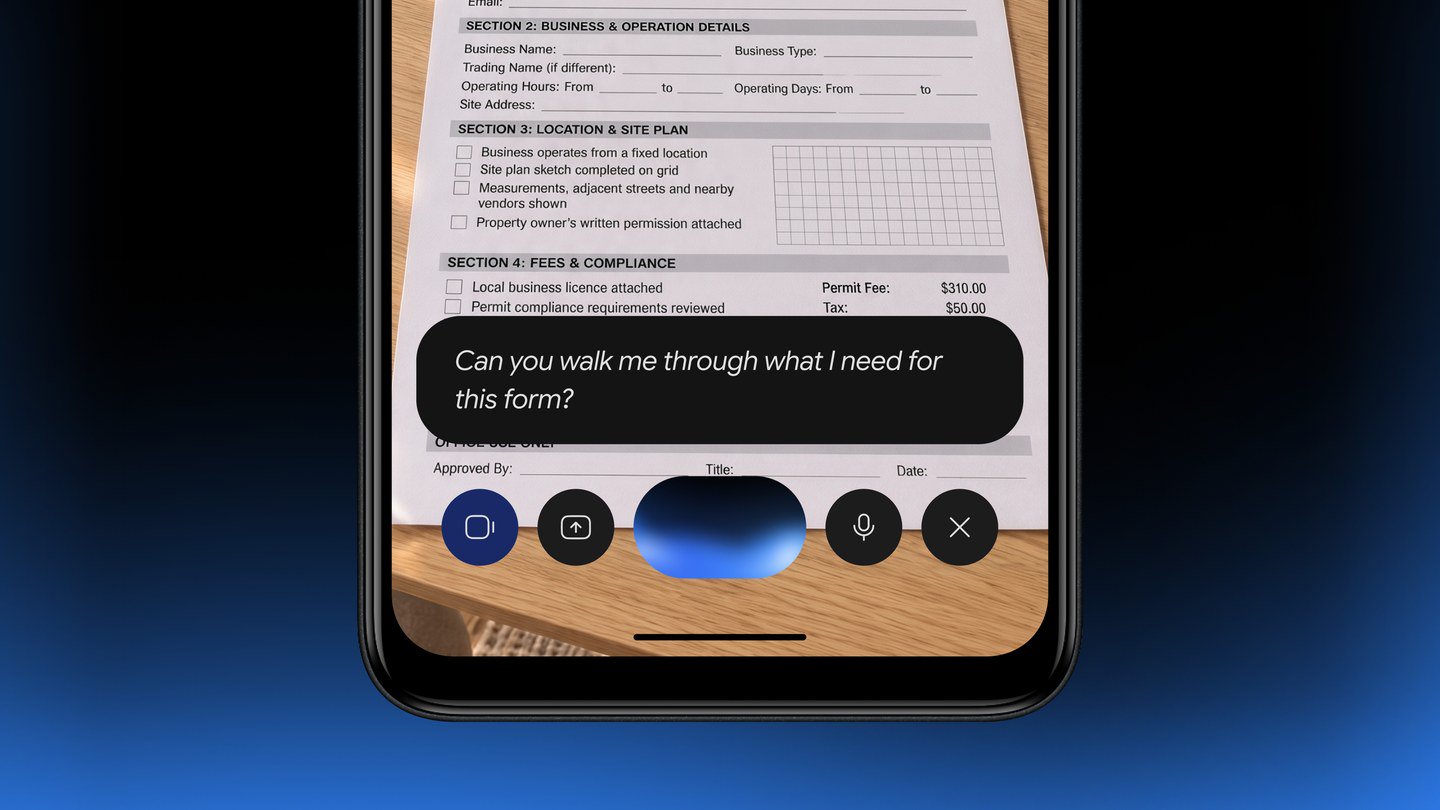
The official blog points to three ways to get started: download the Gemini app from Google Play, press and hold the power button on supported phones, or look for the app preloaded on upcoming devices from partners such as Transsion. Official examples of what the app can do on these devices include talking through an idea or practicing for an interview out loud with Gemini Live in more than 45 languages, pointing the camera at notes or forms to learn and translate, and creating custom images with Nano Banana.

Google's official help article for lower-memory devices adds the eligibility rules and the limits that the blog post does not spell out. Gemini Apps Help says the Gemini mobile app is available on Android (Go edition) devices with 2GB of RAM or more, in the languages and countries where Gemini is already available, and that you must be signed in with a personal Google Account or a work or school account that has access to Gemini Apps. On Android Go devices, the help article says Gemini is available as part of the Google Search app: open Google Play, search for “Google” or “Google Search,” and update the Google Search app if an Update button is shown. You can also download the Gemini app from the Play Store, and some newer devices may include Gemini.
To start a conversation on Android Go, the official help article says to touch and hold the Home button, or to press and hold the Power button on supported devices. It also states two clear limits: “Hey Google” and “Ask about this screen” are not supported on Android (Go edition) devices. The same article says this experience replaces Assistant for Android (Go edition).
Our setup guide walks through those official steps, the account and Family Link notes, and the tasks Google lists for these devices. This rollout is separate from the earlier Gemini 4 Hydrogen launch in Search and the Gemini app; the November 18 post is specifically about bringing the app to eligible lower-memory Android Go phones.

Google does not, in the blog post or the help article we cited, publish a model-by-model list of every eligible Android Go phone, and it describes availability as applying to eligible devices. The practical check is the official combination of 2GB of RAM or more, an updated Google Search or Gemini app, and a signed-in account in a country and language where Gemini is available.
References
- Angus Logan, "The Gemini app is now available on lower-memory Android devices," The Keyword (Google), November 18, 2026: https://blog.google/innovation-and-ai/products/gemini-app/gemini-lower-memory-devices/
- Google, "Get Started with the Gemini mobile app on lower-memory Android devices," Gemini Apps Help, accessed November 19, 2026: https://support.google.com/gemini/answer/17079170?hl=en
Launch
Where to go next
Meet your guide
SurfGirl
author
What to read next
 Google Adds Computer Use to the Gemini App for Mac in the U.S. On November 19, 2026, Google said computer use is available in the Gemini app for Mac, in English in the U.S. Official requirements include an Apple Silicon Mac on macOS Sequoia 15... How to Use Gemini Computer Use on a Mac: Official Requirements, Permissions and Examples Official Google requirements for computer use in the Gemini app for Mac: an Apple Silicon Mac on macOS Sequoia 15.0 or later, a personal Google account for people 18 or older, a Go...
 How to Choose a SwitchBot Lock: Lock Pro vs Lock Ultra vs Lock Vision and Vision Pro A research-based guide to official SwitchBot Lock Pro, Lock Ultra, Lock Vision and Lock Vision Pro specs and November 20, 2026 U.S. prices, including batteries, hubs, keypads, comp...