
How to Winterize and Store an Aiper Robotic Pool Cleaner
A step-by-step off-season routine for Aiper cordless pool robots based on Aiper's own guidance: removal timing, cleaning, filter care, storage and winter battery charging.
Disclosure: This page may contain affiliate links. They do not influence our editorial conclusions. Read the disclosure.
Our pick
- See price at Aiper
Top pick
Aiper
Atlanta-based maker of cordless robotic pool cleaners, solar pool skimmers and smart irrigation for the backyard.
What this guide covers
When the swimming season ends, a cordless robotic pool cleaner goes from working every few days to sitting in a garage for months. How you put it away matters, because the battery, seals, brushes and filters are the parts that wear out, and Aiper's own documentation is specific about how to store its robots. This guide pulls together Aiper's published off-season instructions, user manual notes and support articles into one step-by-step routine for closing out the season and starting the next one. It applies to cordless Aiper robots such as the Scuba V3, Scuba S1 and Scuba X1 series; always check the manual for your specific model, because a few details vary.

Quick checklist
| Step | What to do | Source |
|---|---|---|
| 1 | Take the robot out of the pool before it freezes and before you shock or close the pool | Aiper manual, Aiper blog |
| 2 | Power it off and unplug the charger | Aiper Cold-Season Care |
| 3 | Rinse the body, then clean the shell, wheels, roller brushes and charging port | Aiper Cold-Season Care |
| 4 | Empty and rinse the filter box and MicroMesh filter separately | Aiper manual |
| 5 | Wipe dry and close the charging-port cover | Aiper Cold-Season Care, Aiper manual |
| 6 | Box it and store it indoors in a cool, well-ventilated place out of direct sunlight | Aiper Cold-Season Care, Aiper manual |
| 7 | Top up the battery to 40%–60% every two months | Aiper Cold-Season Care |
| 8 | Fully charge before the first run of the new season | Aiper Cold-Season Care |
Step 1: Get it out of the water at the right time
Aiper's user manual for the Scuba X1 Pro Max states plainly that the device "is not protected against the effect of freezing" and "shall not be left outside during freezing weather conditions." The same manual lists a water temperature range of 32–104°F (0–40°C) for that model, and the older Scuba SE manual recommends 50–95°F (10–35°C) for best performance, so check your own manual before running the robot in cold water late in the season.
Two other moments call for pulling the robot early:
- Before shocking or closing chemicals. Aiper's blog on leaving a robot in the pool warns that if you are shocking the pool, you should always remove the robot, because high chemical concentrations "can ruin a robot in a single afternoon." It suggests waiting about 24 hours after shocking before putting it back in.
- Before it sits idle for weeks. Aiper's FAQ recommends removing the robot after each use and rinsing the filters before storing it. Even models with Eco Mode that are designed to stay in longer should not be left in the water for more than two weeks at a time, according to the FAQ. Solar skimmers such as the Surfer are the exception that Aiper says can stay in the water.
If you plan to close your pool with a winter cover, take the robot out before the cover goes on, not after.
Step 2: Power off and disconnect
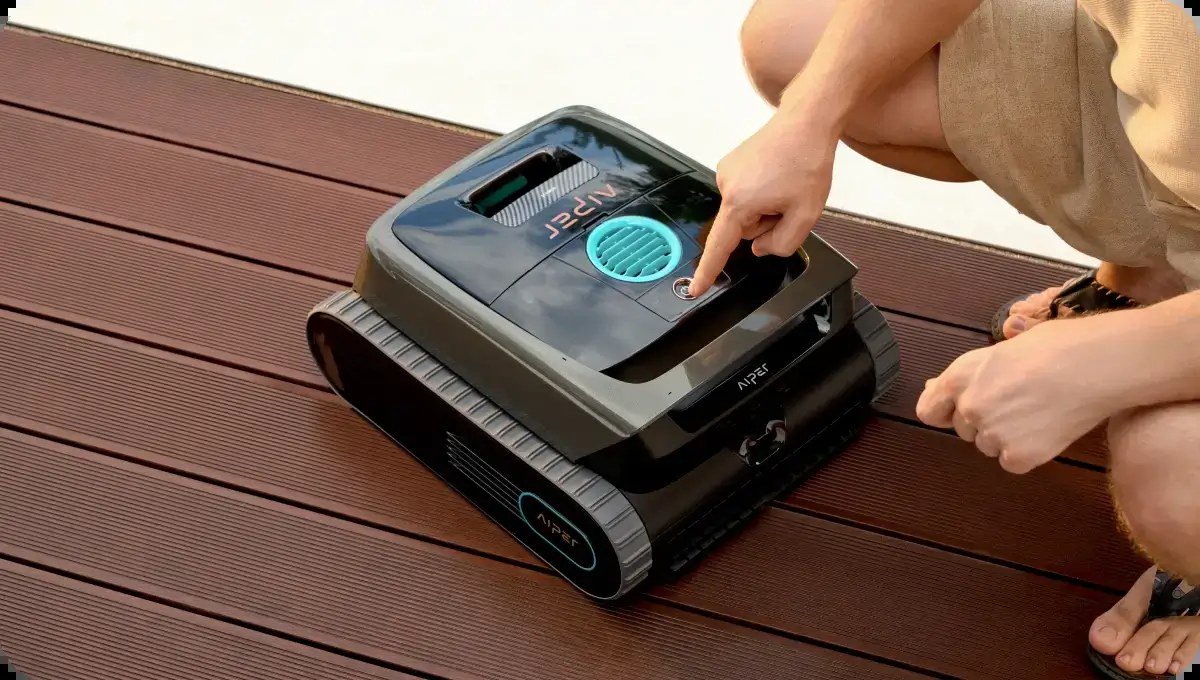
Aiper's Cold-Season Care page starts with the simplest step: power off the device and disconnect it from the charger. Unplug the charger from the wall too. The Scuba X1 Pro Max manual says to unplug the charger when it will not be used for a long time, and to unplug it before cleaning or maintaining it.
Step 3: Rinse and clean the body
Next, clean off any residual dirt. Aiper lists the areas that need attention: the top and bottom shell, wheels, roller brushes and the charging port.
For saltwater pools, Aiper's Scuba V3 support article gives a more detailed routine:
- Rinse the entire chassis, including wheel wells, brush roll and filter cavity, with fresh tap water for about 60 seconds.
- Open the filter access panel and rinse the basket separately.
- Dry the charging contact pins with a clean cloth.
- Store the robot in a shaded, dry location.
For winter storage in saltwater environments, the same article adds two extra steps: remove the filter basket and store it separately, and apply a light coat of dielectric grease to the charging pins to help prevent oxidation. If salt crystals have built up on the two charging pins on the back of the robot, Aiper says to clean them with a dry cotton swab and not to use abrasive tools.
Step 4: Clean the filters properly
The filter system is where debris, algae and odors collect, so it deserves its own step. Aiper's manuals describe two filter layers: a filter box for larger debris and a replaceable MicroMesh ultra-fine filter that can trap particles as small as 3–10 microns, such as silt and some algae.

To clean them, per the manual:
- Open the top shell and lift the filter box out by its handle.
- Open the filter box, empty it and remove the MicroMesh filter.
- Rinse the MicroMesh filter inside and out, and scrub it by hand if needed. Rinse the filter box separately.
- Aiper suggests a high-pressure water gun for a thorough clean.
- Let both parts dry, then reinstall the filter so its rubber strip corners sit in the limiting slots, and click the filter box back in.
Aiper notes that drying the filters after routine cleaning is optional and is mainly to prevent moisture-related odors. Before months in storage, though, drying them fully is the sensible choice, and you should store them in a well-ventilated place out of direct sunlight.
The MicroMesh filter is a consumable. Aiper's manual says to replace it about every 30 uses, and adds that some surface wear after several uses does not affect performance. The off-season is a good time to check its condition and order a replacement if you are close to that number.
Step 5: Dry it off
Using a paper towel or soft cloth, wipe the robot dry, as Aiper's Cold-Season Care page instructs. The Scuba X1 Pro Max manual also says to make sure the charging port cover is properly closed. The Scuba SE manual says the charging port must be completely dry before charging, which matters when you come back to top up the battery during winter.
Step 6: Box it and store it indoors
Aiper says to box the device and store it in a cool, well-ventilated area. Its manuals add: store it indoors when not in use, keep it out of direct sunlight, and keep it away from anything that generates extreme heat. Aiper's blog points out that UV rays degrade plastic, so a sunny shed window or an open patio is not ideal.
Practical placement tips that follow from those rules:
- A garage shelf or utility room is fine if it stays above freezing and is not next to a furnace or water heater.
- Keep the robot upright and off a damp floor.
- Store the charger and any caddy with the robot so nothing goes missing by spring.
Step 7: Maintain the battery over the winter
This is the step most owners skip. Aiper's Cold-Season Care page says to charge the device every two months to 40%–60% battery capacity to maintain battery health. Its FAQ also says to always charge your Aiper before storing it.
If the manual for your exact model gives a different schedule, follow the manual; otherwise use the two-month top-up from Aiper's current US support page. Set a phone reminder for the first of every other month so it does not get forgotten.
When charging, follow Aiper's safety notes: use only the original or authorized charger, charge in a cool, ventilated place, make sure the port is dry, and never charge in direct sunlight.
Step 8: Start the new season
When it is time to use the robot again, Aiper says to fully charge it before putting it in the pool. Before the first run:
- Reinstall the filter basket if you stored it separately, and check the MicroMesh filter.
- If you greased the charging pins, check that charging works normally.
- Inspect brushes and wheels for cracks or wear after storage.
- Make sure your pool chemistry is in the range listed in your manual. The Scuba X1 Pro Max manual, for example, lists pH 7.0–7.8 and a maximum of 4 ppm chlorine.
When to contact Aiper
If the robot will not hold a charge in spring, do not open the battery compartment. Aiper's manuals say to contact customer service to replace the battery, and that only certified professionals should disassemble the drive unit. Aiper's FAQ says its units usually come with a 1–2 year warranty, and you can check the remaining period from the product page and your order date or by contacting support. See our Aiper shopping guide for warranty and return details.
If you are thinking of replacing an older model next season instead, our Aiper Scuba V3 review and Scuba V3 vs Scuba S1 vs Experts Duo comparison cover the current lineup, and we have tracked Aiper's Black Friday 2026 prices.
Common mistakes to avoid
- Leaving the robot in a covered pool all winter. Aiper's manual says the device is not protected against freezing.
- Storing it dirty. Leftover debris in the filter and on brushes leads to odors and wear.
- Storing it in the sun. UV degrades plastic, according to Aiper.
- Letting the battery sit untouched for months. Aiper's current guidance is a 40%–60% top-up every two months.
- Running it out of water to "test" it. Aiper's manuals warn this can cause overheating.
References
- Aiper. "Cold-Season Care." Accessed November 2, 2026. https://aiper.com/us/cold-season-care
- Aiper. "Frequently Asked Questions (FAQ)." Accessed November 2, 2026. https://aiper.com/us/faq
- Aiper. "Can You Leave a Robotic Pool Cleaner in the Pool." https://aiper.com/blogs/can-you-leave-a-robotic-pool-cleaner-in-the-pool/
- Aiper. "Aiper Scuba V3 Saltwater Pool Compatibility." https://aiper.com/blogs/troubleshooting/v3-saltwater-pools/
- Aiper. "Scuba X1 Pro Max Cordless Robotic Pool Cleaner User Manual." https://ap.nice-cdn.com/upload/file/11.Scuba_X1_Pro_Max_User_Manual-Six_Languages.pdf
- Aiper. "Scuba SE Robotic Pool Cleaner User Manual" (hosted by PoolWeb). https://assets.poolweb.com/products/SCP/Scuba-SE-Manual.pdf?sku=AIV-20-1004
- Aiper. "Aiper Scuba V3" product page. Accessed November 2, 2026. https://aiper.com/us/aiper-scuba-v3
Meet your guide
Lipeiguan
author
What to read next
 Best DREO Humidifiers (2026): 713S, 717S, 735S, 747S and Evaporative 774S Compared A research-based 2026 comparison of official DREO humidifier specs and November 19, 2026 listed prices for the 713S, 717S cartridge bundle, 735S, 747S, and evaporative 774S, includ...
 Best Costway Patio Furniture (2026): Conversation Sets, Dining Sets and Loungers A research-based Costway patio furniture roundup as of November 18, 2026: official conversation, dining and folding lounge sets, current prices, weight capacities and box counts fr...
 Sleep Number Pillows Buying Guide: ComfortFit, Shapes and Fills A research-based Sleep Number pillow buying guide as of November 18, 2026, covering official ComfortFit, Down Alternative, True Temp Plush, ResponseFit, DownComfort and NaturalFit...