
How to Set Up SwitchBot Hub 4: Hello Kata, Matter and IR Devices
What official SwitchBot materials say you need to use Hub 4: 2.4 GHz Wi-Fi, the included Type-C adapter, tabletop or wall placement, the SwitchBot app for infrared matching, Hello Kata, Matter and automations, plus the limits SwitchBot itself flags around offline voice control.
Disclosure: This page may contain affiliate links. They do not influence our editorial conclusions. Read the disclosure.
Our pick
- See price at SwitchBot
Top pick
SwitchBot
SwitchBot makes smart home hubs, curtain and lock robots, sensors, lights and household robots, sold on the official US store at us.switch-bot.com and through S...
What this guide covers
SwitchBot Hub 4 is a control hub, not a device you use on its own. Official materials describe a short list of things you need in place — 2.4 GHz Wi-Fi, power, a place to put the hub, and the SwitchBot app — and then a set of features you configure in that app: infrared appliances, Hello Kata, Matter, shortcuts and automations.
This guide stays with those official instructions and limits. It is not a hands-on setup log, and it does not invent tap-by-tap menus that SwitchBot has not published. When we checked the company's User Manual page on November 16, 2026, Hub 4 was listed as a new product, but a Hub 4 PDF was not yet posted next to the manuals for Hub 3, Hub 2 and Hub Mini. Until that manual appears, the official US product page, the November 16, 2026 launch announcement, and the in-app setup flow are the sources to follow.

What you need before you start
The official product page and launch release agree on the network requirement: Hub 4 uses 2.4 GHz Wi-Fi. The product page specifically says compatible infrared control through the built-in IR blaster requires 2.4 GHz Wi-Fi. If your home router offers split 2.4 GHz and 5 GHz networks, use the 2.4 GHz network that SwitchBot names. The launch release also lists Bluetooth among the hub's radios, but it does not describe Bluetooth as a substitute for that Wi-Fi requirement.
Power is straightforward in the launch release: Type-C power with an included 5V/2A adapter. Official product photos show the hub sitting on a short stand with a cable running from the rear. The same release says the hub supports tabletop placement or wall mounting. Choose a spot where the infrared blaster can "see" the appliances you want to control, and where people in the room can reach the display and the dial. The release puts Hello Kata's voice wake-up at about three meters with dual omnidirectional microphones, so a central, unobstructed shelf or wall is more in line with that figure than a closed cabinet.
You will also need the SwitchBot app. Nearly every feature SwitchBot describes — adding infrared appliances, saving scenes, creating automations, linking Matter, and managing Kata — lives in the app rather than only on the hub. If you want official-store Rewards points or order history tied to the same login, our SwitchBot shopping guide covers how the US store account and the app account are linked. For a closer look at price, preorder timing and the official feature set, see our Hub 4 review.

Add the hub, then match infrared appliances
SwitchBot does not publish a separate, step-by-step pairing checklist for Hub 4 on the US store yet, so use the in-app add-device flow and any on-screen instructions that appear once the hub is powered. The official product page assumes the hub is in the SwitchBot app before you start adding appliances or asking Kata for help.
Infrared setup is the most detailed process SwitchBot does describe. The product page says to add compatible IR appliances, including air conditioners, TVs, projectors and fans, in the SwitchBot app, then ask Hello Kata to control supported functions through Hub 4's built-in IR blaster. The launch release adds that the library covers more than 101,000 infrared appliance models and that automatic matching is meant to simplify setup. After a model is matched, supported infrared controls remain available locally even if the internet connection is unavailable.
Two limits belong in the same step. First, compatibility and controls vary by model; a listed category such as "TVs" or "fans" does not mean every function on every remote is supported. Second, local infrared control is not the same as offline voice control. The release's footnote says local IR control does not imply that Kata works offline, and that remote access needs a network connection and online devices.
The launch release also says Hub 4 supports selected streaming devices, including Fire TV, Apple TV and Android TV. If you are adding one of those, treat it as another official compatibility claim that still "depends on the device," and confirm the available controls in the app after matching.

Set up Hello Kata, scenes, shortcuts and the dial
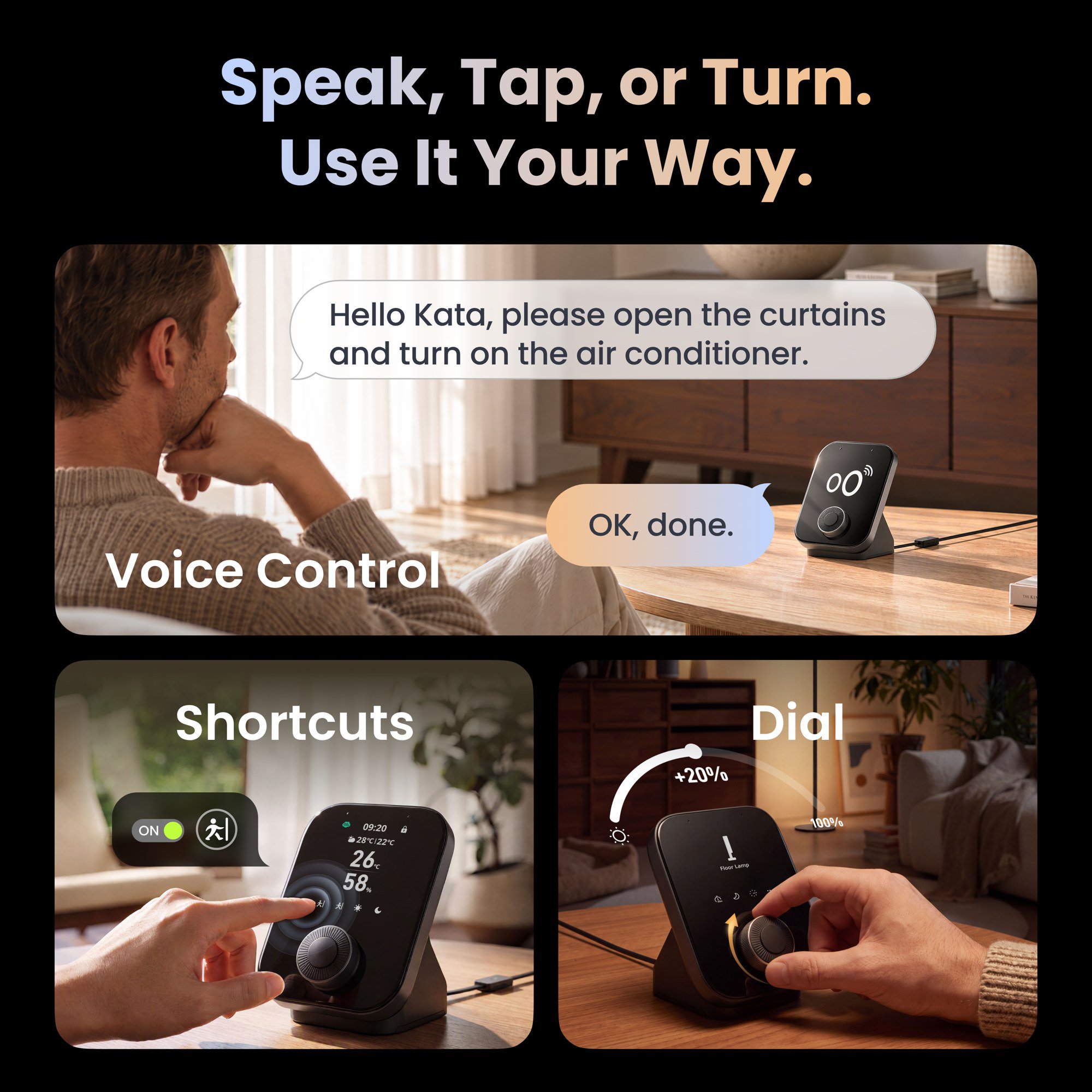
Hello Kata is SwitchBot's wake phrase for Hub 4. The official product page uses the prompt "Hello Kata" and gives everyday examples: turn on the lights, close the curtains, or start a compatible robot vacuum. The launch release's example is "Hello Kata, turn on the AC." Those are illustrations, not a full command list. Supported devices and actions vary by model and integration.
Kata can also run scenes you have already built in the SwitchBot app. The release names Movie Night, Home and Away as examples of presets that can run with one request. That means the order of operations is the opposite of some voice assistants: create and save the scene in the app first, then ask Kata to run it. SwitchBot says Kata executes existing scenes, while automation creation and management remain in the app.
If you would rather not speak, use the hardware. The 2.8-inch color display can show supported devices. Four customizable on-screen shortcut buttons can start saved scenes. The physical rotary knob adjusts supported functions. The product page lists temperature, brightness or volume for the dial; the launch release lists lighting brightness, curtain position and volume. Use the functions the app offers for the device you have selected, rather than assuming every one of those examples will appear.
Voice wake-up, according to the release, works from about three meters with dual omnidirectional microphones, and a manual wake-up option is also available. If Kata is not hearing you, the official materials point first to distance, to whether the requested device is supported, and to whether the hub still has a network connection for anything that is not a local infrared command.

Connect Matter and build automations
Hub 4 is also a Matter Bridge for supported SwitchBot devices. The official product page says it can connect up to 30 supported SwitchBot devices with compatible Matter ecosystems, and that a compatible Matter controller may be required. Available devices and controls vary by product and platform. The launch release specifies Matter Bridge 1.3, Apple Home and other compatible Matter platforms, and says the 30 sub-device cap includes three default entries for the hub's motion, temperature and humidity sensors. Compatible third-party Matter devices may also be controllable through the Home app's Wireless Remote feature, depending on the device and the functions the platform exposes.
Because SwitchBot has not published a Hub 4-specific Matter walkthrough on the US user-manual page, follow the in-app Matter setup and the pairing flow in Apple Home or your chosen Matter controller. Do not assume a device is included until it appears in that platform. The three default sensor entries count toward the 30-device cap in the launch release, which is worth knowing if you are already close to that limit.
Automations are configured in the SwitchBot app, not by asking Kata to invent a new routine. The product page mentions supported triggers such as time or temperature. The launch release adds humidity, motion and light. A typical official example is an air conditioner responding when the room gets too warm, using the hub's built-in temperature reading. Compatible Meter devices can add supported environmental information such as CO2, and official product art notes that CO2 levels and lock status require SwitchBot Meter Pro CO2 and SwitchBot Lock. You can also query supported locks and sensors, or check information such as battery levels, operating modes and maintenance needs, according to the release.
Remote control from the app is a separate path. SwitchBot says you can check and control compatible devices remotely, for example to turn off forgotten lights or start cooling before you get home, but that this needs a network connection and online devices.

After setup: confirm power, placement and store terms
Once the hub is online, it is worth checking a short official list rather than assuming everything is finished:
- The hub is on 2.4 GHz Wi-Fi and is powered with the included Type-C adapter.
- Infrared appliances you care about are matched in the app, and you know which of their functions actually appeared.
- Any scenes you want to start with "Hello Kata," or with the four on-screen shortcuts, already exist in the SwitchBot app.
- If you are using Matter, the devices you expected are visible in Apple Home or your other compatible platform, counting toward the 30-device cap.
- You know which features need the internet (remote app control and, per SwitchBot, Kata) and which matched infrared controls can still work locally.
If you bought Hub 4 from the official US store, shipping, the 30-day refund window and the one-year official-store warranty are described in our shopping guide. The US product page also said preorders are expected to ship in early December 2026, which is the date to check again before you treat the order as already on the way.
References
- SwitchBot, "SwitchBot Launches Hub 4 with Hello Kata Voice Control for a More Connected Home," PR Newswire, November 16, 2026: https://www.prnewswire.com/news-releases/switchbot-launches-hub-4-with-hello-kata-voice-control-for-a-more-connected-home-302940396.html
- SwitchBot US, "SwitchBot Hub 4," accessed November 16, 2026: https://us.switch-bot.com/products/switchbot-hub-4
- SwitchBot US, "User Manual," accessed November 16, 2026: https://us.switch-bot.com/pages/switchbot-user-manual
- SwitchBot US, "Shipping Policy," accessed November 16, 2026: https://us.switch-bot.com/pages/switchbot-shipping-policy
- SwitchBot US, "SwitchBot Rewards Program," accessed November 16, 2026: https://us.switch-bot.com/pages/switchbot-points
Meet your guide
Lipeiguan
author
What to read next
 Google Adds Computer Use to the Gemini App for Mac in the U.S. On November 19, 2026, Google said computer use is available in the Gemini app for Mac, in English in the U.S. Official requirements include an Apple Silicon Mac on macOS Sequoia 15... How to Use Gemini Computer Use on a Mac: Official Requirements, Permissions and Examples Official Google requirements for computer use in the Gemini app for Mac: an Apple Silicon Mac on macOS Sequoia 15.0 or later, a personal Google account for people 18 or older, a Go...
 How to Choose a SwitchBot Lock: Lock Pro vs Lock Ultra vs Lock Vision and Vision Pro A research-based guide to official SwitchBot Lock Pro, Lock Ultra, Lock Vision and Lock Vision Pro specs and November 20, 2026 U.S. prices, including batteries, hubs, keypads, comp...