
How to Use Google Photos' November 2026 Holiday Updates
Google's official November 23, 2026 Photos post lists five holiday-season updates: a highlight-album request, 12 new Remix templates, face and pet filters in shared albums, pin-and-hide controls in Collections, and the Fujifilm for Google Photos Print Store.
Disclosure: This page may contain affiliate links. They do not influence our editorial conclusions. Read the disclosure.
Our pick
- See price at Google Store
Top pick
Google Store
Google's online store for Pixel phones, Fitbit wearables, Nest devices and accessories.
Steps in this guide
Google’s official blog published a short holiday-season Photos post on November 23, 2026, titled “Organize and share your holiday memories with these five updates in Google Photos.” The official post frames the updates around Thanksgiving feasts and family reunions, and it says the goal is to help people “spend less time managing memories and more time making them.” This guide walks through those five official updates in the same order Google used, and it does not add unofficial menu names, hidden settings, or Print Store prices that the official post did not include.

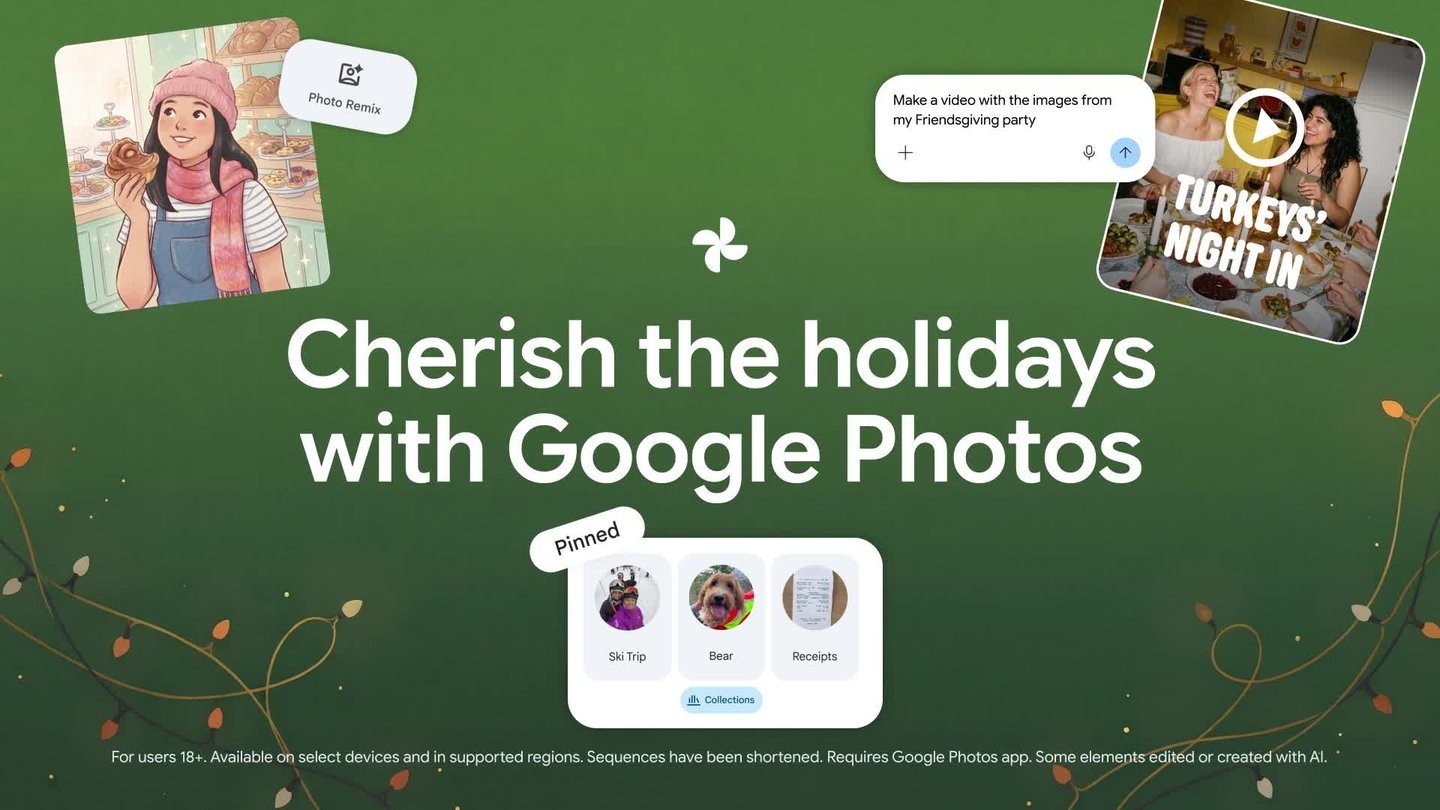
Before you treat every example in the official graphic as a button you will definitely see, read the official footer on that same blog image. It says the features are “For users 18+. Available on select devices and in supported regions. Sequences have been shortened. Requires Google Photos app. Some elements edited or created with AI.” The official post also tells readers to try the updates in Google Photos, which matches that “Requires Google Photos app” line. If your account, device, or region is outside what Google officially supports, the five updates may not appear the way the official graphic shows them.
The first official update is written as a request: “Make a highlight album of our Thanksgiving celebration, email the link to my family, and include a quick recap of the day.” The official blog graphic shows a related example in a prompt field: “Make a video with the images from my Friendsgiving party,” next to a clip titled “TURKEYS’ NIGHT IN.” This guide reports those official examples as examples. It does not claim that every account has an identical prompt box, and it does not invent extra steps such as a required number of photos, a required relative, or a specific email provider. The official wording is that recent updates help you make a highlight album, email the link, and include a quick recap.
The second official update is about Remix templates. Google said you can “turn festive memories into scrapbook-style holiday cards or pastel illustrations with 12 new Remix templates.” The official blog graphic includes a “Photo Remix” card with an illustrated portrait, which matches the official description of scrapbook-style or illustrated results. The official post does not name the 12 templates, does not say whether they replace older Remix styles, and does not say they expire after the holidays. The official Google Photos about page, which is a separate official product page rather than the November 23 post, describes Remix more generally as a way to “remix it into different styles” in the Create tab, alongside other Create-tab tools such as turning a photo into a video or making a collage. That about-page wording is useful context, but it is not part of the November 23 announcement and should not be treated as a new holiday-only feature list.
The third official update is easier to follow because the official post includes a direct action. Google said you can “filter shared albums by people or pets so you don’t have to scroll to find what you need,” and then: “Tap any face in the top carousel to instantly see photos of yourself, loved ones, or pets.” If you are opening a shared holiday album, the official instruction is to use the face carousel at the top rather than scrolling the whole album. The official post does not say what happens if Face Groups are turned off, and it does not list every pet category. This guide does not invent those rules. It only repeats the official carousel step.
The fourth official update is in Collections. Google said you can “customize your Collections tab by pinning your favorite albums and memories front and center, and hiding what you don’t use.” The official blog graphic shows a “Pinned” Collections card with example albums labeled Ski Trip, Bear, and Receipts. Officially, pinning and hiding are the two controls described in the November 23 post. The same official sentence adds an Android-only note: you can “easily access local media with ‘On this device.’” This guide keeps that as an official Android detail. It does not claim the same ‘On this device’ control was described for iPhone in the November 23 post, even though the official Google Photos about page separately says Google Photos can work on iPhone and can sync a library and favorites during setup.

The fifth official update is the Fujifilm for Google Photos Print Store. Google said you can “create personalized gifts like photo books, blankets, mugs, and more” through that official store. The official post does not list current prices, shipping countries, production times, or a holiday cutoff for delivery. This guide therefore does not invent a mug price, a photo-book size, or a “order by” date. If you want a physical gift, the official path named in the November 23 post is the Fujifilm for Google Photos Print Store, and the official product page for that store is the place to read current offer terms.
It also helps to keep this November 23 post separate from other official Google news already on this site. The Gemini 4 Hydrogen launch and the Gemini 4 Hydrogen explainer cover a model launch in the Gemini app and Search, not these Photos tools. The Google connected apps grocery and finance news and the connected apps how-to are about connecting apps in Search and Gemini, not about pinable Collections or Remix templates. The Google Wallet and Gemini finance news is likewise a different official thread.
The official Google Photos about page, checked alongside this announcement, still describes the broader product in official terms that can help you decide whether the holiday updates matter to you. It says Google Photos is for editing, organizing, searching, and backing up photos, and it lists official tools such as Magic Eraser, Photo Unblur, Photo Stacks, and document albums for screenshots, receipts, and notes. It also states “15 GB of storage,” with an official footnote marker, and says that is “3x more than many other cloud storage services.” This guide does not convert that official 15 GB figure into a paid-plan comparison, because the about page’s footnote details were not fully extracted here. The about page also says Photos can be used on iPhone, with official wording that you can sync your library and favorites during setup and that photos will automatically upload to the app.
A practical way to use the November 23 post is to open the official Google Photos app, then go through the five official items in order: try the highlight-album request if you want a Thanksgiving or reunion share link; look for the 12 new Remix templates if you want a card or illustration; use the face carousel at the top of a shared album; pin or hide items in Collections, and, on Android, look for “On this device”; and open the official Fujifilm for Google Photos Print Store only if you want a physical gift, after reading the official store terms. If any of those official controls is missing, treat the official 18+ and “select devices and supported regions” footer as the first explanation, rather than assuming the post promised a universal rollout.
The short news item on these five official updates is the same official announcement in brief. You can also open Google’s official site through our Google tracking link.
References
Meet your guide
Lipeiguan
author
What to read next
 Wyze Window Bird Cam Launches at $69.98 With a Three-Month Bird Watch Trial Wyze's official November 24, 2026 blog post names that date as launch day for the Window Bird Cam at an MSRP of $69.98. The official product page, checked 2026-11-29T01:38:19Z, lis...
 Apple Store Black Friday Event 2026: Gift Cards up to $300 Through November 30 Official Apple Store Black Friday Event terms, checked 2026-11-29T01:38:19Z, run from November 27, 2026, at 12:00 a.m. PT through November 30, 2026, at 11:59 p.m. PT in the United... How to Set Up the Wyze Window Bird Cam and Bird Watch Official Wyze Window Bird Cam setup steps, box contents, and the difference between free camera features and the Bird Watch plan. The official product page, checked 2026-11-29T01:3...