
Bose S1 Pro+ Setup for Guitar and Vocals: ToneMatch, Wireless Transmitters and Live Stream Mode
How to set up the Bose S1 Pro+ for a solo musician: positions and Auto EQ, combo inputs, ToneMatch presets, Bluetooth backing tracks, docking wireless transmitters, Insert Mode for pedals, Live Stream recording and expanding to two speakers.
Disclosure: This page may contain affiliate links. They do not influence our editorial conclusions. Read the disclosure.
Our pick
- See price at Bose
Top pick
Bose
Massachusetts-based audio company known for QuietComfort noise-cancelling headphones and earbuds, home theater soundbars and portable Bluetooth speakers.
Steps in this guide
The Bose S1 Pro+ is sold as a party speaker, but it is built like a small PA for musicians: two mic and instrument channels, a third channel for backing tracks, ToneMatch EQ presets, reverb, a line output and an optional set of wireless transmitters that charge inside the speaker.
This guide explains how to set the S1 Pro+ up for guitar and vocals, using Bose's owner's guide and product page as of November 14, 2026. It is research-based, not a hands-on review, so treat it as a map of the features and follow the owner's guide for your exact firmware.

What the S1 Pro+ gives a musician
Bose lists the S1 Pro+ at $699 on bose.com, with bundles at $848 (with the Wireless Instrument Transmitter for ¼-inch instruments) and $858 (with the Wireless Mic/Line Transmitter – XLR). The transmitters sell separately for $149 and $159, and a pair of S1 Pro+ systems is $1,398.
The key published specs:
| Spec | Bose S1 Pro+ |
|---|---|
| Channels | 3 (Channels 1 and 2 for mics and instruments, Channel 3 for Bluetooth and line sources) |
| Ch. 1 and 2 inputs | Combo XLR and ¼-inch (6.35 mm) TS/TRS, balanced or unbalanced |
| Ch. 3 inputs | Bluetooth 5.0, ¼-inch TRS mono line input, 3.5 mm stereo AUX |
| Outputs | XLR line out (post-mix, variable), USB-C for Live Stream mode and updates |
| Battery | Up to 11 hours, 5,500 mAh |
| Size and weight | 13.1 x 9.4 x 11.0 inches, 14.4 lb |
| Audience guide | Up to 50 people per Bose |
| Water resistance | Not water resistant |
Bose's product page lists a 5-hour battery charge time, while the owner's guide says to allow up to 4 hours. Either way, plan to charge the night before a gig. The guide also notes that battery life and charging time vary with what you play and how loud.
Step 1: Pick a position (Auto EQ does the rest)
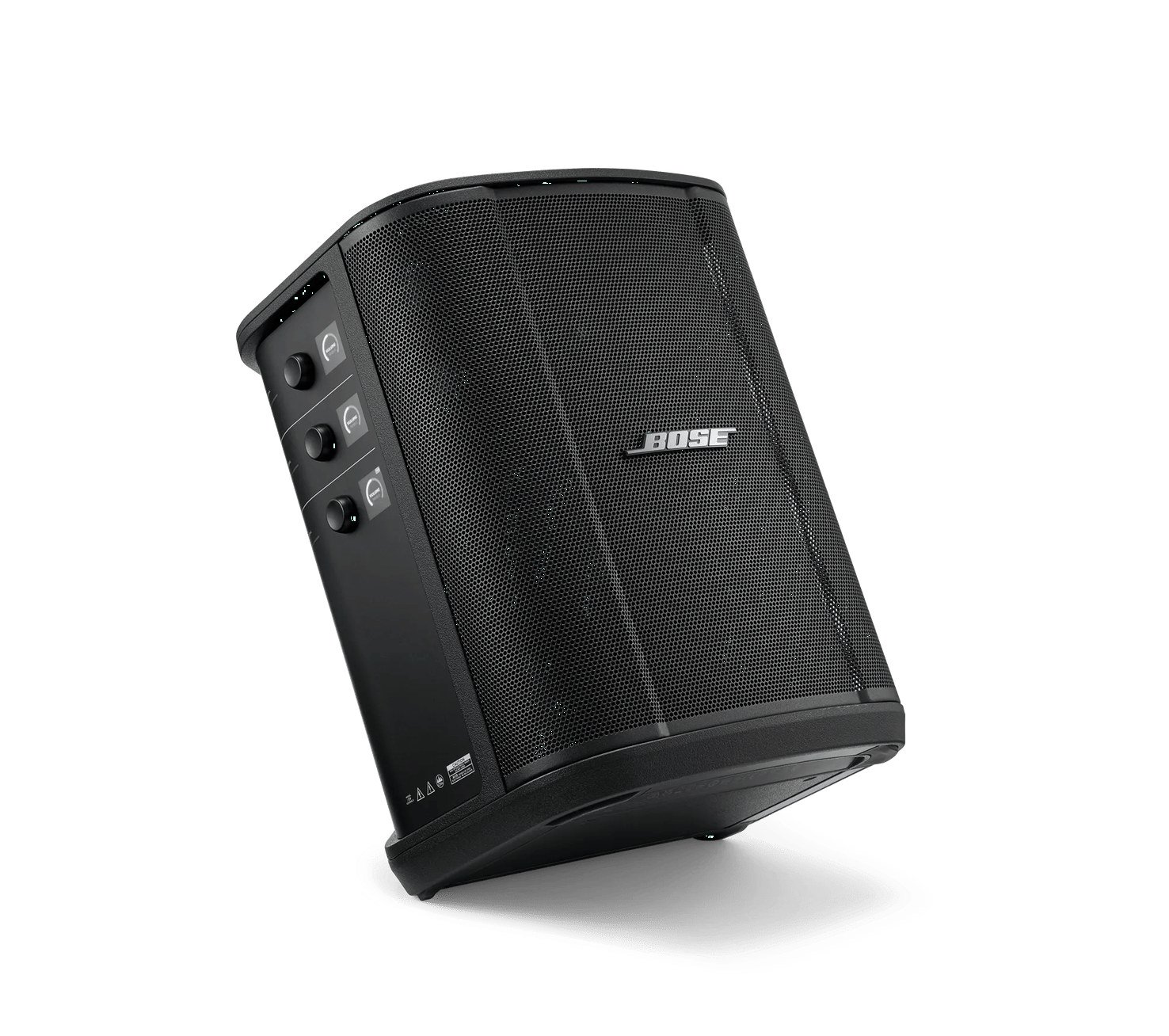
The S1 Pro+ has four positions, and internal sensors detect which one you're using. Bose calls this Auto EQ: once you move the speaker, it applies the EQ curve for that orientation.
- Upright on a table or elevated surface: Bose's recommendation for spreading sound evenly across an audience.
- Tilted back on the floor: for small rooms where the audience is close. Bose suggests standing or sitting to one side so your body doesn't block the sound.
- Monitor mode: lay it on its side on the floor, facing the performer, and use it as a personal floor monitor. Rotate the Bose logo to match.
- On a speaker stand: for general-purpose sound reinforcement (stand sold separately).
For stage placement, Bose says the best spot for both audience and performer is directly behind you, or behind and slightly off to one side.

Step 2: Plug in your guitar and mic
Channels 1 and 2 are for instruments and microphones. Both use combo jacks that accept an XLR mic cable or a ¼-inch instrument cable, and Bose says the inputs have gain staging set to keep noise low at normal channel volume. A common setup is vocal mic on Channel 1 and guitar on Channel 2.
- Connect your mic or instrument to Channel 1 or 2.
- Turn the channel control to set volume. Press it to cycle through treble, bass and reverb (reverb is on Channels 1 and 2 only).
- Watch the signal/clip lights. Solid green means signal is present. Solid red means the signal is clipping or the system is limiting, so turn down the channel or the source.
The channel displays rotate automatically to match the speaker's position.

Step 3: Set ToneMatch for each channel
ToneMatch is Bose's EQ preset system. To set it, press and hold the channel control for Channel 1 or 2 until the extra menu appears, select ToneMatch, and choose:
- Microphone: tuned by default for a dynamic handheld microphone.
- Instrument: tuned by default for a steel-string acoustic guitar with piezo pickups.
- Off: bypasses ToneMatch.
The defaults suit the most common singer-songwriter setup. If you use something else, the Bose Music app (called Bose app on the product page) gives you the full ToneMatch library, with presets for specific mic and instrument models plus generic EQ filters. When a custom preset is active, a small symbol appears next to the channel icon. Custom presets stay until you clear them or factory reset the system.
Two cases where Bose gives specific advice:
- Amp modeler pedals: use the app to select the Full Range Flat Response (FRFR) ToneMatch preset for that channel.
- Feeding a mixer or a second S1 Pro+: set ToneMatch to Off and reverb to its lowest setting on the receiving channel so you don't stack EQ and effects.
Step 4: Add backing tracks on Channel 3
Channel 3 is for prerecorded audio. You can stream from one Bluetooth device at a time (press and hold the Bluetooth button until the light blinks blue, then pick "Bose S1 Pro+" on your phone), or plug in a ¼-inch line source such as a mixer or effect, or a 3.5 mm source such as a laptop. You can use Bluetooth and a wired line source at the same time. Bose notes that Channel 3's volume, treble and bass then affect both sources, so set your phone's own volume to balance them.
A USB-A port can also charge your phone from the speaker.
Step 5: Go wireless with Bose transmitters
The S1 Pro+'s biggest upgrade for musicians is support for two optional transmitters:
- Bose Wireless Instrument Transmitter ($149), with a ¼-inch plug for guitars, basses and keyboards.
- Bose Wireless Mic/Line Transmitter – XLR ($159), which plugs into a wired mic or a line-level source. Switch it between mic and line input by holding its Power and MUTE buttons together.
Pairing works by docking. The S1 Pro+ has a charging port for each of Channels 1 and 2. Push a transmitter into a port until it clicks and wait 5 seconds; it pairs to that channel and starts charging. A transmitter pairs to one channel at a time, so to move it, dock it in the other port. Then press it to release it, plug it into your instrument or mic, and power it on. The transmitter light turns solid blue when connected.

Bose lists up to 2 hours to fully charge a transmitter and up to 5 hours of typical use. A transmitter turns itself off after 30 minutes with no audio and no button presses.
Use your pedals with Insert Mode
When a transmitter is connected to a channel whose Insert setting is on Auto, that channel's ¼-inch input becomes an effects loop. Connect a pedal or vocal processor with an insert cable (¼-inch TRS to dual ¼-inch TS). Bose warns not to plug a normal instrument cable into that input while a transmitter is connected. It also notes that AC-powered effects units may need a hum eliminator.
Step 6: Record or livestream with Live Stream mode
Connect the S1 Pro+ to a computer with a USB-C cable (not included) and turn on Live Stream mode in the Channel 3 system menu. The computer then sees the speaker as an audio interface. It receives a dual mono mix of all three channels, which you can record into a DAW or send to a streaming app. In this mode the channel knobs act like mixer faders for that mix, and Channel 3 gets a separate monitor volume, so you can change how loud the room is without changing the stream. Live Stream mode stays on until you turn it off or power the speaker down.
Step 7: Scale up when the room gets bigger
- Two speakers: link a second S1 Pro+ with an XLR cable from LINE OUT, or wirelessly. Bose recommends two systems for stereo and for DJ use. In the app, Dual Wireless Streaming plays Bluetooth audio on two compatible Bose systems in dual mono or stereo. Bose lists the S1 Pro+ and the L1 Pro8, L1 Pro16 and L1 Pro32 line arrays as compatible.
- Add bass: turn on Sub EQ and send LINE OUT to a powered subwoofer. Bose recommends its Sub1 or Sub2 but says Sub EQ works with any powered sub.
If you play bigger rooms all the time, Bose says its L1 systems' longer line arrays carry sound farther, with less drop-off than the S1 Pro+'s smaller array.

Practical tips before your first gig
- Turn off auto-off. The speaker powers down after 4 hours with no audio and no control changes. That can be a problem on a long day with breaks. Turn it off in the Channel 3 menu or in the app.
- Save Scenes. The app can save channel and system settings as Scenes, so a duo setup and a solo setup are one tap apart. The app can also mute channels or reverb.
- Keep it dry. Bose says the S1 Pro+ is not water resistant and warns against charging it while wet. Outdoor shows need cover.
- Protect it in transit. Bose sells an S1 Pro+ Play-Through Cover for $89.
- Check the battery pack. In November 2026 Bose and the CPSC recalled certain S1 Pro and S1 Pro+ battery packs over fire and overheating risk (recall 27-065). Affected packs have a 17-digit serial number starting with one of seven prefixes listed by Bose, and the CPSC says you can keep using the speaker on AC power once a recalled pack is removed. Read our Bose S1 Pro battery recall news and our guide on how to check your S1 Pro battery serial number before you rely on battery power.
Warranty and buying direct
The product page shows a 1-year Bose limited warranty for all products, while its S1 Pro+ FAQ says the S1 Pro+ has a two-year limited warranty. Confirm the term on your receipt or with Bose support. Buying from bose.com currently includes free standard shipping on orders of $49 or more, a 30-day return window extended to January 31 for holiday purchases, and a holiday price match for purchases made October 30 to December 25. Details are in our Bose shopping guide.
Bottom line
For a solo musician or duo, the S1 Pro+ covers most small-venue needs in one box: two combo inputs with ToneMatch and reverb, a backing-track channel, up to 11 hours on battery, and docking wireless transmitters. The main limits are no water resistance and a smaller array than Bose's L1 systems. If you buy one used, check the battery pack against the recall first.
References
- Bose, S1 Pro+ Portable Bluetooth Speaker System product page and FAQ: https://www.bose.com/p/portable-pa/s1-pro-wireless-pa-system/S1PROP-SPEAKERWIRELESS.html
- Bose, S1 Pro+ Wireless PA System owner's guide (PDF): https://assets.bosecreative.com/m/ea1791b5e3bdf31/original/872237_OG_S1PROP-SPEAKERWIRELESS_en.pdf
- Bose, Portable PA catalog: https://www.bose.com/c/portable-pa
- U.S. Consumer Product Safety Commission, Bose recall of S1 Pro and S1 Pro+ battery packs (recall 27-065): https://www.cpsc.gov/Recalls/2027/Bose-Recalls-Lithium-Ion-Battery-Packs-for-S1-Pro-and-S1-Pro-Bluetooth-Speaker-Systems-Due-to-Risk-of-Injury-from-Fire-and-Overheating-Hazards-0
- Bose, Recall of certain S1 Pro system battery packs: https://www.bose.com/support/s1-battery-recall
Meet your guide
Lipeiguan
author
What to read next
 Best RayNeo Glasses (2026): Air 3s, Air 4 Pro, GT, GT Max, iO and X3 Pro A research-based 2026 best-of guide to official RayNeo Air, GT, iO and X3 Pro specs and November 20, 2026 U.S. sale prices, with a buyer FAQ on 3DoF, prescription lenses, bundles a...
 RayNeo GT and GT Max vs XREAL One and One Pro: Display, Price and Fit A research-based comparison of official RayNeo GT and GT Max specs and November 20, 2026 U.S. sale prices against XREAL One and One Pro, including field of view, weight, IPD, audio...
 RayNeo's U.S. Black Friday Sale Is Live: Official Prices Include GT at $249 and iO at $389 RayNeo's official U.S. Black Friday sale runs November 19–30, 2026, with up to 30% off selected glasses and bundles. Official product pages on November 19 listed GT at $249 (was $3...