
How to Interconnect X-Sense Smoke Alarms: Wireless, Base Station, Hardwired or Wi-Fi
X-Sense sells four kinds of smoke and CO alarm systems that don't all work together. How SC07-W wireless, SBS50 base station, XP0J-iA hardwired and Wi-Fi-only models link, plus NFPA placement and testing steps.
Disclosure: This page may contain affiliate links. They do not influence our editorial conclusions. Read the disclosure.
Our pick
- See price at X-Sense
Top pick
X-Sense
X-Sense makes home safety devices, including smoke, carbon monoxide and combination alarms, heat alarms, water leak sensors and digital radon detectors, and sel...
Steps in this guide
Fire-safety groups recommend interconnected smoke alarms: when one sounds, they all sound, so a fire in the basement wakes someone asleep upstairs. The National Fire Protection Association (NFPA) says "it is best to use interconnected smoke alarms," and gives the same advice for carbon monoxide (CO) alarms. X-Sense sells several ways to do this, and they don't all work together. Pick the wrong family and you can end up with alarms that can't talk to each other.
This guide explains X-Sense's four approaches, using the brand's product pages and specifications as of November 14, 2026, then walks through planning and setting up a system. It is research-based and does not come from installing every model ourselves. Always follow the manual for the exact pairing steps on your model.

Step 1: Understand the four X-Sense options
X-Sense's model names hint at how each alarm connects. These are the four main families on its US store:
| Approach | Example models | How alarms link | App alerts | Power |
|---|---|---|---|---|
| Wireless interconnect (no hub) | SC07-W, XS01-WR | Alarm to alarm by radio | No | Battery |
| Base station system | XS01-M, SC07-MR, XP0A-MR, XC0C-MR | Radio, through the SBS50 base station | Yes, via the base station | Battery |
| Hardwired | XP0J-iA | House wiring | Yes, over Wi-Fi | 120 V with battery backup |
| Wi-Fi only | XP0A-iR, XS0B-iR, XS01-WX | Not interconnected | Yes | Battery |
X-Sense also sells standalone alarms, such as the SD2J0AX smoke alarm and the SC07 smoke and CO alarm, that don't interconnect at all.
Wireless interconnect without a hub
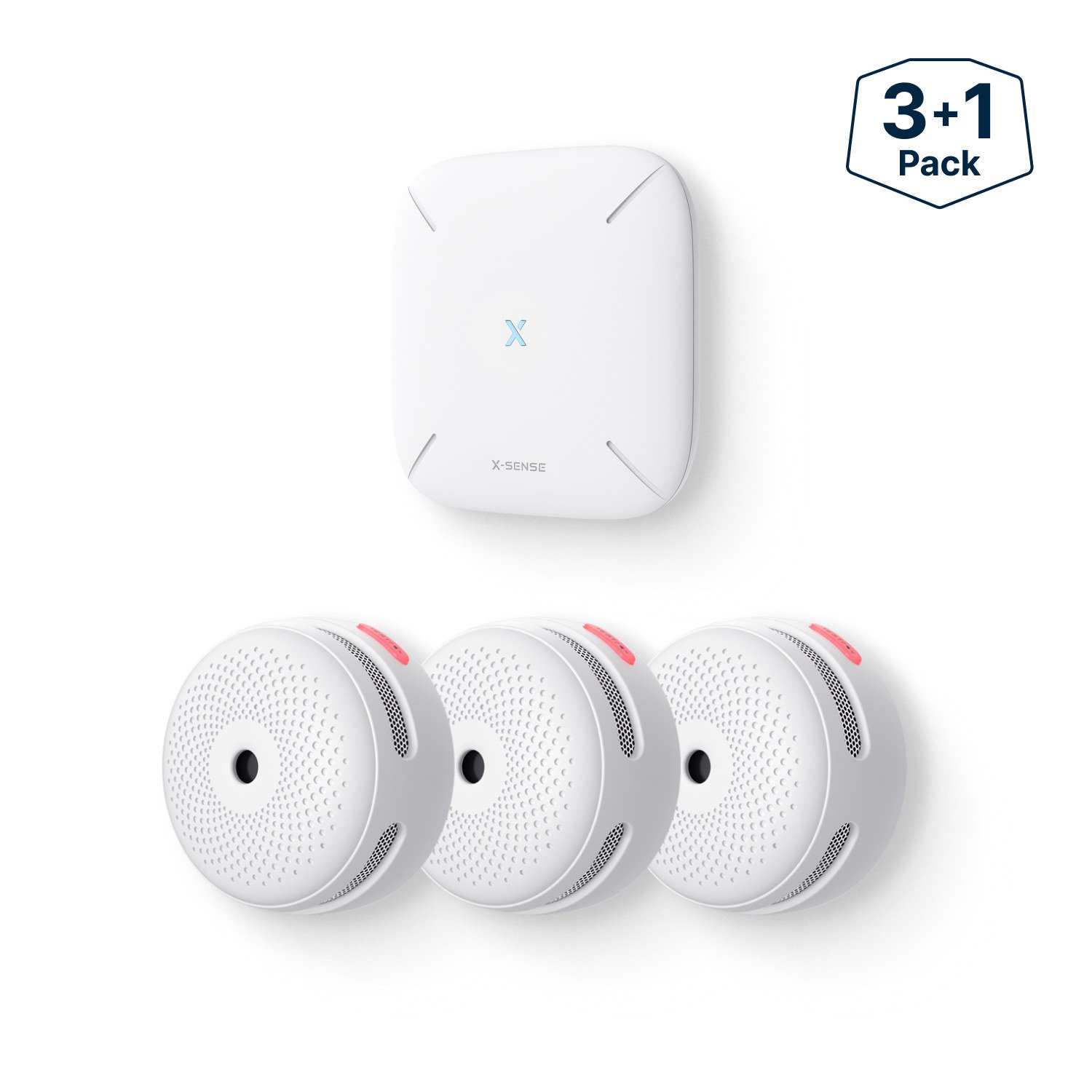
The SC07-W smoke and CO alarm and the XS01-WR smoke alarm link directly to each other by radio, with no base station and no Wi-Fi. X-Sense says up to 18 compatible alarms can be connected, with a range of over 820 feet (250 meters) in open air. The SC07-W page lists exactly which models can join: up to 12 SC01-W, SC06-W or XP0H-W alarms, plus up to 6 from a list that includes the SC07-W and SD19-W. X-Sense lists the optional RC01 Pro remote ($16.19) as a way to test and hush all linked alarms with one button.
This is the simplest way to get whole-home interconnection. The trade-off is that X-Sense doesn't list app support for these models, so you won't get phone alerts when you are away. The SC07-W has a 10-year sealed battery, and the XS01-WR uses a replaceable battery that X-Sense rates for about 5 years.

The SBS50 base station system
The SBS50 base station is X-Sense's hub. It plugs into the wall, joins your home's 2.4 GHz Wi-Fi network (X-Sense says it doesn't work with 5 GHz) and talks to compatible alarms by radio. X-Sense says it supports up to 50 devices and covers about 1,700 feet (500 meters) in open space. It also has its own adjustable 100 dB siren.
X-Sense lists these compatible devices on the SBS50 page: the SC07-MR and XP0A-MR smoke and CO alarms, the XS01-M and XS0B-MR smoke alarms, the XC01-M CO alarm, SWS51 and SWS0A water leak sensors, and STH0A and STH51 thermometer-hygrometers. The XS01-M and SC07-MR product pages say they require the SBS50.
When one alarm on the base station goes off, X-Sense says all connected alarms sound together and you get a phone notification through the X-Sense Home Security app. It also notes that if the Wi-Fi drops or the power goes out and the base station loses its connection to your phone, the alarms still work and still interconnect. You lose the phone alerts, not the protection.
This system also adds an optional paid fire dispatch service and, per X-Sense, Home Assistant compatibility.

Hardwired
The XP0J-iA smoke and CO alarm connects to 120-volt house wiring, with a CR123A battery as backup. X-Sense says up to 18 devices can be interconnected through the wiring, with up to 1,000 feet (300 meters) of wire between the first and last unit. It also connects to 2.4 GHz Wi-Fi for app alerts and has voice alerts.
Hardwired alarms make the most sense when you are replacing existing hardwired alarms or wiring a new build. The NFPA says only qualified electricians should install hardwired smoke alarms.
Wi-Fi-only smart alarms
The XP0A-iR, XS0B-iR and XS01-WX connect straight to your Wi-Fi for phone alerts, with no base station. They are handy for a single room, an apartment or a vacation home you want to check from a distance. But X-Sense's own feature lists mark "Interconnected Alarm" as not supported on these three models, so they don't sound together. If whole-home interconnection is your goal, choose one of the other three approaches.
Step 2: Decide which approach fits your home
- You want every alarm to sound together and don't need phone alerts: wireless interconnect (SC07-W or XS01-WR). No hub, no Wi-Fi setup.
- You want interconnection plus phone alerts, and maybe water leak sensors: the SBS50 system, for example an XS01-M kit or SC07-MR alarms.
- You already have hardwired alarms or are renovating: XP0J-iA, installed by an electrician.
- You only need one or two alarms you can monitor remotely: a Wi-Fi model such as the XP0A-iR.
Don't mix families on the assumption that they will link. X-Sense lists specific compatible models for each system. If you already own X-Sense alarms and want to add a different family, check the compatibility list on the product page or ask X-Sense support first.
Step 3: Plan where each alarm goes
The NFPA's placement guidance:
- Put smoke alarms inside every bedroom, outside each sleeping area (such as the hallway) and on every level, including the basement.
- Mount smoke alarms on the ceiling or high on a wall.
- Keep smoke alarms at least 10 feet from the stove to reduce nuisance alarms, and don't put them in kitchens or bathrooms.
- Put CO alarms in a central location outside each sleeping area and on every level, and interconnect them too.
- Follow the manufacturer's instructions for exact placement and mounting height.
Make a simple floor plan and count the alarms you need. For CO, a combination smoke and CO alarm such as the SC07-W or SC07-MR covers both hazards in one unit. For a kitchen or garage, where a smoke alarm would give false alarms, X-Sense sells the XH02-M heat alarm, which it says can link with Link+ alarms or join the SBS50 system.

Step 4: Pair the alarms before you mount them
Exact steps vary by model, so use the manual for your alarm. You can download it from the Resource Center on each X-Sense product page. These tips apply to any system:
- Pair at a table first. Linking alarms side by side before they go on the ceiling is easier than standing on a ladder, and you can confirm each one joins the group.
- For a base station system, set up the SBS50 first. Plug it in, add it in the X-Sense Home Security app on a 2.4 GHz network, then add each alarm. Name each alarm by room so a notification tells you where the alarm is.
- Stay within the limits. X-Sense lists 18 alarms for its wireless and hardwired systems, and up to 50 devices on the SBS50.
- Check range in place. After mounting, trigger a test and confirm every alarm sounds. If one doesn't, it may be too far from the others or the base station, or blocked by walls.
Step 5: Test and maintain
The NFPA says to test smoke and CO alarms at least once a month by pressing the test button. On an interconnected system, a test from one alarm should set off all the others. That is a good monthly check that the links are still working. X-Sense says you can also identify the source of an alarm: on the XS01-WR, pressing mute on any alarm silences the others, and the one that keeps sounding is the source. On the SC07-W, the alarm that detected the hazard flashes its red LED differently from the linked alarms.
Replace smoke alarms 10 years after their manufacturing date, as the NFPA recommends. X-Sense lists a 10-year product life for these alarms. Replace batteries in models with replaceable batteries when they chirp for low battery.
Prices on X-Sense's store
When we checked on November 14, 2026, X-Sense listed:
| Model | Pack | Price |
|---|---|---|
| XS01-WR | 6-pack | $99.99 |
| SC07-W | 3-pack | $139.99 |
| XS01-M + SBS50 | 3-pack kit | $76.99 |
| SC07-MR + SBS50 | 5-pack kit | $159.99 |
| XP0J-iA | 3-pack | $125.99 |
| XP0A-iR | 1-pack | $31.99 |
Prices change often, so check your cart. Before you mount anything, read X-Sense's 30-day return conditions, because installation and app registration can reduce a refund. Our X-Sense shopping guide covers returns and the 5-year alarm warranty. X-Sense also sells radon detectors; see our X-Sense radon detector comparison.
References
- NFPA, Smoke Alarm Information: https://www.nfpa.org/education-and-research/home-fire-safety/smoke-alarms
- NFPA, Carbon Monoxide Safety: https://www.nfpa.org/education-and-research/home-fire-safety/carbon-monoxide
- X-Sense, SC07-W Wireless Interconnected Smoke and CO Alarm: https://www.x-sense.com/products/sc07-w-wireless-interconnected-combination-smoke-and-carbon-monoxide-detector
- X-Sense, XS01-WR Wireless Interconnected Smoke Alarm: https://www.x-sense.com/products/x-sense-wireless-interconnected-smoke-alarm-xs01-wr
- X-Sense, SBS50 Base Station: https://www.x-sense.com/products/x-sense-sbs50-base-station-your-complete-home-safety-hub
- X-Sense, XS01-M Interconnected Smart Smoke Alarm: https://www.x-sense.com/products/fs31-smoke-alarm-kit
- X-Sense, SC07-MR Interconnected Smart Smoke and CO Alarm: https://www.x-sense.com/products/x-sense-sc07-mr-combo-smoke-and-co-detector
- X-Sense, XP0J-iA Smart Hardwired Smoke and CO Alarm: https://www.x-sense.com/products/xp0j-ia-smart-hardwired-smoke-and-co-alarm-with-voice-alerts
- X-Sense, XP0A-iR Smart Smoke and CO Detector: https://www.x-sense.com/products/x-sense-wifi-smoke-and-co-detector-xp0a-ir
- X-Sense, XH02-M Interconnected Smart Heat Alarm: https://www.x-sense.com/products/x-sense-smart-heat-alarm-xh02-m-with-10-year-sealed-battery
Meet your guide
Lipeiguan
author
What to read next
 How to Choose a SwitchBot Lock: Lock Pro vs Lock Ultra vs Lock Vision and Vision Pro A research-based guide to official SwitchBot Lock Pro, Lock Ultra, Lock Vision and Lock Vision Pro specs and November 20, 2026 U.S. prices, including batteries, hubs, keypads, comp...
 How to Install and Use SwitchBot Curtain 3 A research-based SwitchBot Curtain 3 how-to as of November 18, 2026: official Rod 3 package contents, 15–40 mm track fit, app pairing before hanging, magnet stops, calibration, Tou...
 How to Test Your Home for Radon With an X-Sense Detector A research-based X-Sense XR0B-SR how-to as of November 18, 2026: where to place the detector, how long to wait, how to read pCi/L and Bq/m³, and what X-Sense and EPA documents say...