
Keychron Nape Pro Review: A Below-Keyboard Trackball for Keyboard-First Users
A research-based look at Keychron's Nape Pro: 25mm trackball, OctaShift 8-angle placement, ZMK firmware, control dial, tri-mode connectivity and 50-hour battery, plus what buyers on Keychron's stores report.
Disclosure: This page may contain affiliate links. They do not influence our editorial conclusions. Read the disclosure.
Our pick
- See price at Keychron
Top pick
Keychron
Keychron makes mechanical and magnetic-switch keyboards, wireless mice and trackballs such as the Nape Pro and T1 HE. Keychron UK (keychron.uk) is its UK store,...
Our verdict
Based on Keychron's specifications, the Nape Pro is a clever, highly programmable trackball for keyboard-first and split-keyboard users, with eight placement angles, ZMK firmware and a control dial, but its small 25mm ball, 50-hour battery and mixed buyer feedback on build feel make it a specialist tool rather than a mouse replacement for everyone.
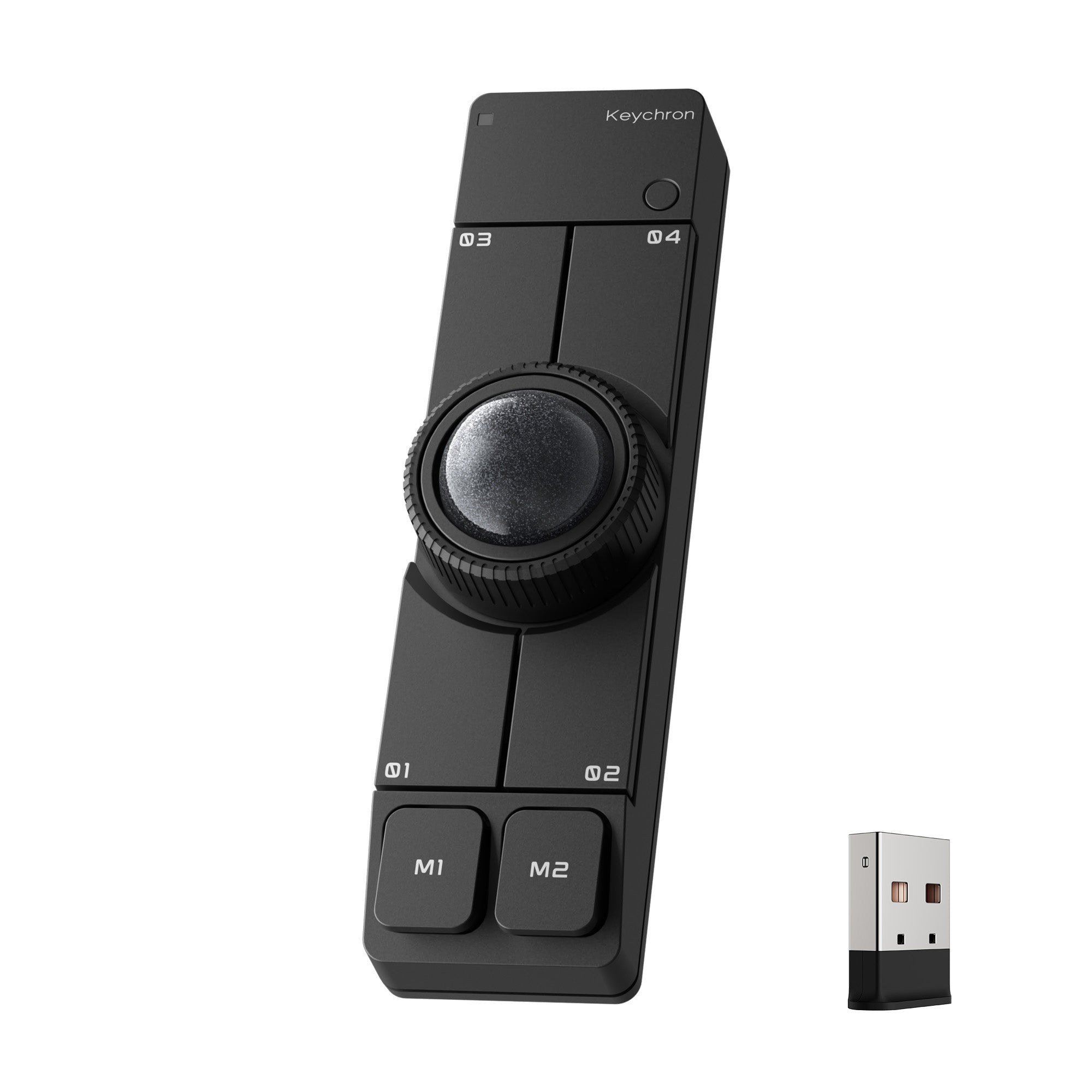
The Keychron Nape Pro is an unusual input device: a slim wireless trackball designed to sit directly below your keyboard's spacebar, so you can move the cursor with your thumb without taking your hands off the keys. Co-developed with Gizmodo Japan, it won Tom's Hardware's Best of CES 2026 Best Mouse award, according to Keychron. This research-based review looks at what Keychron's official pages say it does, what verified buyers report, and who it suits. We have not tested the Nape Pro ourselves.

Verdict
Based on Keychron's specifications, the Nape Pro (£84.99 at Keychron UK, $89.99 in the US) is a clever, highly programmable trackball for keyboard-first and split-keyboard users, with eight placement angles, ZMK firmware and a control dial, but its small 25mm ball, 50-hour battery and mixed buyer feedback on build feel make it a specialist tool rather than a mouse replacement for everyone.
What the Nape Pro is
Most trackballs are shaped like mice. The Nape Pro is a flat bar. Keychron designed it to fill the unused space in front of a keyboard, turning that edge into what it calls a keyboard-integrated input zone. Your thumbs already rest near the spacebar when typing, so the cursor is a short thumb movement away.
Keychron positions it for four uses: as a keyboard companion, as a left-hand-friendly pointing device, as a macro control device, and for presentations and media control. Because the device never moves across the desk, it needs no mousepad.
Key specifications
From Keychron's product pages:
- Trackball: 25mm, thumb-operated
- Sensor: PixArt 3222, up to 4,000 DPI
- Polling rate: up to 1,000Hz in wired and 2.4GHz modes
- Buttons: six customizable buttons with silent clicks
- Control dial: programmable, for scrolling, zooming, timeline scrubbing or volume
- Placement: OctaShift support for eight angles
- Connectivity: 2.4GHz wireless, Bluetooth and USB-C wired
- Battery life: up to 50 hours
- Weight: 82g
- Firmware and software: ZMK, configured in the Keychron Launcher web app
- Price: £84.99 at Keychron UK (black or white), $89.99 on Keychron's US store

Placement: the OctaShift idea
The Nape Pro's most distinctive feature is OctaShift. You can place the bar horizontally under the spacebar, vertically between the halves of a split keyboard, diagonally on either side of the keyboard, or beside a drawing tablet, and set the matching angle so that pushing the ball "up" still moves the cursor up. Keychron supports eight angles in total.
This is what makes it appealing for split keyboards, which leave a gap in the middle of the desk, and for left-handed users, who can place it on the left with the same cursor behavior. One Keychron UK reviewer says the device sits between the halves of a Keychron Q11 split keyboard and that they have "barely touched" their mouse since.

Customization
The Nape Pro runs ZMK, an open-source firmware, and is set up in the Keychron Launcher web app. Each of the six buttons can perform a mouse click, a keyboard shortcut, a layer switch or a multi-step macro, and the dial can be reassigned too. Keychron highlights common actions such as back, forward, copy, paste, undo and app switching. Settings are stored on the device itself, so your layout follows you between computers without installing software on each one.
That makes it useful beyond pointing. Video editors can scrub timelines with the dial, presenters can use it to move slides, and anyone can turn it into a compact shortcut pad.
Connectivity and battery
You can connect over 2.4GHz for low-latency desktop use, Bluetooth for laptops and tablets, or a USB-C cable that lets you keep working while it charges. Keychron rates the battery for up to 50 hours. That is reasonable for a small device but well short of the up to 106 hours Keychron quotes for its newer T1 HE trackball, so expect to charge it more often.
What buyers say
Customer reviews on Keychron's own stores are mixed, and worth reading before you buy:
- On Keychron's US store, the Nape Pro had 16 reviews when we checked: 9 five-star, 2 four-star, 2 three-star, 2 two-star and 1 one-star. Positive reviewers mention easy setup, being able to use it while charging, and good tracking on different desk surfaces.
- Several US reviewers say the plastic feels cheaper than Keychron's keyboards, and some mention a loose trackball or a scroll dial that catches.
- On Keychron UK, the four reviews at the time of writing were all two or three stars. Complaints include a learning curve, a ball that feels fiddly because it is small, buttons that are hard to press anywhere but the edge, and in one case a gritty dial and an intermittent cursor drift that required a restart.
- Even critical reviewers praised Keychron's software, and the most positive UK reviewer still called the product a convert for their split-keyboard setup.
Those reviews are a small sample and individual experiences vary, but they suggest two things: the concept works best for people committed to a keyboard-first setup, and it is worth buying somewhere with a clear return process.
Who should buy it
The Nape Pro makes the most sense for a few specific groups:
- Split-keyboard users, who can place it vertically in the gap between the halves.
- Heavy keyboard users and programmers who want to avoid reaching for a mouse and already rely on shortcuts and layers.
- Left-handed people who struggle to find trackballs designed for them.
- Video and audio editors who want a dial for scrubbing and a few macro buttons next to the keyboard.
- Travelers who want a light pointing device that works on any surface without a mousepad.
It is a harder sell for gamers, for anyone who wants a large trackball for precise work, or for people who simply want a comfortable mouse. Those buyers may be happier with a conventional mouse or a thumb trackball such as Keychron's T1 HE.
Strengths
- Hands stay on the keyboard. Cursor control sits within your natural typing range.
- Placement flexibility. Eight supported angles suit split keyboards, left-handed users and tablet setups.
- Deep programmability. ZMK firmware, six remappable buttons and a dial, with settings saved on the device.
- Quiet. Silent clicks suit shared spaces.
- Light and portable. At 82g with three connection modes, it travels well.
Limitations
- Small ball. The 25mm ball keeps the device compact but some buyers find it fiddly.
- Learning curve. Dragging and fine adjustments take practice, as several reviewers note.
- Battery life. Up to 50 hours means more frequent charging than many mice.
- Build feel. Multiple reviewers describe the plastic as less premium than Keychron's keyboards.
- Price. At £84.99 it costs more than many conventional wireless mice.
Nape Pro or T1 HE?
Keychron's new T1 HE takes the opposite approach: a right-handed mouse body with a large, adjustable 34mm thumb ball, magnetic-optical switches and longer battery life, at $59.99 on pre-order. If you want an everyday mouse replacement, it may suit you better; if you want the cursor under your thumbs while typing, the Nape Pro is the more distinctive tool. See our T1 HE vs Nape Pro comparison.
Buying from Keychron UK
Keychron UK sells the Nape Pro for £84.99, dispatched from the UK with free delivery on orders over £30 and a 24-month warranty. You have 14 days from the day after delivery to tell the store you want a change-of-mind return. Our Keychron UK shopping guide explains the return costs, refund timing and warranty claim process.
References
- Keychron UK, Keychron Nape Pro Wireless Trackball Mouse (product page and customer reviews): https://www.keychron.uk/products/keychron-nape-pro-wireless-trackball-mouse
- Keychron, Keychron Nape Pro Wireless Trackball Mouse (specifications and customer reviews): https://www.keychron.com/products/keychron-nape-pro-wireless-trackball-mouse
- Keychron UK, Return Policy: https://www.keychron.uk/pages/return-policy
Meet your guide
Lipeiguan
author
What to read next
 Google Adds Computer Use to the Gemini App for Mac in the U.S. On November 19, 2026, Google said computer use is available in the Gemini app for Mac, in English in the U.S. Official requirements include an Apple Silicon Mac on macOS Sequoia 15... How to Use Gemini Computer Use on a Mac: Official Requirements, Permissions and Examples Official Google requirements for computer use in the Gemini app for Mac: an Apple Silicon Mac on macOS Sequoia 15.0 or later, a personal Google account for people 18 or older, a Go...
 How to Choose an LG Monitor in 2026: UltraGear, UltraFine, UltraWide and Smart Models A research-based 2026 guide to choosing an LG monitor, using official LG.com specs and listed U.S. prices as of November 19, 2026, for UltraFine and UltraWide work displays, webOS...