
Keychron T1 HE vs Nape Pro: Which Keychron Trackball Should You Buy?
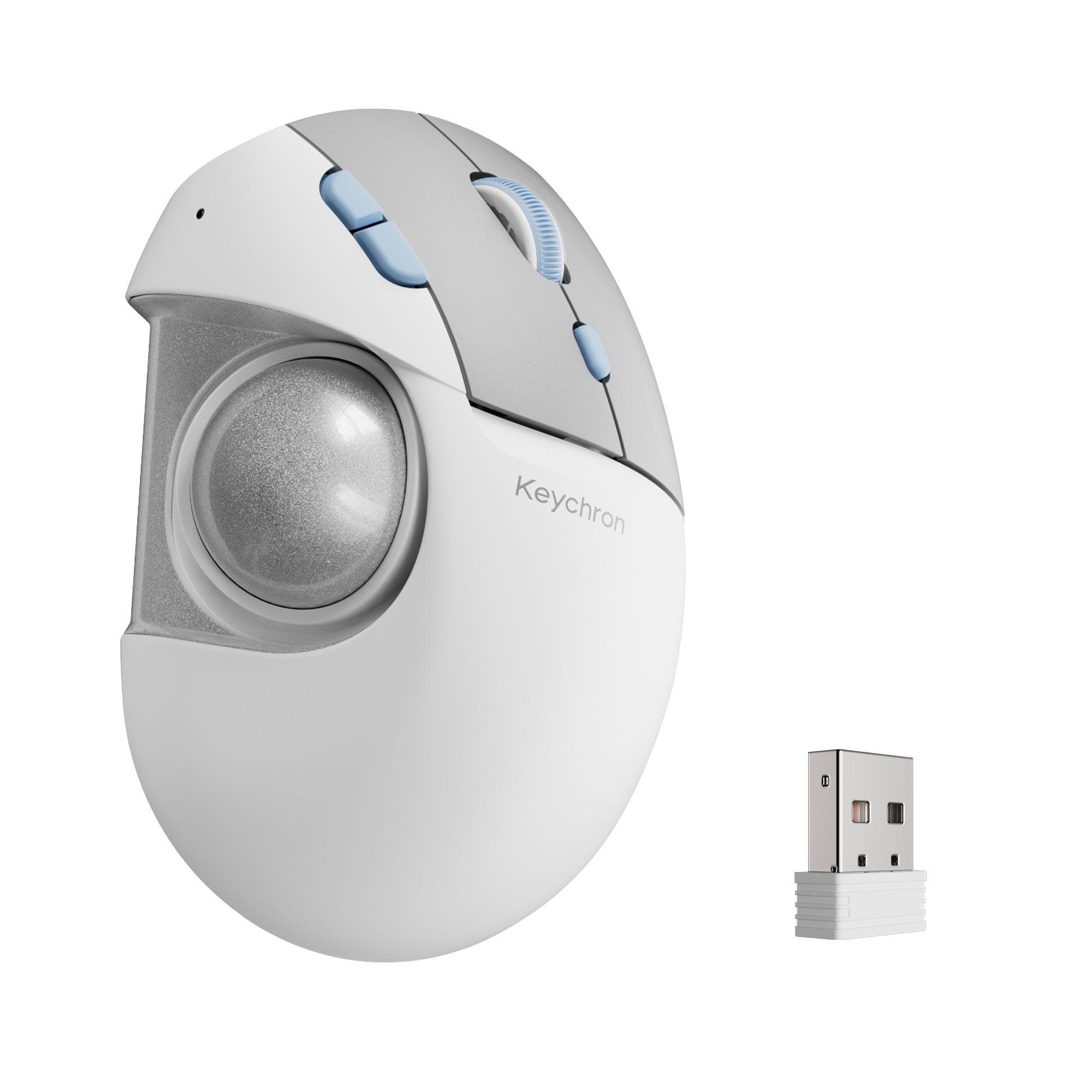
Keychron's new $59.99 T1 HE is a right-handed thumb trackball with an adjustable 34mm ball; the Nape Pro is a slim bar that sits below your keyboard. We compare design, specs, battery, buttons and price.
Disclosure: This page may contain affiliate links. They do not influence our editorial conclusions. Read the disclosure.
Our pick
- See price at Keychron
Top pick
Keychron
Keychron makes mechanical and magnetic-switch keyboards, wireless mice and trackballs such as the Nape Pro and T1 HE. Keychron UK (keychron.uk) is its UK store,...
Keychron now makes two very different trackballs. The Nape Pro is a slim bar with a small 25mm ball that sits below your keyboard's spacebar, while the new T1 HE is a contoured, right-handed mouse with a large 34mm thumb ball you can reposition. Both promise less hand movement than a regular mouse, but they solve the problem in opposite ways. This comparison uses Keychron's official product pages and specifications as of November 14, 2026.

Quick answer
- Choose the T1 HE if you want a trackball to replace your everyday mouse, you are right-handed, and you value comfort and click feel. It costs $59.99 on pre-order and ships in early December 2026.
- Choose the Nape Pro if you want to keep your hands on the keyboard, work at a small or split-keyboard desk, are left-handed, or want a programmable macro and media controller as well as a pointer. It costs $89.99 in the US and £84.99 at Keychron UK, and it is shipping now.
Specifications side by side
| T1 HE | Nape Pro | |
|---|---|---|
| Price | $59.99 (pre-order) | $89.99 US / £84.99 UK |
| Availability | Ships early December 2026 (global store) | Shipping now, including from Keychron UK |
| Form | Right-handed contoured mouse | Flat bar for below or beside the keyboard |
| Trackball | 34mm, removable, 3-axis position adjustment | 25mm |
| Handedness | Right-handed only | Works on either side; "left-hand friendly" |
| Sensor | PixArt 3212 | PixArt 3222 |
| Max DPI | 2,400 | 4,000 |
| Polling rate | Up to 1,000Hz wired/2.4GHz, 125Hz Bluetooth | Up to 1,000Hz wired/2.4GHz |
| Main switches | Keychron MagOptic, 12-step actuation, Rapid Trigger | Silent clicks |
| Buttons and controls | 6 customizable buttons, 24-step optical scroll wheel | 6 customizable buttons, programmable control dial |
| Connectivity | 2.4GHz, Bluetooth 5.2 (3 devices), USB-C | 2.4GHz, Bluetooth, USB-C |
| Battery life | Up to 106h Bluetooth, 98h 2.4GHz (600mAh) | Up to 50h |
| Weight | 160g | 82g |
| Firmware and software | Keychron Launcher web app with AI assistant | ZMK firmware, Keychron Launcher |
Design and ergonomics
The biggest difference is where your hand goes. The T1 HE is a conventional thumb trackball: your palm rests on a contoured, angled body and your thumb rolls the ball on the side, so the mouse never moves. Keychron's twist is that the ball can be moved by a few millimeters on three axes using screws underneath, letting you set it where your thumb naturally rests instead of stretching to reach it.

The Nape Pro is not shaped like a mouse at all. It is a narrow bar that Keychron designed to sit right below the spacebar, turning the front edge of your keyboard into a control area. You move the cursor with your thumb without lifting your hands from the typing position. Keychron's OctaShift feature supports eight placement angles, so it can also sit vertically between the halves of a split keyboard, diagonally to one side, or next to a drawing tablet, and cursor directions stay correct after rotation.
That flexibility makes the Nape Pro the only option of the two for left-handed users. Keychron explicitly lists the T1 HE as right-handed.

Trackball size and control
Ball size affects precision and feel. The T1 HE's 34mm ball is large, similar to many dedicated thumb trackballs, and Keychron says it is removable for cleaning, with official replacement balls to come. The Nape Pro's 25mm ball is much smaller to keep the device compact. Some buyers on Keychron UK's product page say the small ball takes time to get used to, while others on Keychron's US page praise how easy it was to set up, so expect a learning curve with either design if you are coming from a regular mouse.
On paper, the Nape Pro's PixArt 3222 sensor reaches a higher maximum of 4,000 DPI against the T1 HE's 2,400 DPI. For office work, both ranges are generous; higher DPI mainly matters on very large or multiple high-resolution displays. Both reach 1,000Hz polling over a cable or the 2.4GHz receiver.
Buttons, clicks and scrolling
The T1 HE focuses on click quality. Its left and right buttons use Keychron MagOptic switches, which detect clicks without physical contact. You can run them in Optical Mode for consistent clicks or Magnetic Mode with 12 actuation steps, and Rapid Trigger resets the button immediately on release. Keychron targets up to 100 million clicks, aimed at reducing the wear that causes double-clicking in older mice. It also has a 24-step optical scroll wheel.
The Nape Pro focuses on programmability. Its six buttons can trigger mouse clicks, keyboard shortcuts, layer switches or multi-step macros, and its programmable control dial can scroll, zoom, scrub video timelines or change volume. Clicks are silent, which suits shared offices or late-night work. Because it runs ZMK firmware, settings are saved on the device and travel with it between computers.
Battery and connectivity
Both connect three ways: a 2.4GHz receiver, Bluetooth, or a USB-C cable that also lets you keep working while charging. The T1 HE has a clear battery advantage, with Keychron quoting up to 106 hours on Bluetooth and 98 hours on 2.4GHz from a 600mAh cell. The Nape Pro is rated for up to 50 hours. The T1 HE can pair with up to three devices over Bluetooth.
The trade-off is weight. At about 160g, the T1 HE is roughly twice as heavy as the 82g Nape Pro, though weight matters less with a trackball because the device does not move during use. The Nape Pro is easier to carry in a laptop bag.
Price and availability
The T1 HE is the cheaper of the two at $59.99, but it is a pre-order with an estimated early December ship date, and it was not listed on Keychron UK when we checked. The Nape Pro costs $89.99 in the US and £84.99 at Keychron UK, where it ships from UK stock with free delivery on orders over £30 and a 24-month warranty. Our Keychron UK shopping guide covers that store's return and warranty rules.
Typical setups for each
T1 HE scenarios. A right-handed office worker who spends the day in spreadsheets and browsers and wants a mouse that does not slide around the desk. Someone with a small desk or no room for a mousepad. A user whose current mouse has started double-clicking from worn switches, who would benefit from Keychron's contactless MagOptic design. Anyone who has tried thumb trackballs before but found the ball too far away.
Nape Pro scenarios. A programmer on a split keyboard who wants the pointer in the gap between the halves. A writer who hates moving a hand off the home row to nudge the cursor. A video editor who wants a dial for scrubbing timelines plus a few macro buttons. A left-handed user, or someone who travels with a compact keyboard and wants a light, pocketable pointer.
Some people may end up with both: the T1 HE as the main mouse at a desk and the Nape Pro in a laptop bag. Keychron's Launcher configures both devices, so button mappings can be set up in a similar way.
Which should you buy?
Buy the T1 HE if you want a comfortable everyday trackball for a right hand, with long battery life and durable, adjustable clicks, and you can wait until December. Buy the Nape Pro if you are a keyboard-first user who hates reaching for a mouse, you use a split or compact keyboard, you are left-handed, or you want a small macro controller. Our Nape Pro review goes deeper on its strengths and the complaints buyers have raised, and our T1 HE launch story has the full specification list.
References
- Keychron, T1 HE Wireless Adjustable Trackball Mouse: https://www.keychron.com/products/keychron-t1-he-wireless-adjustable-trackball-mouse
- Keychron, Nape Pro Wireless Trackball Mouse: https://www.keychron.com/products/keychron-nape-pro-wireless-trackball-mouse
- Keychron UK, Nape Pro Wireless Trackball Mouse: https://www.keychron.uk/products/keychron-nape-pro-wireless-trackball-mouse
Meet your guide
Lipeiguan
author
What to read next
 Google Adds Computer Use to the Gemini App for Mac in the U.S. On November 19, 2026, Google said computer use is available in the Gemini app for Mac, in English in the U.S. Official requirements include an Apple Silicon Mac on macOS Sequoia 15... How to Use Gemini Computer Use on a Mac: Official Requirements, Permissions and Examples Official Google requirements for computer use in the Gemini app for Mac: an Apple Silicon Mac on macOS Sequoia 15.0 or later, a personal Google account for people 18 or older, a Go...
 How to Choose an LG Monitor in 2026: UltraGear, UltraFine, UltraWide and Smart Models A research-based 2026 guide to choosing an LG monitor, using official LG.com specs and listed U.S. prices as of November 19, 2026, for UltraFine and UltraWide work displays, webOS...