
Seagate FireCuda Forge Review: Alkemi Hybrid Drive Specs, Price, SSD Needs and Who It Suits
A research-based look at Seagate's FireCuda Forge: how Alkemi combines your NVMe SSD with an 8TB or 20TB hard drive, rated speeds, ports, SSD requirements, upgrade rules, price and who should buy or skip it.
Disclosure: This page may contain affiliate links. They do not influence our editorial conclusions. Read the disclosure.
Our pick
- See price at Seagate
Top pick
Seagate
Seagate is a data storage company that makes hard drives, SSDs and external storage, including the FireCuda gaming line, the Expansion and One Touch external dr...
Our verdict
Based on Seagate's specifications, the FireCuda Forge is a well-thought-out single-volume drive for USB4 and Thunderbolt users who want SSD-tier speed for active files and 8TB or 20TB of capacity, but the user-supplied SSD, high launch price and full-wipe upgrade rule make it a premium convenience purchase rather than a value pick.
Seagate's FireCuda Forge is one of the more unusual storage launches of 2026. Instead of choosing between a fast external SSD and a roomy hard drive, it puts both in one desktop enclosure and lets Seagate's new Alkemi software decide where each file lives. It launched on November 10, 2026 in 8TB and 20TB versions starting at $699 and $899.
This review is research-based. It draws on Seagate's launch release, the FireCuda Forge product page, the official data sheet and the online user manual, all read on November 12, 2026. We have not run our own benchmarks, so speed figures below are Seagate's ratings, not measured results.

What the FireCuda Forge is
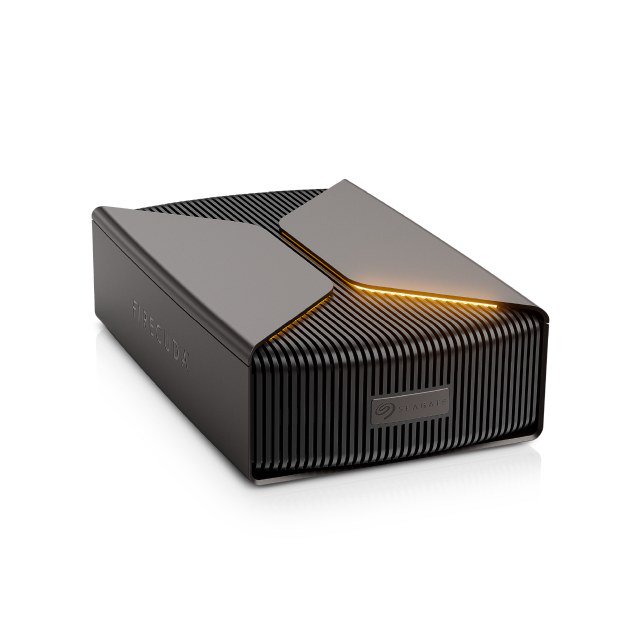
The Forge is an external, mains-powered drive that connects to a computer over USB4. Inside is a 3.5-inch hard drive (8TB or 20TB) and an empty M.2 slot. You add your own NVMe SSD, and the enclosure combines the two into a single volume. Your computer sees one drive with the hard drive's capacity, not two separate disks.
Seagate calls the technology behind this Alkemi. In its launch release, the company says Alkemi learns how data is used in real time and keeps recent and frequently accessed content on the SSD, while the hard drive provides capacity for larger libraries. Seagate frames it as taking the tiered storage used in data centers and bringing it to the desktop. The Forge is the first product on the platform.

Key specifications
| Spec | FireCuda Forge 8TB | FireCuda Forge 20TB |
|---|---|---|
| Model | STNS8000400 | STNS20000400 |
| Launch price | $699 | $899 |
| Rated speed | Up to 2,500MB/s read, 2,000MB/s write | Same |
| Interface | USB4 (USB-C) | Same |
| SSD slot | M.2 2280 NVMe, SSD not included | Same |
| Systems | Windows 11, macOS 26 and later | Same |
| Size | 9.46 x 5.78 x 2.57 in | Same |
| Weight | 4.06 lb (1.85 kg) | 4.22 lb (1.92 kg) |
| Warranty | 2 years (Americas, EMEA), 3 years (APAC) | Same |
The box includes the base unit, a 12V power supply with multi-region plug adapters, an M.2 mounting screw, two thermal pads, a 2mm hex screwdriver, a USB-C to USB-C USB4 cable and, per the data sheet, a two-month Adobe Creative Cloud plan.
The SSD you must add
This is the most important thing to understand before buying. The Forge does not work without an SSD, and Seagate does not include one. The user manual lists the requirements:
- M.2 2280 form factor, NVMe
- PCIe Gen3 or newer
- At least 2,400MB/s read and 2,000MB/s write
- DRAM cache recommended
- No heatsink, because the enclosure uses the supplied thermal pads
Capacity matters in a specific way. Seagate says the Forge recognizes only up to 1TB of SSD capacity, so 1TB is the recommended size. A larger SSD works, but the extra space is not used and does not improve performance. A smaller SSD also works, but the manual warns that performance may be reduced, since less of your active data fits in the fast tier. Seagate also says PCIe Gen4 and newer drives are supported but do not make the Forge faster.
In practice, the sensible pick is a 1TB Gen3 or Gen4 NVMe drive with DRAM that meets the speed floor. That keeps the total cost down without leaving performance on the table. Our step-by-step SSD installation guide walks through choosing and fitting one.

Ports and computers it suits
Seagate's minimum requirement is a USB4 or Thunderbolt 3 port on the computer, and the manual adds that Thunderbolt 4 and Thunderbolt 5 also work. Owners on Thunderbolt 3 or 4 should make sure their PC maker's latest firmware is installed. The FAQ is blunt about older machines: computers with only USB-A ports are "not optimized" for the Forge, and connecting it to older USB ports is not recommended. Hubs and docks are fine only if they provide a USB4 or Thunderbolt 3 or later connection.
Out of the box the volume is formatted NTFS for Windows. On a Mac, the manual says the volume appears read-only until you reformat it in Disk Utility, for example to APFS, or to exFAT if you need to move the drive between Windows and macOS.
Upgrades, and the data-loss warning
Two design choices help the Forge last longer than a sealed external drive. First, you choose the SSD and can change it. Second, Seagate lets you replace the hard drive with a larger 3.5-inch drive later, using the included hex screwdriver.
The trade-off is serious. Because the SSD and hard drive form one volume, the manual says changing or removing either one erases all data on the volume and does not allow recovery. Any upgrade means copying everything off first and back again afterward. Seagate also says data on the SSD you install is deleted when the Forge prepares it, so do not fit a drive that holds files you need.

Design, lighting and software
The enclosure has a ridged metal look and programmable RGB lighting. The LEDs also report status. According to the manual, white at startup means the drive is booting, and solid orange is normal operation. A yellow front LED means no SSD was detected, a third LED in orange means no hard drive was detected, and red signals a fan or internal error. That is handy, because the most likely setup mistake is an SSD that is not fully seated.
Seagate Toolkit adds RGB customization and scheduled backup plans on Windows, plus mirror folders on Windows and Mac. The FAQ also notes that the Forge watches its temperature and can perform an emergency shutdown if it gets too hot, so it needs open airflow around the case.
Price and value
At launch, Seagate listed the 8TB model at $699 and the 20TB model at $899, available from its online store and authorized partners, with availability varying by market. Seagate's product page showed the drive as out of stock when we checked on November 12, 2026.
You have to add the cost of a 1TB NVMe SSD to those prices. That makes the Forge a premium choice compared with buying a plain external hard drive and a separate portable SSD, which is the obvious alternative. The difference is convenience: one cable, one drive letter and no manual file shuffling between fast and slow storage. Whether Alkemi's automatic caching is worth the premium depends on how much you value that, and on how well it performs in independent long-term testing, which is not yet available.
Pros and cons
Strengths, based on Seagate's specifications:
- One volume with hard-drive capacity (8TB or 20TB) and SSD-tier speed for active files
- Rated up to 2,500MB/s read and 2,000MB/s write over USB4
- You choose the SSD, and the hard drive can be upgraded later
- Clear status LEDs and Seagate Toolkit backup and RGB tools
- Windows 11 and macOS 26 support
Limitations:
- SSD not included, which adds to an already high price
- Only 1TB of SSD capacity is used, regardless of the drive you fit
- Changing the SSD or hard drive wipes the whole volume
- Needs USB4 or Thunderbolt 3 or later and a power outlet; not for older USB-A-only PCs
- 2-year limited warranty in the Americas, versus 3 years in Asia-Pacific
- New platform with no long-term independent track record yet

Who should buy it, and who should skip it
The Forge makes the most sense for PC gamers with big game libraries and creators who keep active projects next to large archives of footage, and who have a USB4 or Thunderbolt port. If you want one desktop drive that handles both jobs without managing two disks, it is built for you.
Skip it if your computer lacks USB4 or Thunderbolt, if you need a portable drive (it weighs over 4 pounds and needs mains power), or if you are comfortable keeping a fast SSD for current work and a cheaper hard drive for archives. Buyers who regularly upgrade storage should also weigh the full-wipe rule.
Buying tips
- Order the SSD at the same time and check it against Seagate's list: M.2 2280 NVMe, Gen3 or newer, 1TB, at least 2,400/2,000MB/s, DRAM recommended, no heatsink.
- If you buy from the Seagate Store, you get a 30-day return window; see our Seagate Store shopping guide.
- Register the drive using the QR code in the quick start guide to access Seagate's partner offers.
For the launch details, see our news report on the FireCuda Forge launch.
References
- Seagate, "Seagate Launches the FireCuda Forge, Powered by New Alkemi Intelligent Platform," Nov 10, 2026: https://www.seagate.com/stories/articles/seagate-launches-the-firecuda-forge-powered-by-new-alkemi-intelligent-platform-to-deliver-both-ssd-grade-responsiveness-and-hdd-capacity-pr/
- Seagate, FireCuda Forge product page: https://www.seagate.com/products/gaming-drives/pc-gaming/firecuda-forge/
- Seagate, FireCuda Forge data sheet: https://www.seagate.com/content/dam/seagate/en/content-fragments/products/datasheets/firecuda-forge/firecuda-forge-DS37-1-2609US-en_US.pdf
- Seagate, FireCuda Forge user manual (Welcome, Getting Started, LEDs, Toolkit, Hard Drive Replacement, FAQ): https://www.seagate.com/manuals/firecuda-forge/
Meet your guide
Lipeiguan
author
What to read next
 Google Adds Computer Use to the Gemini App for Mac in the U.S. On November 19, 2026, Google said computer use is available in the Gemini app for Mac, in English in the U.S. Official requirements include an Apple Silicon Mac on macOS Sequoia 15... How to Use Gemini Computer Use on a Mac: Official Requirements, Permissions and Examples Official Google requirements for computer use in the Gemini app for Mac: an Apple Silicon Mac on macOS Sequoia 15.0 or later, a personal Google account for people 18 or older, a Go...
 How to Choose a SwitchBot Lock: Lock Pro vs Lock Ultra vs Lock Vision and Vision Pro A research-based guide to official SwitchBot Lock Pro, Lock Ultra, Lock Vision and Lock Vision Pro specs and November 20, 2026 U.S. prices, including batteries, hubs, keypads, comp...