
Xfinity Shopping Guide: 5-Year Price Guarantee, Membership, Moving and Equipment Returns
What to know before you sign up, move or cancel with Xfinity: how the no-contract 5-Year Price Guarantee works, what's included, membership tiers that replaced Xfinity Rewards, moving rules, and how to return equipment to avoid charges.
Disclosure: This page may contain affiliate links. They do not influence our editorial conclusions. Read the disclosure.
Our pick
- See price at Xfinity
Top pick
Xfinity
Comcast's U.S. consumer brand for home internet, TV, streaming and Xfinity Mobile, selling no-contract internet plans with a 5-Year Price Guarantee for new memb...
What this guide covers
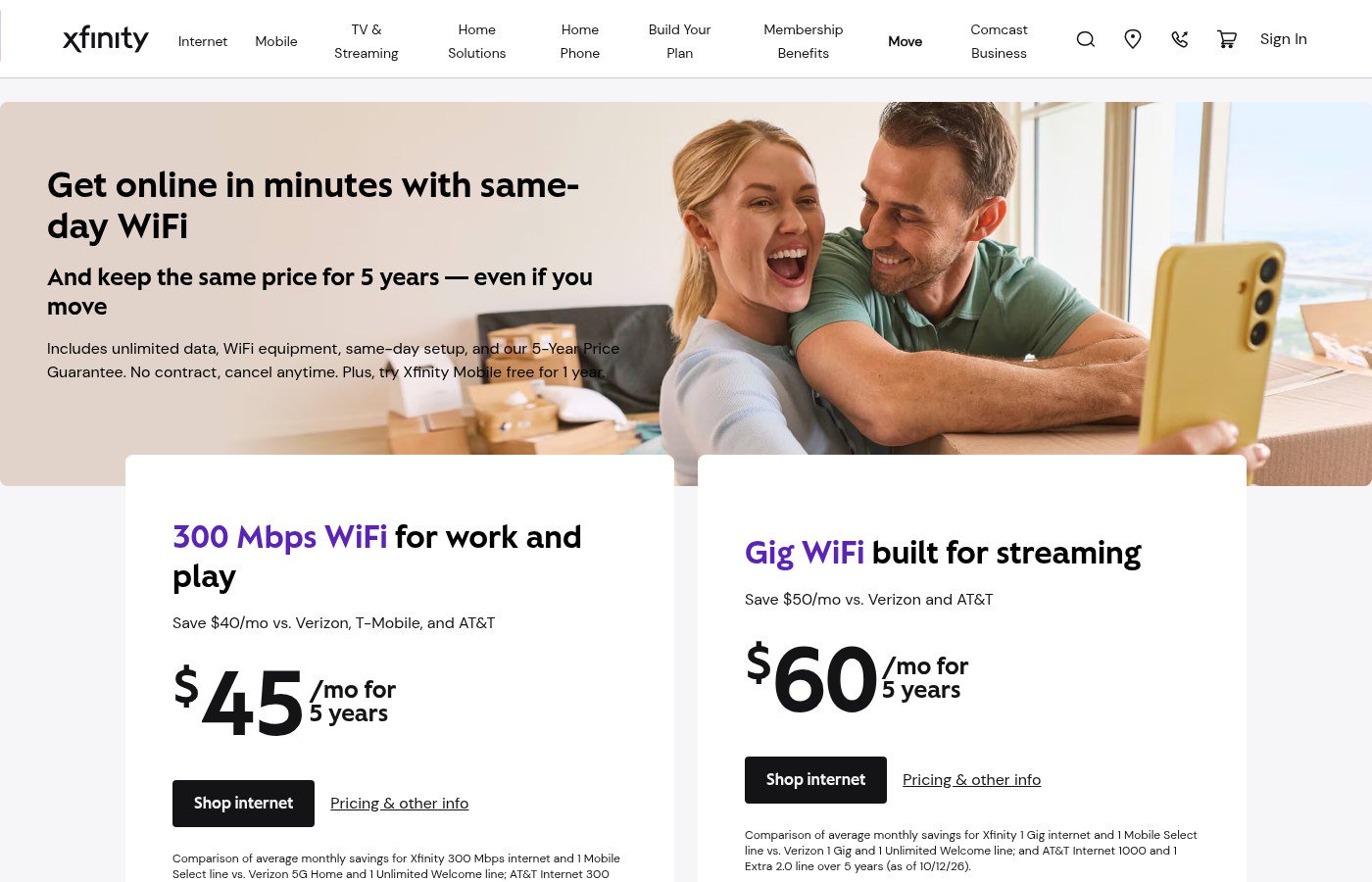
Xfinity, Comcast's home internet and mobile brand, has changed how it sells home internet. Annual contracts are gone, a 5-Year Price Guarantee is now the main offer, and the old Xfinity Rewards program has been replaced by a membership program. This guide covers what to know before you sign up, move or cancel: pricing terms, what's included, membership perks, moving your service, and returning equipment. It is based only on Xfinity's own pages, checked on November 10, 2026. Offers and prices vary by address and change often, so always confirm at checkout.

1. Contracts: there aren't any
Xfinity says its current home internet plans come with no annual contract. Its plan pages and 5-Year Price Guarantee page say you can cancel at any time without a penalty, and its internet FAQ says there is no early termination fee. That makes Xfinity easy to try. Your main financial commitment is returning the rented equipment if you leave (see section 5).
2. The 5-Year Price Guarantee
The guarantee is the core of Xfinity's current offer. According to Xfinity's explainer:
- What it locks: your base monthly internet rate for 60 months. Taxes, fees and installation charges are not included and are subject to change.
- Who qualifies: new Xfinity Internet members who sign up for paperless billing and autopay from a stored bank account, at an address where service is available. Without autopay from a bank account, Xfinity's page says you pay an extra $10 a month.
- Speeds covered: the explainer lists 300 Mbps, 500 Mbps and 1 Gig. Xfinity's gaming page also shows 1.2 Gig and 2 Gig tiers marked "5-year Price Guarantee."
- What happens after five years: regular rates apply. Xfinity suggests contacting it before the guarantee ends to look at new offers.
- If you move: Xfinity's moving page says you "keep the same price for 5 years — even if you move," and its internet FAQ says the rate stays the same if you move to a new address in its service area.
Sample prices on November 10, 2026
Xfinity shows prices for the address you enter. With the site's default location set to Seattle, the deals page listed:
| Plan | Price shown | Term |
|---|---|---|
| 300 Mbps | $45/month | 5-Year Price Guarantee |
| 500 Mbps | $50/month | 5-Year Price Guarantee |
| 1 Gig | $60/month | 5-Year Price Guarantee |
| 300 Mbps (alternative) | $40/month | 1-year price |
The fine print said the offer ends December 1, applies to new Xfinity Internet customers, and requires autopay from a stored bank account and paperless billing, with taxes and fees extra. Prices at your address may be different.
What's included in the price
Xfinity's plan pages list these extras with current internet plans:
- Unlimited data, with no data caps
- WiFi equipment (the Xfinity Gateway) at no extra cost. Xfinity says this includes its Advanced Security protection for devices on the network.
- A free Xfinity Mobile Select line for one year. This is for new Xfinity Mobile phone customers on 300 Mbps or faster plans, worth up to $30 a month, one per account. Regular rates apply after 12 months.
- Peacock Premium for two years on Gig-speed plans. The gaming page says it must be activated within the first 90 days.
- Same-day WiFi: order online and pick up the equipment at an Xfinity Store, or choose same-day delivery where available.
3. Xfinity membership (formerly Xfinity Rewards)
If you remember Xfinity Rewards, it's gone. Xfinity's membership FAQ says it "replaced Xfinity Rewards with a brand new membership experience" that's included with your service. Membership is also where Xfinity put its free 15-day WiFi speed boost for the Grand Theft Auto VI launch.

How it works, according to Xfinity:
- Who's a member: anyone with at least one eligible active service. Eligible services include Xfinity Internet, Internet Essentials, Xfinity TV, NOW TV and NOW StreamSaver postpaid, Xfinity Mobile, Xfinity Voice, Xfinity Home Security and Xfinity Smart Home. Xfinity Prepaid Internet and bulk accounts paid by a third party are not eligible.
- No points: there are no points to track and no limit on how many benefits you can redeem at once. Some benefits expire. Details for perks you've claimed are under "My redeemed benefits."
- New benefits every Thursday: Xfinity adds perks, discounts and exclusives weekly. On November 10 these included sweepstakes for trips and live shows, a $1 movie rental and a free trial of Calm Premium.
- Tiers: benefits grow with how long you've been a customer or how many services you have:
- Silver: 0–1 year or 1 service
- Gold: more than 1–5 years or 2 services. Adds 50% off mobile accessories.
- Platinum: more than 5–10 years or 3 services. Adds Peacock Premium at no extra cost.
- Diamond: 10+ years or 4 services. Adds smartwatch discounts for Xfinity Mobile members.
To redeem, sign in at xfinity.com/membership (or customer.xfinity.com/membership) or use the Xfinity app.
4. Moving with Xfinity
Xfinity's moving page and FAQ cover the basics:
- Timing: you can schedule a move up to 30 days before your move date.
- Activation: if you qualify for self-installation, you can activate services as soon as you move in. Professional installation can be booked for as early as the next day, if appointments are available.
- Gaps between homes: Xfinity says you won't be billed for gaps in service. In the meantime you can use Xfinity WiFi hotspots, which are included with Xfinity Internet in select areas, and the Xfinity Stream app.
- Equipment: you may be able to bring it with you. If you need new equipment, you can book a professional install or set it up yourself.
- Keeping your plan: offers vary by area. If your current plan isn't available at the new address, you can shop for new offers. The 5-Year Price Guarantee rate, as noted above, moves with you within the service area.
- Moving outside the service area: return your equipment before you move.
- After the move: activate the equipment in the Xfinity app at the new address so speed and reliability are set up for it.
- Same-day delivery: orders from eligible ZIP codes placed before 3 p.m. local time can arrive the same day. Later orders arrive the next day, and store pickup may be another option.
Xfinity's refunds page adds that when you transfer service to a new address, any credit balance usually moves to the new account rather than being refunded.
5. Returning equipment and canceling
Returning rented equipment matters because unreturned gear is the main source of surprise charges after you leave.

How to return. Start at the Digital Return Center (xfinity.com/returns) with your Xfinity ID and password. It works even after your account is disconnected. You have two main options:
- An Xfinity Retail Store. Hand the equipment to a store representative. It is removed from your account right away, and you get a receipt.
- UPS. Use the prepaid label from a recent Xfinity shipment, or print one from the Digital Return Center. Pack the equipment in its original box or any box that fits, attach the label, and keep the top part with the tracking number as your receipt. Drop it at any UPS location or call 1-800-PICK-UPS for a pickup. Allow up to two weeks for the return to show on your account.
What to send back. Only the device, its remote and the power cord. You don't need to return HDMI, Ethernet or coax cables. Xfinity Cameras and Xfinity Mobile products have their own return processes.
Deadlines and refunds. Xfinity's refunds page says that if rented equipment isn't returned within 30 days of disconnecting, unreturned equipment charges may be added and can reduce or wipe out any refund. Disconnected accounts are reviewed once all equipment is back or 30 days have passed. Eligible refunds usually arrive at the last payment method on file within four to six weeks. Deposits paid at signup can be credited back after 12 months if you've paid on time for six months in a row.
Other things to know when canceling:
- Your final bill may include prorated charges or equipment charges not seen on earlier bills.
- Your comcast.net email can stay active if you logged in during the 90 days before disconnecting and then log in at least once every nine months.
- If you keep Xfinity Mobile without Xfinity Internet, TV or Voice, Xfinity charges an extra $25 a month: per account on the latest price plan, or per line on older plans.
- Purchased movies and shows stay watchable in Xfinity Stream with your primary Xfinity ID.
Quick checklist
- Check prices at your exact address. The Seattle prices above are examples only.
- Set up paperless billing and bank-account autopay, or budget the extra $10 a month
- Remember that taxes, fees and installation are outside the price guarantee
- Redeem membership perks weekly. Gamers can claim the free 15-day speed boost before December 3, 2026.
- Moving? Schedule up to 30 days ahead and activate the gateway at the new address
- Leaving? Return the gateway, remote and power cord within 30 days and keep your receipt
For the latest Xfinity news, see our story on Xfinity's free 15-day WiFi speed boost for GTA VI. Our how-to guide explains how to claim it, and the research-based Xfinity Internet review weighs the plans.
References
- Xfinity. "What to Know About the New 5-Year Price Guarantee." xfinity.com/hub. Accessed November 10, 2026.
- Xfinity. "Xfinity Featured Deals." xfinity.com/learn/deals. Accessed November 10, 2026.
- Xfinity. "Xfinity Gaming." xfinity.com/gaming. Accessed November 10, 2026.
- Xfinity. "Xfinity Internet — Home Internet Service" (FAQ). xfinity.com/learn/internet-service. Accessed November 10, 2026.
- Xfinity. "Xfinity Membership Benefits." xfinity.com/membership. Accessed November 10, 2026.
- Xfinity. "Xfinity Moving — Transfer Your Xfinity Service." xfinity.com/learn/moving. Accessed November 10, 2026.
- Xfinity Support. "How to return your Xfinity equipment." xfinity.com. Accessed November 10, 2026.
- Xfinity Support. "What to expect with a refund from Xfinity." xfinity.com. Accessed November 10, 2026.
- Xfinity Support. "Xfinity deposit returns." xfinity.com. Accessed November 10, 2026.
- Xfinity Support. "What to know when canceling your Xfinity services." xfinity.com. Accessed November 10, 2026.
- Comcast Corporation. "Xfinity Gives Gamers a Free 15-Day WiFi Speed Boost for the Highly Anticipated Grand Theft Auto VI Launch." corporate.comcast.com, November 9, 2026.
Meet your guide
Lipeiguan
author
What to read next
 Google Brings the Gemini App to Eligible Android Go and Lower-Memory Phones On November 18, 2026, Google said the Gemini app is available on eligible Android (Go edition) devices after a re-architecture for lower-memory phones. Official help adds a 2GB RAM... How to Use the Gemini App on Android Go and Other Lower-Memory Phones Official Google steps for the Gemini app on eligible Android (Go edition) devices with 2GB of RAM or more: update Google Search or install Gemini from Play, start a chat with a lon...
 Google Wallet Is Now Available on iOS in the U.S.; Tap-to-Pay Is Not Included On November 17, 2026, Google said Wallet is available to iOS users in the United States, with Gmail sync, loyalty-card scanning, payment-card management for online Google Pay check...