
MacPaw Brings Moonlock to iPhone With Scam Detect and a Security Score
On November 18, 2026, MacPaw launched Moonlock for iPhone, the first mobile version of the Mac cybersecurity app. Official features include Scam Detect for texts, screenshots and QR codes, optional Safe SMS filtering, a 0-to-100 Security Score, Email Breach History, and device checks. The release does not state a price.
Disclosure: This page may contain affiliate links. They do not influence our editorial conclusions. Read the disclosure.
Key facts
- Announced
- November 18, 2026, 8:03 a.m. ET
- Availability
- Starting November 18, 2026, via the App Store listing linked in the official release
- Headline feature
- Scam Detect for text messages, screenshots and QR codes
- Other official tools
- Safe SMS, 0–100 Security Score, Email Breach History, device and network checks
- Price
- Not stated in the official launch release; check the live App Store listing
MacPaw announced on November 18, 2026 that Moonlock, the cybersecurity app it launched on Mac in 2025, is now available for iPhone. The official launch release, issued from Boston at 8:03 a.m. ET, says this is the first time Moonlock's consumer security tools have come to mobile devices. MacPaw says the iPhone app is available starting November 18, 2026, and points people to the App Store listing to download it. The release does not state a price.
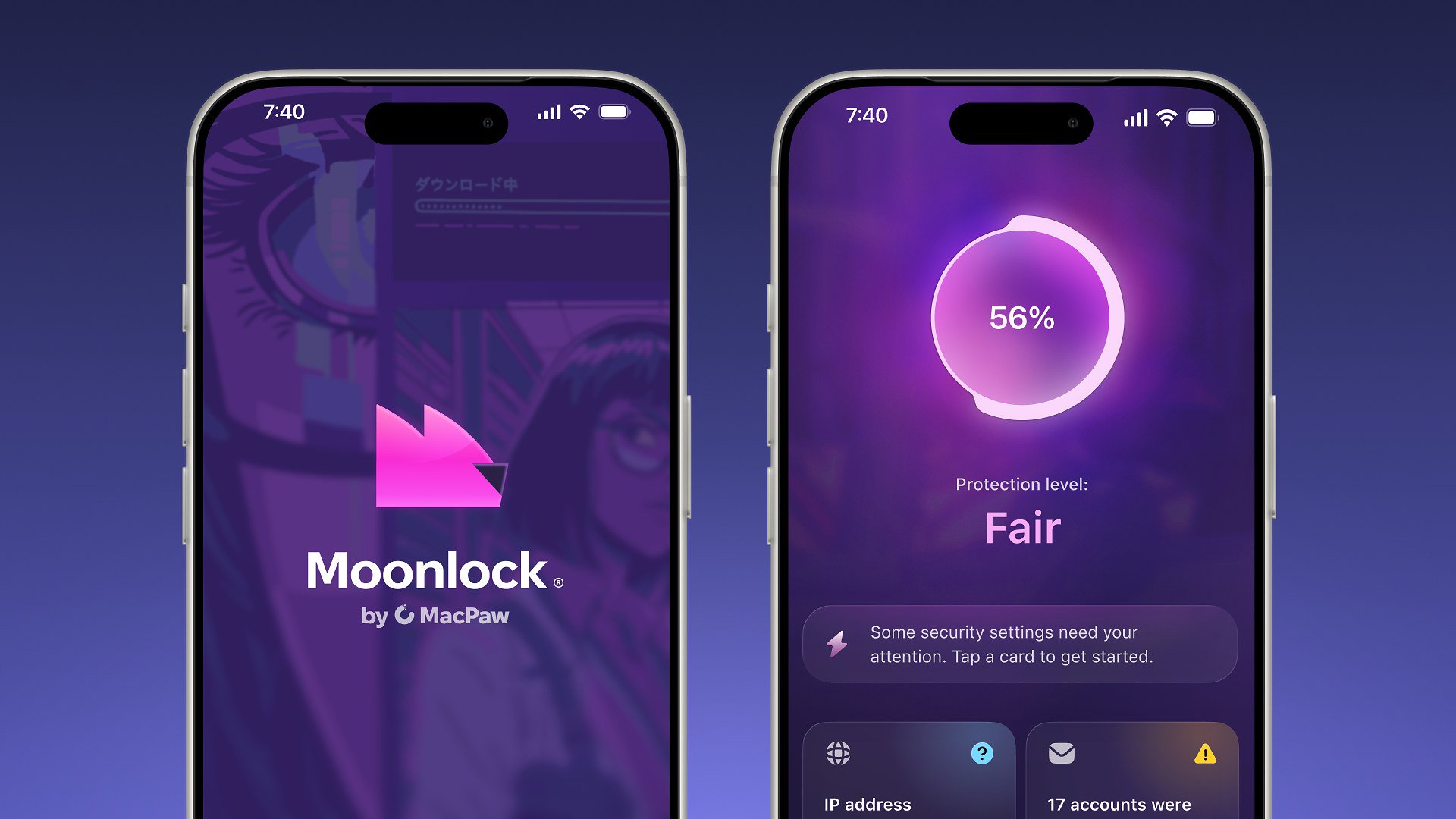
The company's framing is practical rather than technical. Moonlock's product lead, Oleg Stukalenko, said the aim is to help people "spot a scam before they tap, see where their security stands, and know exactly what to do next." The official product photo released with the announcement shows two iPhones: one on the Moonlock splash screen, and one showing a Security Score of 56 percent with the label "Protection level: Fair."

According to the official release, Scam Detect is the headline iPhone feature. MacPaw says people can paste, scan or share a text message, a screenshot or a QR code with Moonlock and receive an assessment explaining why something may be suspicious. That is the official description of the workflow; this news item is not a hands-on test of those checks.
The same announcement lists four other iPhone tools:
- Safe SMS, which MacPaw says automatically filters suspected scam texts out of the inbox when enabled, and keeps a record of what was caught and why.
- Security Score, a 0-to-100 score of the iPhone's security setup, plus one recommended action at a time.
- Email Breach History, which tells users whether their email has appeared in a known data breach, which service leaked it, when, and what was exposed, then walks them through securing each affected account.
- Device and Network Checks, covering Wi-Fi safety, passcode protection, iOS updates and signs of jailbreaking, with a checklist of recommended one-time fixes, step-by-step instructions and a time estimate for each change.

Our iPhone how-to walks through those official features and limits in more detail. The earlier Mac-focused Moonlock setup guide remains the supporting article for the desktop app, and Moonlock is also covered in our MacPaw apps overview.
MacPaw describes Moonlock as part of its ecosystem of Mac and iPhone protection tools. For official details and the download link, see the November 18, 2026 launch release and moonlock.com.
References
- MacPaw, "MacPaw Brings Moonlock to iPhone, Expanding Scam Detection and Everyday Security to Mobile," PR Newswire, November 18, 2026, 8:03 ET: https://www.prnewswire.com/news-releases/macpaw-brings-moonlock-to-iphone-expanding-scam-detection-and-everyday-security-to-mobile-302942718.html
- Apple App Store, "Moonlock," linked from the official launch release, accessed November 18, 2026: https://apps.apple.com/app/moonlock/id6799935865
- Moonlock official site, accessed November 18, 2026: https://moonlock.com/
Launch
Where to go next
Meet your guide
SurfGirl
author
What to read next
 Google Adds Computer Use to the Gemini App for Mac in the U.S. On November 19, 2026, Google said computer use is available in the Gemini app for Mac, in English in the U.S. Official requirements include an Apple Silicon Mac on macOS Sequoia 15... How to Use Gemini Computer Use on a Mac: Official Requirements, Permissions and Examples Official Google requirements for computer use in the Gemini app for Mac: an Apple Silicon Mac on macOS Sequoia 15.0 or later, a personal Google account for people 18 or older, a Go...
 Google Brings the Gemini App to Eligible Android Go and Lower-Memory Phones On November 18, 2026, Google said the Gemini app is available on eligible Android (Go edition) devices after a re-architecture for lower-memory phones. Official help adds a 2GB RAM...