
Best Anycubic Resin 3D Printers (2026): Photon Mono 4 vs M7 vs M7 Pro vs P1 vs P1 Max
A research-based guide to Anycubic's seven current Photon resin 3D printers: the best pick for each kind of buyer, key specs side by side from Anycubic's own spec tables, what each model adds, extras to budget for, and a buyer's FAQ.
Disclosure: This page may contain affiliate links. They do not influence our editorial conclusions. Read the disclosure.
Our pick
- See price at Anycubic
Top pick
Anycubic
Shenzhen-based 3D printer maker founded in 2015, selling Kobra FDM printers, Photon resin printers, ACE multicolor filament units, wash-and-cure stations, filam...
Anycubic's US store currently lists seven resin printers in its Photon family, from the compact Photon Mono 4 to the large Photon P1 Max. All of them cure liquid photopolymer resin with a monochrome LCD, but they differ a lot in build volume, detail, speed, automation and price. This guide matches each model to the buyer it suits, using Anycubic's own spec tables and the prices its US product pages showed on November 4, 2026, during the brand's Black Friday sale.
If you're still choosing between resin and filament, resin is the better fit for miniatures, figurines, jewelry masters and other small, detailed parts, while FDM printers handle large, tough functional parts at a lower running cost. For Anycubic's filament side, see our Kobra X Combo vs Kobra S1 Combo comparison.

Quick picks
| Printer | Best for | Screen / XY resolution | Build volume (mm) | Speed (Anycubic spec) | Price shown Nov 4 (regular) |
|---|---|---|---|---|---|
| Photon Mono 4 | Lowest-cost start | 7" 10K / 17 × 17 μm | 153.4 × 87 × 165 | up to 70 mm/h (High Speed Resin) | $159 ($219) |
| Photon Mono 4 Ultra | Small prints, Wi-Fi | 7" 10K / 17 × 17 μm | 153.4 × 87 × 165 | up to 120 mm/h (High Speed Resin) | $279 ($299) |
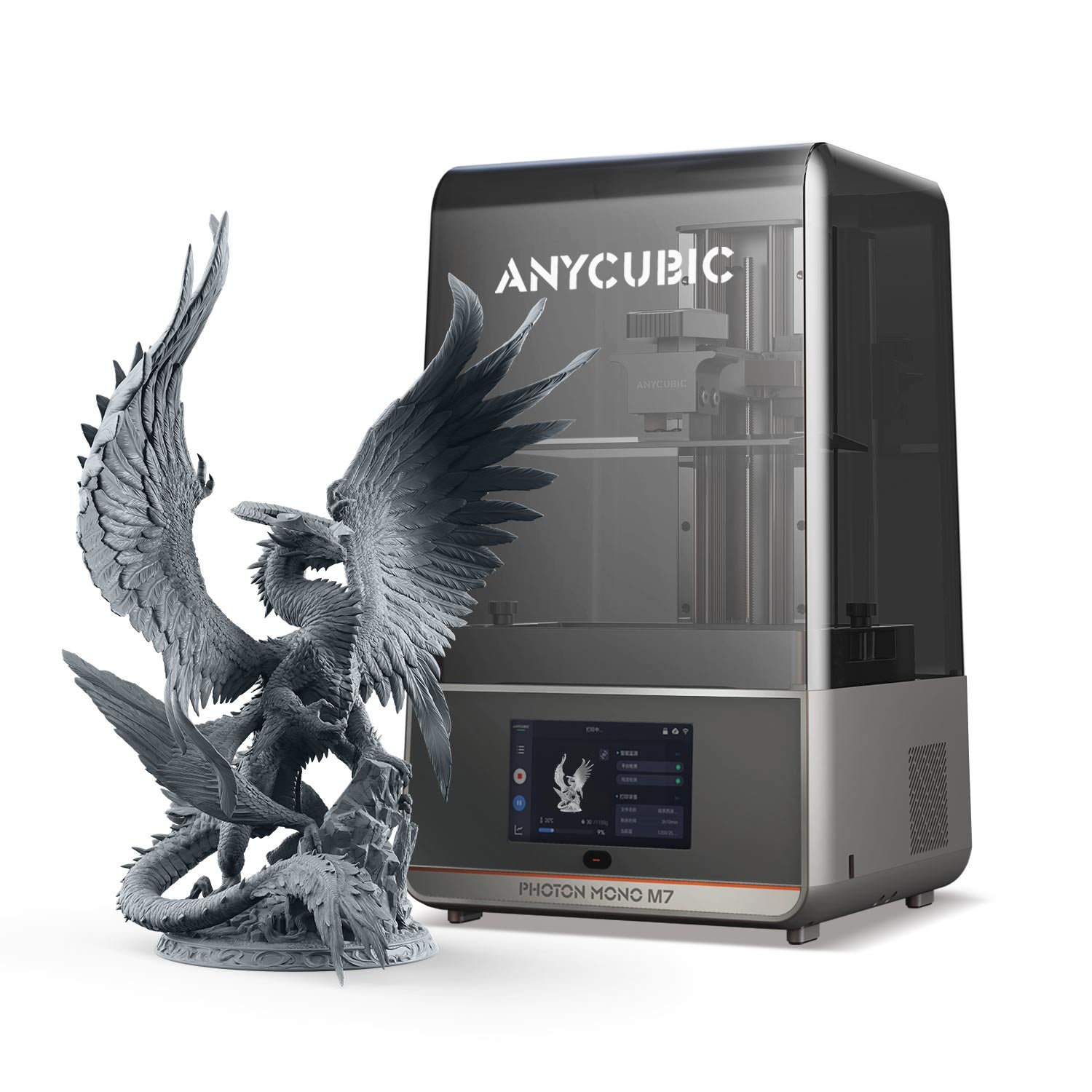
| Photon Mono M7 | Best value mid-size | 10.1" 14K / 16.8 × 24.8 μm | 223 × 126 × 230 | up to 150 mm/h (High-Speed Resin) | $389 ($519) |
| Photon Mono M7 Pro | Mid-size with heating and auto-refill | 10.1" 14K / 16.8 × 24.8 μm | 223 × 126 × 230 | up to 170 mm/h (High-Speed Resin) | $459 ($669) |
| Photon P1 | Precision mechanics, dual-color option | 10.1" 14K / 16.8 × 24.8 μm | 223 × 126 × 230 | 25–35 mm/h (0.05 mm, Standard Resin) | $508.90 ($849) |
| Photon Mono M7 Max | Large prints on a budget | 13.6" 7K / 46 × 46 μm | 298 × 164 × 300 | up to 86 mm/h (High-Speed Resin) | $649 ($899) |
| Photon P1 Max | Largest volume, finest large-format pixels | 14" 12K / 24.8 × 24.8 μm | 285.5 × 214 × 300 | 15–25 mm/h (0.05 mm, Standard Resin) | $849 ($999) |
Two caveats on the table. First, Anycubic quotes speed differently across lines: the Mono and M7 pages give maximums at a 0.1 mm layer with its High-Speed Resin, while the P1 pages give a range at a finer 0.05 mm layer with standard resin, so the P1 figures aren't directly comparable. Second, sale prices move often during holiday promotions; the P1's own spec table showed $499 while its buy box showed $508.90 when we checked. Treat every price as a snapshot.
Best value overall: Photon Mono M7
The Photon Mono M7 is the model that balances size, detail and price best in the current lineup. Its 10.1-inch 14K monochrome LCD (13312 × 5120) gives an XY resolution of 16.8 × 24.8 μm, and the 223 × 126 × 230 mm build volume (6.5 L) is roughly three times the Mono 4's. That's enough room for a full tray of tabletop miniatures or a mid-size bust.
Anycubic lists a top speed of 90 mm/h with standard resin and 150 mm/h with its High-Speed Resin 2.0 at a 0.1 mm layer. The mechanics step up too: the spec table lists dual linear rails on the Z-axis with 10 μm precision and an improved ACF release film. The M7 also gets Anycubic's "intelligent detections": failed-print detection that pauses the job, release-film lifespan reminders, resin residue detection to protect the screen, and resin usage monitoring. It supports the Anycubic app and file transfer by USB and Wi-Fi.
What it lacks compared with the Pro is the heated vat and the automatic resin refill. At $389 on sale, it's the default recommendation for most people who print miniatures and models.
Best upgrade: Photon Mono M7 Pro
The M7 Pro shares the M7's screen, build volume and resolution, but adds the two features that matter most in a cold room or on long prints. Its spec table lists a dynamic temperature-control resin vat, which Anycubic describes as auto-adaptive heating, and a resin auto-fill unit that refills and withdraws resin. Light intensity rises to 5500 μW/cm² (from 4500 on the M7) and the quoted top speed to 130 mm/h with standard resin and 170 mm/h with High-Speed Resin.

Power draw also rises, from 135 W on the M7 to 240 W. The sale gap between the two was $70 on November 4. If your printer will live in a garage, basement or any room that gets cold in winter, the heated vat is the feature to pay for, because resin viscosity rises as it cools.
Best budget pick: Photon Mono 4
The Photon Mono 4 is Anycubic's entry model and the cheapest printer in the range at $159. It uses a 7-inch 10K mono LCD with 17 × 17 μm pixels and a 153.4 × 87 × 165 mm build volume (2.2 L), which Anycubic positions for medium-sized household items, accessories and intricate models. The layer height range is 0.03–0.15 mm.

The trade-offs are clear on the spec sheet. Leveling is a four-point manual process, the Z-axis uses a single linear rail, file transfer is USB only, the control screen is a 2.8-inch touch panel and the Anycubic app isn't supported. The top speed is 50 mm/h with standard resin. If you want to learn resin printing on small parts without a big outlay, it does the job; if you know you'll want app control later, look one step up.
Best compact connected pick: Photon Mono 4 Ultra
The Mono 4 Ultra keeps the Mono 4's 7-inch 10K screen and identical build volume but swaps in a COB light source with a Fresnel lens and a light uniformity algorithm, rated at 3500 μW/cm² or more. Anycubic quotes up to 80 mm/h with standard resin and 120 mm/h with High Speed Resin 2.0. It also moves to an ACF release film, a 4.3-inch touch screen, USB plus Wi-Fi transfer, and a finer minimum layer height of 0.02 mm.

Like the Mono 4, it uses four-point manual leveling, and the spec table says the Anycubic app isn't supported. At $279 on sale it's $120 more than the Mono 4, and only $110 less than the much larger M7, which is the comparison worth making before you buy.
Best for precision and dual-color work: Photon P1
The Photon P1 is the newest line in the range and is built differently from the Mono and M7 printers. Instead of a lead screw, Anycubic lists dual rails plus an industrial-grade ball screw, with a repeat positioning accuracy of ±0.01 mm, and a precision-ground steel build plate. Leveling is "Auto-Leveling 3.0 with Feedback," and the vat has dynamic temperature control. Anycubic also says the P1 is engineered for very viscous resins up to 8000 cps.

Its headline feature is Wave Release, a textured release film that Anycubic says cuts release force by 60% compared with a smooth NFEP film. The product we checked is the version sold with the optional dual-color/dual-material printing platform, which Anycubic says allows simultaneous two-color or two-material prints for multi-part models and reduces the amount of premium resin needed for small jobs.
The build volume and 14K screen match the M7 series. Anycubic quotes 25–35 mm/h at a 0.05 mm layer with standard resin, so it isn't sold as a speed machine. Choose it for engineering resins, dual-material experiments or the more rigid mechanics.
Best for large prints on a budget: Photon Mono M7 Max
The M7 Max is the cheapest way into large-format resin printing in the lineup. Its 13.6-inch 7K LCD covers a 298 × 164 × 300 mm build volume (14.7 L), and it includes a heated vat (20–40 °C, per the product page), a resin auto-fill unit, a 1.3 L unibody vat with scale markings and a UV-blocking hinged cover.

The trade-off is pixel size. At 46 × 46 μm, its XY resolution is much coarser than the 14K models, so it suits large cosplay pieces, props and batches of bigger parts more than fine miniatures. It weighs 24 kg, so plan for a sturdy bench.
Best large-format flagship: Photon P1 Max
The P1 Max brings the P1's ball screw, Wave Release film and heated vat to the largest volume in the range: 285.5 × 214 × 300 mm, which Anycubic describes as 18.3 L. Its 14-inch 12K screen (11520 × 8640) uses square 24.8 × 24.8 μm pixels, much finer than the M7 Max. Anycubic also lists an integrated camera for remote monitoring through its app, Wi-Fi plus Ethernet, a 1.9 L vat and a noise level of 45 dB or less.

At $849 on sale and 23.1 kg, it's a machine for people who regularly print large or batch jobs and want finer detail than the M7 Max offers.
What else to budget for
Every resin printer needs a way to wash and cure prints. Anycubic sells its Wash & Cure 3, 3 Plus and 3 Max stations as bundle options on each product page. You'll also need resin, gloves, a well-ventilated space, replacement release film and, if odor matters, the optional AirPure activated-carbon purifier. The product pages also show free express shipping, a 14-day no-reason return, a 30-day after-sales guarantee and a one-year warranty on 3D printers; our Anycubic shopping guide covers those policies in detail.
Buyer's FAQ
Which Anycubic resin printer is best for miniatures? The M7 or M7 Pro. Both have 14K screens and a build plate big enough for a full tray of figures, and the Pro adds heating and auto-refill.
Is the Photon Mono 4 good enough for a beginner? For small prints, yes. Its main limits are manual leveling, USB-only transfer and no app support.
Is the Mono 4 Ultra worth it over the Mono 4? It adds Wi-Fi, a stronger COB light source, ACF film and higher quoted speeds. If you'd rather have more build volume, the M7 is only a little more on sale.
Do I need a heated vat? It helps in rooms below normal room temperature, because cold resin is thicker. The M7 Pro, M7 Max, P1 and P1 Max all list dynamic vat temperature control; the Mono 4, Mono 4 Ultra and M7 don't.
How does Anycubic compare with ELEGOO for resin? Both sell full ranges from small to large format. Our best ELEGOO resin printers guide covers the Mars, Saturn and Jupiter lines.
Bottom line
For most new resin buyers the Photon Mono M7 is the best value at its current sale price, and the M7 Pro is the upgrade if your printer sits somewhere cold. The Mono 4 is the low-cost starter, the Mono 4 Ultra the compact connected option, the P1 the precision and dual-color pick, and the M7 Max and P1 Max are for people who really need a big build volume.
References
- Anycubic US, Photon Mono M7 product page and spec table, accessed November 4, 2026. https://us.anycubic3d.com/products/photon-mono-m7
- Anycubic US, Photon Mono M7 Pro product page, accessed November 4, 2026. https://us.anycubic3d.com/products/photon-mono-m7-pro
- Anycubic US, Photon Mono 4 product page, accessed November 4, 2026. https://us.anycubic3d.com/products/photon-mono-4
- Anycubic US, Photon Mono 4 Ultra product page, accessed November 4, 2026. https://us.anycubic3d.com/products/photon-mono-4-ultra
- Anycubic US, Photon P1 with Dual-Color/-Material Printing Platform product page, accessed November 4, 2026. https://us.anycubic3d.com/products/photon-p1-dual-color-and-dual-material-printing
- Anycubic US, Photon Mono M7 Max product page, accessed November 4, 2026. https://us.anycubic3d.com/products/photon-mono-m7-max
- Anycubic US, Photon P1 Max product page, accessed November 4, 2026. https://us.anycubic3d.com/products/photon-p1-max-best-large-resin-3d-printer
Meet your guide
Lipeiguan
author
What to read next
 Anycubic Kobra S1 Maintenance Guide: Lubrication Schedule, Cleaning and Clearing a Clogged Nozzle How to maintain an Anycubic Kobra S1, based on Anycubic's official wiki: a part-by-part schedule, how to grease the Z-axis screw and Y-axis rods, why the X-axis must never be greas...
 How to Switch From iPhone to Pixel 11: Transfer Photos, iMessages, eSIM and Passwords A step-by-step guide to moving from an iPhone to a Pixel 11, based on Google's Pixel Help instructions: what to do before setup, how the transfer and eSIM move work, what data carr...
 Best Bose Earbuds 2026: QuietComfort Ultra vs QuietComfort vs Ultra Open vs Sport Open vs Wired All five Bose earbuds compared on Bose's published specs and prices, from the $299 QuietComfort Ultra Earbuds (2nd Gen) and Ultra Open Earbuds (2nd Gen) to the $99 Noise Cancelling...