
Best Seagate External Hard Drives in 2026: Expansion vs One Touch vs FireCuda X Vault
Which Seagate external hard drive should you buy? We sort the Expansion portable, One Touch portable, Expansion desktop, One Touch desktop and FireCuda X Vault by use case, with capacities, Seagate.com prices, power needs, encryption and warranty from Seagate's own pages.
Disclosure: This page may contain affiliate links. They do not influence our editorial conclusions. Read the disclosure.
Our pick
- See price at Seagate
Top pick
Seagate
Seagate is a data storage company that makes hard drives, SSDs and external storage, including the FireCuda gaming line, the Expansion and One Touch external dr...
Seagate sells more external hard drives than most shoppers realize, and the names overlap: there is an Expansion portable and an Expansion desktop, a One Touch portable and a One Touch desktop, plus FireCuda gaming drives. They differ in ways that matter after you buy, such as whether you need a wall outlet, whether the drive has hardware encryption, and whether the warranty runs one year or two.
This guide sorts Seagate's current consumer external hard drives by use case, using the specs, included items and list prices on Seagate's own product pages as read on November 13, 2026. It is research-based rather than a hands-on test. Prices on Seagate.com change often and sale prices come and go, so treat the figures below as a snapshot and check the product page before you buy.

Quick picks
| Pick | Best for | Capacities | Seagate.com price seen | Warranty |
|---|---|---|---|---|
| Expansion portable | Simple, low-cost backup on the go | 2TB, 4TB | $149.99 (2TB), $189.99 (4TB) | 1-year limited |
| One Touch portable | Portable backup with password protection | 2TB, 4TB | $159.99 (2TB), $199.99 (4TB) | 2-year limited |
| Expansion desktop | Big home archives at the lowest cost per drive | 4TB – 30TB | From $279.99 (8TB) | 1-year limited |
| One Touch desktop | Large storage with a single USB-C cable | 8TB – 24TB | From $559.99 (16TB) | 2-year limited |
| FireCuda X Vault | Gaming PC storage with RGB lighting | 8TB – 20TB | $299.99 (8TB) | See product page |
All five include Seagate's Rescue Data Recovery Services for the stated period where available. Seagate notes that Rescue "may not be available in all countries" and that warranty periods may vary by region.
1. Best budget portable: Expansion portable
The Expansion portable is Seagate's no-frills 2.5-inch pocket drive. Seagate describes it as "simple, dependable backup" with plug-and-play setup on most Windows and macOS systems.
- Capacities and price: 2TB at $149.99 and 4TB at $189.99 on Seagate.com.
- Size and weight (2TB): 13 x 82 x 117.3 mm and 150 g.
- In the box: the drive, a 0.5 m USB Micro-B to Type-C cable and a quick start guide.
- Coverage: 1-year limited warranty and 1-year Rescue Data Recovery Services.
The cable detail is worth noticing: the drive end is Micro-B, and the computer end is USB-C. That suits modern laptops, but if your computer only has USB-A ports you will need an adapter or a different cable.

Who should buy it: students and anyone who wants a cheap second copy of photos and documents, and does not need encryption or backup software.
2. Best portable for privacy: One Touch portable
The One Touch portable costs only $10 more than the Expansion portable at each capacity on Seagate.com, and that money buys real extras:
- Hardware encryption with password protection, which Seagate says "helps keep personal and work files safe, private and yours."
- A native USB-C cable (0.5 m USB Type-C) instead of Micro-B to Type-C.
- Seagate Toolkit backup software, which is not compatible with ChromeOS.
- Complimentary trials of Adobe Creative Cloud Pro, Mylio and Synology Deep Search (terms apply).
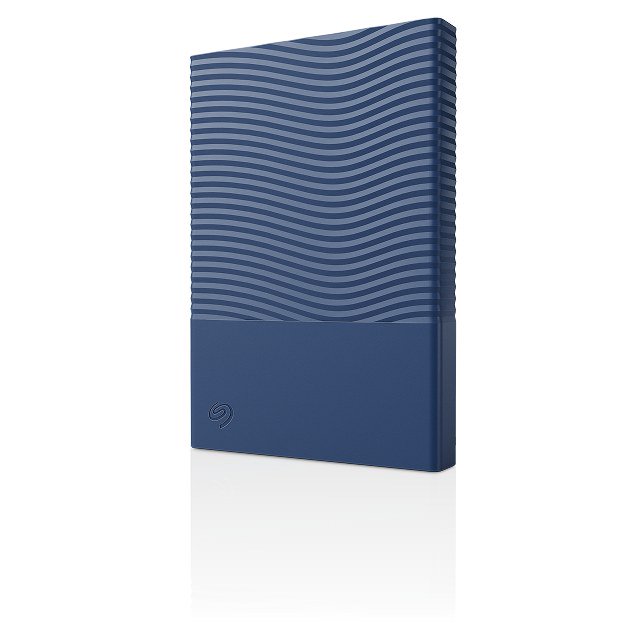
- Three colors: dark blue, space gray and white.
- 2-year limited warranty and 2-year Rescue Data Recovery Services.
The 2TB model measures 14 x 81 x 117 mm and weighs 156 g. Seagate notes that Mac users must reformat the drive to use it with Time Machine.
Who should buy it: travelers and remote workers carrying client files, or anyone who wants the longer warranty for a small premium.
3. Best for big home archives: Expansion desktop
When you need to store years of photos, a media library or full system backups, a 3.5-inch desktop drive is the better value. The Expansion desktop runs from 4TB up to 30TB.
- Prices seen on Seagate.com: $279.99 for 8TB, $629.99 for 20TB and $759.99 for 24TB. Seagate's listing page also showed a separate Expansion desktop listing (4TB–28TB) with a sale price of $499.99 against $629.99, so compare SKUs before you check out.
- Size and weight (8TB): 132.5 x 42.5 x 189.5 mm and 1,112 g.
- In the box: the drive, a 0.8 m USB Micro-B to Type-C cable, an external power adapter and a quick start guide.
- Coverage: 1-year limited warranty and 1-year Rescue Data Recovery Services.

It needs a wall outlet, so it is meant to live next to a desktop computer or a router, not in a bag.
Who should buy it: families and creators who want lots of space for the lowest price per drive and don't mind a power brick.
4. Best single-cable desktop drive: One Touch desktop
The One Touch desktop is the unusual one: a high-capacity desktop drive that Seagate says is bus-powered over USB-C, with "no wall outlet required."
- Capacities and prices: 16TB at $559.99, 20TB at $649.99 and 24TB at $779.99 on Seagate.com (8TB is also listed).
- Size and weight (16TB): 186.8 x 40.3 x 131.7 mm and about 1,114 g.
- Requirements: a USB-C port with 15W or higher power delivery and a USB-C data cable. Seagate warns the drive "may not function properly" otherwise and recommends installing Seagate Toolkit to verify your setup.
- Extras: Toolkit software, a 0.5 m USB-C cable, a space gray finish, 2-year limited warranty and 2-year Rescue Data Recovery Services. Seagate lists it as best for "home and office storage, local cloud alternative."

Public customer reviews on Seagate's product page echo the power requirement: one reviewer said the page "should be clearer that it is USBc only," and Seagate replied that it appreciated the point about "communicating the USB-C requirement more clearly." Before buying, check that your laptop's or desktop's USB-C port supplies at least 15W.
Who should buy it: MacBook and modern laptop owners who want 16TB or more on their desk with one cable and no power brick.
5. Best for PC gamers: FireCuda X Vault
FireCuda X Vault is Seagate's external gaming hard drive, "officially designed for Xbox on PC," according to Seagate.
- Capacities and price: 8TB at $299.99 on Seagate.com, with a 20TB model also listed.
- Size and weight (8TB): 198 x 53.2 x 132 mm and 1,290 g.
- Power: bus-powered USB-C, with the same 15W USB-C power delivery requirement as the One Touch desktop.
- Compatibility: Seagate lists "most Windows systems."
- Lighting: customizable RGB and Windows Dynamic Lighting.
- Bundled offers: a one-month Xbox Ultimate Game Pass for PC membership (new subscribers only) and a two-month Adobe Creative Cloud plan.

Who should buy it: PC gamers who want a large game library drive that matches an RGB setup. If you want SSD-level speed for your most-played games, look at Seagate's hybrid FireCuda Forge instead, covered in our FireCuda Forge review and launch news.
How to choose: four questions
1. Will the drive move around? If yes, choose a portable (Expansion portable or One Touch portable). Desktop models weigh over a kilogram.
2. Does your computer have a 15W USB-C port? If not, avoid the bus-powered One Touch desktop and FireCuda X Vault, and pick the Expansion desktop with its power adapter.
3. Do you need encryption? Among these five, only the One Touch portable lists hardware encryption with password protection on Seagate's product pages.
4. How long a warranty do you want? One Touch models carry two years of warranty and Rescue coverage; Expansion models carry one.
Compatibility notes
Seagate says its external hard drives work with Windows 10 and higher and macOS 10.15 and higher, that drives with USB-C can connect to iPhone 15 and newer through the Files app, and that they work with ChromeOS for drag-and-drop transfers. Seagate Toolkit software is not compatible with ChromeOS, and One Touch drives need reformatting for Time Machine.
Buying from Seagate.com
Seagate's store showed free standard shipping on orders over $199 when we checked. For return windows, warranty registration and other store policies, see our Seagate Store shopping guide. If you're also setting up a hybrid drive, our guide on installing an SSD in FireCuda Forge walks through the requirements.
References
- Seagate, External hard drives listing: https://www.seagate.com/products/external-hard-drives/
- Seagate, Expansion portable external hard drive: https://www.seagate.com/products/personal-storage-devices/expansion-portable-external-hard-drive/
- Seagate, One Touch portable external hard drive: https://www.seagate.com/products/personal-storage-devices/one-touch-portable-external-hard-drive/
- Seagate, Expansion desktop external hard drive: https://www.seagate.com/products/personal-storage-devices/expansion-desktop-external-hard-drive/
- Seagate, One Touch desktop external hard drive (including customer reviews): https://www.seagate.com/products/personal-storage-devices/one-touch-desktop-external-hard-drive/
- Seagate, FireCuda X Vault external gaming hard drive: https://www.seagate.com/products/gaming-drives/pc-gaming/firecuda-x-vault-external-gaming-hard-drive/
Meet your guide
Lipeiguan
author
What to read next
 Google Adds Computer Use to the Gemini App for Mac in the U.S. On November 19, 2026, Google said computer use is available in the Gemini app for Mac, in English in the U.S. Official requirements include an Apple Silicon Mac on macOS Sequoia 15... How to Use Gemini Computer Use on a Mac: Official Requirements, Permissions and Examples Official Google requirements for computer use in the Gemini app for Mac: an Apple Silicon Mac on macOS Sequoia 15.0 or later, a personal Google account for people 18 or older, a Go...
 How to Choose a SwitchBot Lock: Lock Pro vs Lock Ultra vs Lock Vision and Vision Pro A research-based guide to official SwitchBot Lock Pro, Lock Ultra, Lock Vision and Lock Vision Pro specs and November 20, 2026 U.S. prices, including batteries, hubs, keypads, comp...