
Google Pixel Tag Setup Guide: Find Hub, Precision Finding, Sharing and Battery
How to check your phone's compatibility, set up Google Pixel Tag with Fast Pair, find lost items in Find Hub, share a tag with family, share a lost bag's location with an airline and look after the CR2032 battery.
Disclosure: This page may contain affiliate links. They do not influence our editorial conclusions. Read the disclosure.
Our pick
- See price at Google Store
Top pick
Google Store
Google's online store for Pixel phones, Fitbit wearables, Nest devices and accessories.
What this guide covers
Google Pixel Tag is Google's first finder tag, a thin tracker that works with the Find Hub app on Android phones. It went on sale on November 11, 2026, for $29.99 for one tag or $99.99 for a four-pack on the Google Store. This guide walks through what you need before you buy, how to set it up, how to find a lost item, how sharing works, and how to look after the battery. Everything here comes from Google's own product page, blog posts and help pages, so you can check each detail yourself.

Before you buy: check your phone
The most important requirement is your phone. Google says Pixel Tag works with Android phones running Android 9 or later. That covers the basics: pairing, seeing the tag on a map in Find Hub, and ringing it when it is within Bluetooth range.
The more advanced "precision finding" features need more recent hardware:
- Ultra Wideband (UWB) guidance needs an Android phone that supports Ultra Wideband. With it, Find Hub can show direction and distance to the tag as you walk toward it.
- Bluetooth Channel Sounding needs a compatible device running Android 16 or later with Bluetooth 6.0 or later, according to Google's spec page.
If your phone has neither, the tag still works for map location and ringing, but you will not get the on-screen guidance that points you to it. It is worth checking your phone's spec sheet for UWB or Bluetooth 6.0 before you buy, especially if precision finding is the main reason you want a Google tag.
Pixel Tag is built for Android. Google lists Android phones as the compatible devices, so it is not the right tracker for an iPhone household.
What you get for the money
Here is what Google lists on its spec page and store page:
| Spec | Pixel Tag |
|---|---|
| Price | $29.99 (one), $99.99 (four-pack) on the Google Store |
| Size | 28 mm wide, 46.1 mm tall, 5.4 mm deep (1.1 x 1.8 x 0.2 in) |
| Weight | 11.8 g (0.4 oz) with battery, 8.8 g without |
| Materials | Polycarbonate and metal; Google describes a stainless steel design |
| Durability | IP67, up to 1 meter for up to 30 minutes |
| Battery | User-replaceable CR2032 coin cell, rated for over one year |
| Connectivity | Bluetooth Channel Sounding, Ultra Wideband for Precision Finding |
| Other | Built-in speaker, accelerometer, button |
| Color | Fog |
| Warranty | 1 year in the US |
| In the box | One Google Pixel Tag |
Two details are easy to miss. First, the four-pack works out to about $25 per tag, so it makes sense if you plan to tag keys, a wallet, a bag and luggage. Second, the box contains only the tag. Google describes it as slim enough for a wallet and able to attach to everyday items like keys, so think about how you will carry it before you order.

How to set up Pixel Tag
Google's setup process is short. Based on Google's blog post and help pages:
- Pull the battery tab. The tag ships with a tab that keeps the battery disconnected. Pulling it powers the tag on.
- Bring the tag close to your Android phone. Your phone should be running Android 9 or newer, with Bluetooth on.
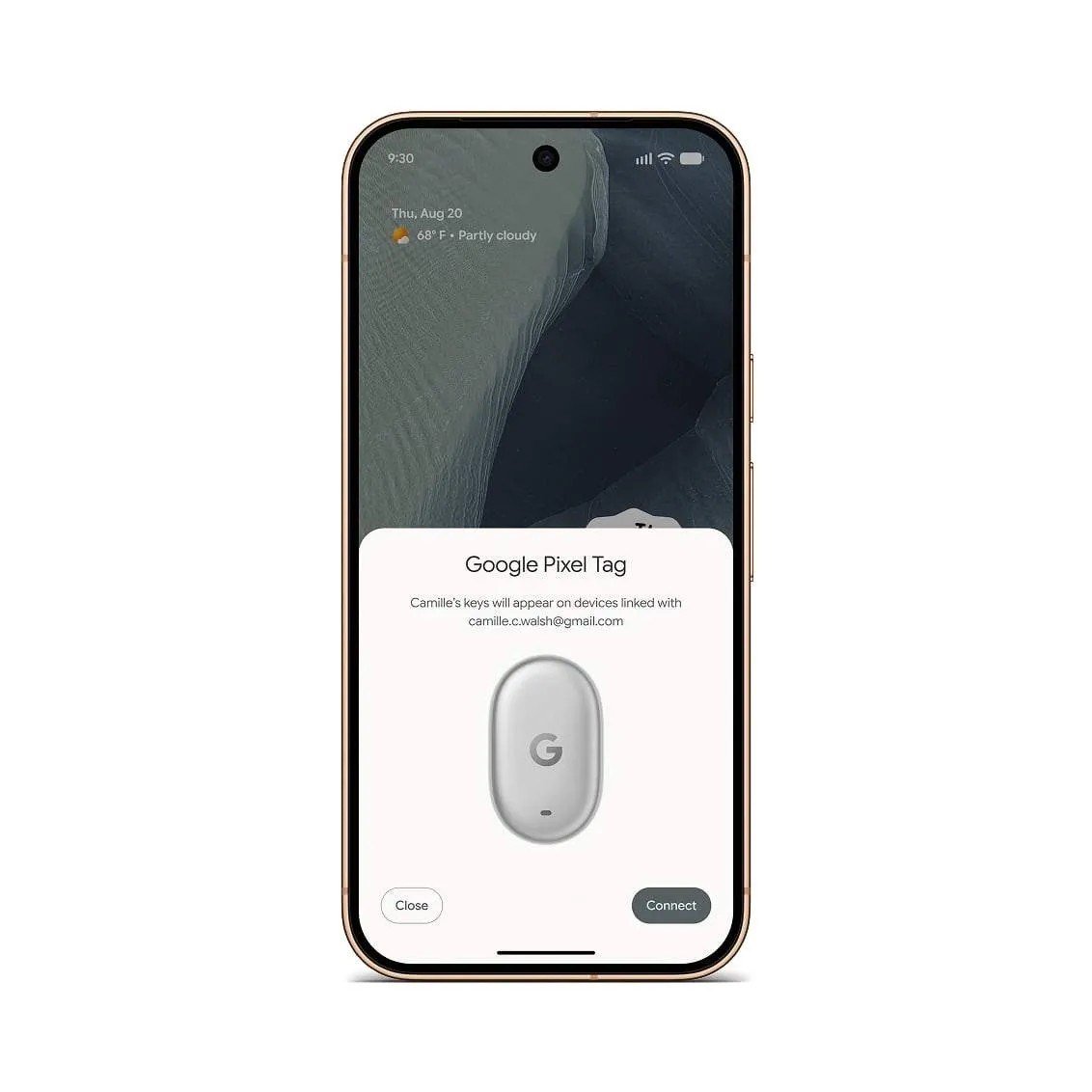
- Follow the Fast Pair prompt. A pop-up appears on your phone showing Google Pixel Tag. Tap to connect and follow the on-screen steps.
- Name the item. In Find Hub you can pick an item category or type a custom label, such as "Car keys" or "Blue suitcase". A clear name helps when you have several tags.

Once paired, the tag shows up in the Find Hub app alongside your other devices.
If you are buying a four-pack, set up one tag at a time and name each one as you go. That way you won't have four items all called "Pixel Tag" in your list.
How to find a lost item
Finding an item works in layers, depending on how far away it is.
When it is nearby. Open Find Hub and select the item. If you are within Bluetooth range, you can play a sound on the tag. Google's store page also says you can ask Gemini to ring it for you. If your phone supports UWB, Find Hub gives visual direction and distance guidance, which Google describes as meter-by-meter guidance. Google's example is finding keys under a pile of laundry or between couch cushions.
When it is far away. If the tag is out of your phone's range, Find Hub uses its crowdsourced network. Google says this network covers more than 1 billion Android devices, which can help locate your item even when it is miles away. The location then shows on the map in Find Hub.
Before you lose it. Find Hub offers Left Behind alerts that you can turn on to get a warning when you leave an item behind. This is the feature to enable for things you tend to forget, like a work bag or gym keys.

Finding your phone with the tag
Pixel Tag has a physical button. Google says that if you misplace your phone, you can press the button on your Pixel Tag to ring the phone, even when it is on silent. If you often lose your phone around the house, this makes the tag on your key ring a lot more useful.
Sharing a tag with family
Shared items, such as a family car key or a suitcase used by two people, are a common reason to buy a tracker. Google says you can share Pixel Tag with up to 10 people. Its Find Hub help page describes the steps:
- The owner sends an invitation. In Find Hub, select the tag, tap Share ownership, and send the invitation with any messaging app, email or Quick Share.
- The other person accepts. They open the link on an Android device and get prompted to install Find Hub if they don't have it. They have 24 hours to accept.
- The owner confirms. Back in Find Hub, the owner opens the tag's settings, selects the person, and taps Confirm.
Google notes that it takes several minutes after sharing before the shared owner can see the tag's location. That delay is a privacy measure. The owner can stop sharing at any time, after which only the owner can find the tag.
Lost luggage: sharing an item's location with an airline
Find Hub has a separate feature for lost items. When your tag is not nearby, Find Hub shows a "Share item location" option. It creates a web link you can give to a third party, such as an airline, so they can see where your bag is. Google's help page says the location stays encrypted, with a decryption key added to the link. Anyone who has the link can see the item's location until the link expires. Use it only with the people you want to help, and don't post it publicly.

Privacy and unwanted tracking
Google says location data from the tag is encrypted and is not stored on the Find Hub network. Its blog describes the crowdsourced network as using end-to-end encrypted location information. Google also says your phone will alert you automatically if it detects an unknown tag traveling with you, and it will tell you how to ring that tag and what to do next. These alerts are part of Find Hub on Android, so they protect you whether or not you own a Pixel Tag.
Battery care
Pixel Tag uses a standard CR2032 coin cell that you can replace yourself. Google rates it for over one year. That rating comes from Google's testing with pre-production units and an average use pattern of playing sounds and precision finding. Google says actual battery life varies with usage, environment and the replacement battery's brand, and may be lower.
Find Hub shows three battery levels on each device: "OK," "Low" and "Very Low." Google's advice is to replace the battery when it reaches "Low." Keeping a spare CR2032 in a drawer means you won't lose tracking while you wait for a new cell to arrive.
On durability, the tag has an IP67 rating, which covers dust and water up to one meter for up to 30 minutes. Google's fine print says this resistance can fade over time with wear, and that liquid damage voids the warranty and drop damage is not covered. Treat it as protection against splashes and rain, not permission to go swimming with it.
Is Pixel Tag right for you?
Pixel Tag makes the most sense if:
- you use an Android phone running Android 9 or later;
- you want a tracker that works natively in Find Hub without a third-party app;
- you value the phone-ringing button and a replaceable battery;
- you have a phone with UWB or Bluetooth 6.0, so you can use precision finding.
It makes less sense if you use an iPhone, or if your phone lacks both UWB and Bluetooth 6.0 and nearby guidance is the main feature you want.
If you are still choosing a phone to pair it with, our Pixel 11 vs Pixel 11 Pro comparison covers the current lineup, and the Google Store shopping guide explains returns, price match and financing before you order. For the launch details and pricing, see our news story: Google Pixel Tag goes on sale at $29.99.
References
- Google, "Keep tabs on your valuables with Google Pixel Tag," The Keyword, Aug 12, 2026: https://blog.google/products-and-platforms/devices/pixel/google-pixel-tag/
- Google, "November Pixel Drop: Gemini Intelligence and Pixel Tag," The Keyword, Nov 10, 2026: https://blog.google/products-and-platforms/devices/pixel/november-2026-pixel-drop/
- Google Store, Google Pixel Tag product page: https://store.google.com/us/product/pixel_tag
- Pixel Phone Help, "Google Pixel Tag technical & device specifications": https://support.google.com/pixelphone/answer/17469707
- Pixel Phone Help, "Share & manage devices with Find Hub": https://support.google.com/pixelphone/answer/14800516
Meet your guide
Lipeiguan
author
What to read next
 Google Adds Computer Use to the Gemini App for Mac in the U.S. On November 19, 2026, Google said computer use is available in the Gemini app for Mac, in English in the U.S. Official requirements include an Apple Silicon Mac on macOS Sequoia 15... How to Use Gemini Computer Use on a Mac: Official Requirements, Permissions and Examples Official Google requirements for computer use in the Gemini app for Mac: an Apple Silicon Mac on macOS Sequoia 15.0 or later, a personal Google account for people 18 or older, a Go...
 How to Choose a SwitchBot Lock: Lock Pro vs Lock Ultra vs Lock Vision and Vision Pro A research-based guide to official SwitchBot Lock Pro, Lock Ultra, Lock Vision and Lock Vision Pro specs and November 20, 2026 U.S. prices, including batteries, hubs, keypads, comp...