
Prime Video Downloads FAQ: Devices, Limits, Expiry and Offline Viewing Abroad
How Prime Video downloads work: which devices can download, how many titles and devices you get, when downloads expire, what happens abroad and why Chromecast won't play them.
Disclosure: This page may contain affiliate links. They do not influence our editorial conclusions. Read the disclosure.
Our pick
- See price at Prime Video
Top pick
Prime Video
Amazon's streaming video service, included with Amazon Prime membership.
What this guide covers
Downloading Prime Video titles is the easiest way to keep a flight, a commute or a weak hotel Wi-Fi connection from ruining your plans, but the rules are spread across several Amazon help pages and they change depending on whether a title is included with Prime, rented or bought. This FAQ pulls those rules together: which devices can download, how many titles you can keep, when downloads expire, and what changes when you travel. Everything here comes from Amazon's Prime Video help pages and its Prime Video Ultra announcement, as they read on November 9, 2026.
It is a research-based summary of Amazon's published rules, not a log of our own downloads. Amazon says these restrictions can change and some vary by location, so the detail page of each title is the final word.

Quick answers
- Devices: a Fire tablet, or the Prime Video app for iOS, Android, macOS, or Windows 10 and 11.
- Included titles: many, but not all, can be downloaded. The detail page tells you.
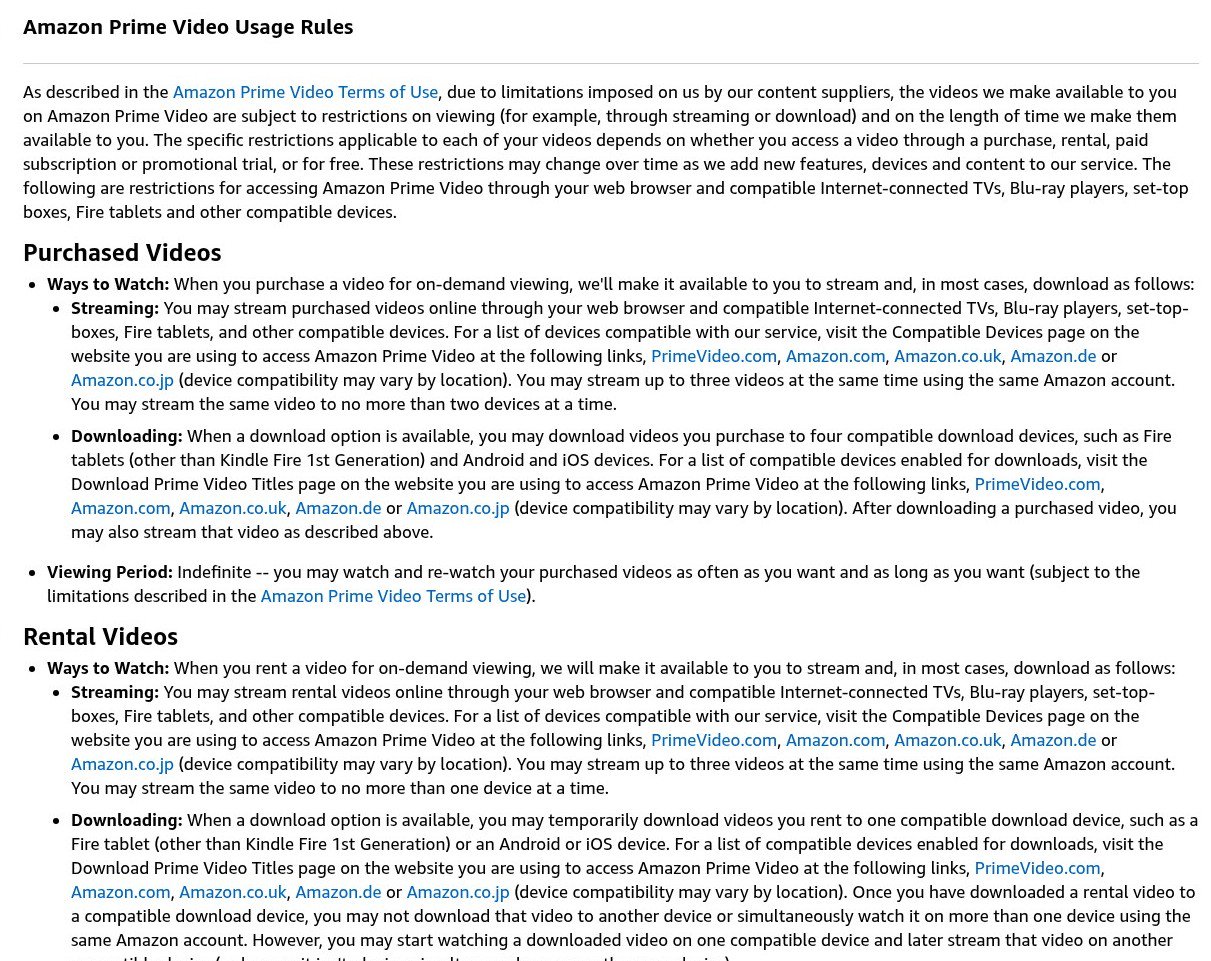
- Downloads per title: a Prime title can be on two devices at once; a rental on one; a purchase on up to four.
- Total downloads: Amazon's Ultra announcement lists 50 offline downloads with the included Prime Video benefit and 100 with Ultra.
- Expiry: you typically have 30 days to start watching an included download, then 48 hours to finish once you press play.
- TV playback: casting downloads over Chromecast or AirPlay isn't permitted.
Which devices can download Prime Video titles?
Amazon's download help page says you need a Fire tablet, or the Prime Video app for iOS, Android, macOS, or Windows 10 and 11. You can't download in a web browser. In the Android and Windows apps, you can choose where downloads are saved, but Amazon doesn't recommend saving them to USB-connected drives.
How do I download a movie or an episode?
Open the Prime Video app and find the title. For a movie, choose the download option on the detail page. For a TV show, you can download an entire season, or tap the download icon next to individual episodes in the episode list.

Can I download everything that's included with Prime?
No. Amazon's usage rules say many subscription titles are available for temporary download, and the detail page for each title shows whether it is. Studios set these limits, so two shows in the same row can behave differently. If an included title can't be downloaded, Amazon notes that the same video may be available to rent or buy, and rentals and purchases can usually be downloaded.
How many devices can hold the same download?
That depends on how you got the title:
| How you got it | Devices that can hold the download | How long you can watch it |
|---|---|---|
| Included with Prime or Prime Video | 2 at a time | Typically 30 days to start, then 48 hours to finish |
| Rented | 1 | Typically 48 hours after you start, within the rental window (usually 30 days) |
| Purchased | Up to 4 | Indefinitely, subject to Amazon's terms |
For included titles, if a title is already downloaded on two devices, you have to delete it from one before downloading it to a third. A rented title downloaded to one device can't be downloaded to another, but you can start it on that device and keep streaming it elsewhere, as long as it isn't playing on two devices at once.
Is there a limit on the total number of downloads?
Yes. Amazon's usage rules say it sets a maximum number of titles that can be downloaded at a time across Prime, Prime Video and third-party add-on subscription titles, on all devices tied to your Amazon account, and that the cap can vary by location and other factors.
For US customers, Amazon's Prime Video Ultra announcement gives the specific numbers: 50 offline downloads with the Prime Video benefit included with Prime, and 100 with the Ultra upgrade. Ultra costs $4.99 a month in the US, or $45.99 a year for annual Prime members, and it also adds ad-free movies and shows, 4K and Dolby Atmos. Our Prime Video plans FAQ explains whether Ultra is worth paying for.
When do downloads expire?
For titles included with Prime or Prime Video, Amazon says you'll typically have 30 days to begin watching a downloaded video, and typically 48 hours to finish once you start. Some titles have different windows. The practical lesson: download on the day you leave, not the week before, and don't press play on a long movie until you have time to finish it.
Rentals follow the rental clock. Amazon's rent-and-buy help page says rented titles stay in your library for 30 days from the date of rental, and once you press play you have at least 48 hours to finish. Some titles have longer viewing periods. Purchased videos can be watched and rewatched indefinitely, although Amazon notes that a bought title can become unavailable because of licensing restrictions or other limited reasons.
What happens to downloads if I cancel Prime?
Amazon's usage rules say that once your Prime or Prime Video membership or trial ends or is canceled, you can't watch any subscription video unless you rented or bought that title. Rentals and purchases follow their own rules above.
Can I watch downloads abroad?
Yes, and that's one of the best reasons to download. Amazon's travel help page says the selection of titles you can stream may change outside your home country, but if you have a compatible device you can download titles before you travel and watch them offline anywhere in the world.
Amazon adds a note for EU residents: when traveling within the EU, they see the same titles as at home; outside the EU they can stream and download Amazon Originals; and because the UK has left the EU, EU customers in the UK won't see the same titles as at home.

Can I play downloads on a TV?
Not by casting. Amazon's download page says playing downloaded content over Chromecast or AirPlay isn't permitted. It says offline playback to a television is possible with supported devices using the appropriate adapters. If you're near Wi-Fi, streaming from the TV's own Prime Video app is the simpler route.
Do downloads show up in my child's profile?
Yes, and this surprises many parents. Amazon's Kids profile page says all downloads, including those from an adult's profile, remain available in Kids profiles. Clear adult downloads before handing over a shared tablet. Our guide to Prime Video parental controls covers the rest of the family setup.
How many people can stream at once?
Amazon's general usage rules page still says you can stream up to three titles at the same time on one account, and the same title on no more than two devices at a time. Its 2026 Ultra announcement lists four concurrent streams with the included benefit and five with Ultra. Amazon also says limits vary by region, so if you're planning around the number of screens, check the help page for your country. Our Prime Video vs Netflix comparison compares screen limits and downloads side by side.
A pre-trip checklist
- Update the Prime Video app on each phone, tablet or laptop.
- Check the download badge on each detail page and swap out titles that can't be downloaded.
- Download on Wi-Fi a day or two before you leave, keeping the 30-day start window in mind.
- Delete finished downloads to stay under your account's cap.
- Don't press play on a long film until you have time, because the 48-hour finish window starts then.
- If you're renting for a trip, remember a rented download lives on one device only.
For ideas on what to queue up, see our James Bond watch-order guide and the Prime Video November 2026 lineup.
References
- Amazon. "Download Prime Video Titles." Prime Video Help. https://www.primevideo.com/help?nodeId=GMF637NHNEF9D8GT (accessed November 9, 2026).
- Amazon. "Amazon Prime Video Usage Rules." Prime Video Help. https://www.primevideo.com/help?nodeId=202095500 (accessed November 9, 2026).
- Amazon. "Rent and Buy Prime Video Titles." Prime Video Help. https://www.primevideo.com/help?nodeId=G4HUP5EWXFZDHGFC (accessed November 9, 2026).
- Amazon. "Can I Watch Prime Video If I Travel Abroad?" Prime Video Help. https://www.primevideo.com/help?nodeId=GJ2P83PMNC54XKV9 (accessed November 9, 2026).
- Amazon. "What are Prime Video Kids Profiles?" Prime Video Help. https://www.primevideo.com/help?nodeId=GD6ARQYPV5H7RYA4 (accessed November 9, 2026).
- Amazon. "Prime Video's Ad Free subscription is now Prime Video Ultra." About Amazon. https://www.aboutamazon.com/news/entertainment/prime-video-ultra-ad-free-streaming (accessed November 9, 2026).
Meet your guide
Lipeiguan
author
What to read next
 Apple TV Will Be the Exclusive U.S. Home of F1 Academy Beginning in 2027 On November 19, 2026, Apple said F1 Academy will stream on Apple TV in the United States beginning in 2027, with every qualifying session and race included for U.S. Apple TV subscr... How to Watch F1 Academy on Apple TV in 2027: Official Calendar and Subscription Note Apple said U.S. Apple TV subscribers will get every F1 Academy qualifying session and race beginning in 2027. This guide records the official seven-round 2027 calendar graphic and...
 Google Adds Computer Use to the Gemini App for Mac in the U.S. On November 19, 2026, Google said computer use is available in the Gemini app for Mac, in English in the U.S. Official requirements include an Apple Silicon Mac on macOS Sequoia 15...