
XREAL Eye Explained: 6DoF, Camera Specs, Compatibility and Is It Worth $99?
XREAL Eye buyer's FAQ from XREAL's own specs: how the $99 module adds 6DoF spatial anchoring to XREAL One series glasses, 12MP camera limits, 2-minute clips, Beam Pro requirements, compatibility and who should buy it.
Disclosure: This page may contain affiliate links. They do not influence our editorial conclusions. Read the disclosure.
Our pick
- See price at XREAL
Top pick
XREAL
Maker of AR and XR display glasses, including the Android XR-based XREAL AURA.
What this guide covers
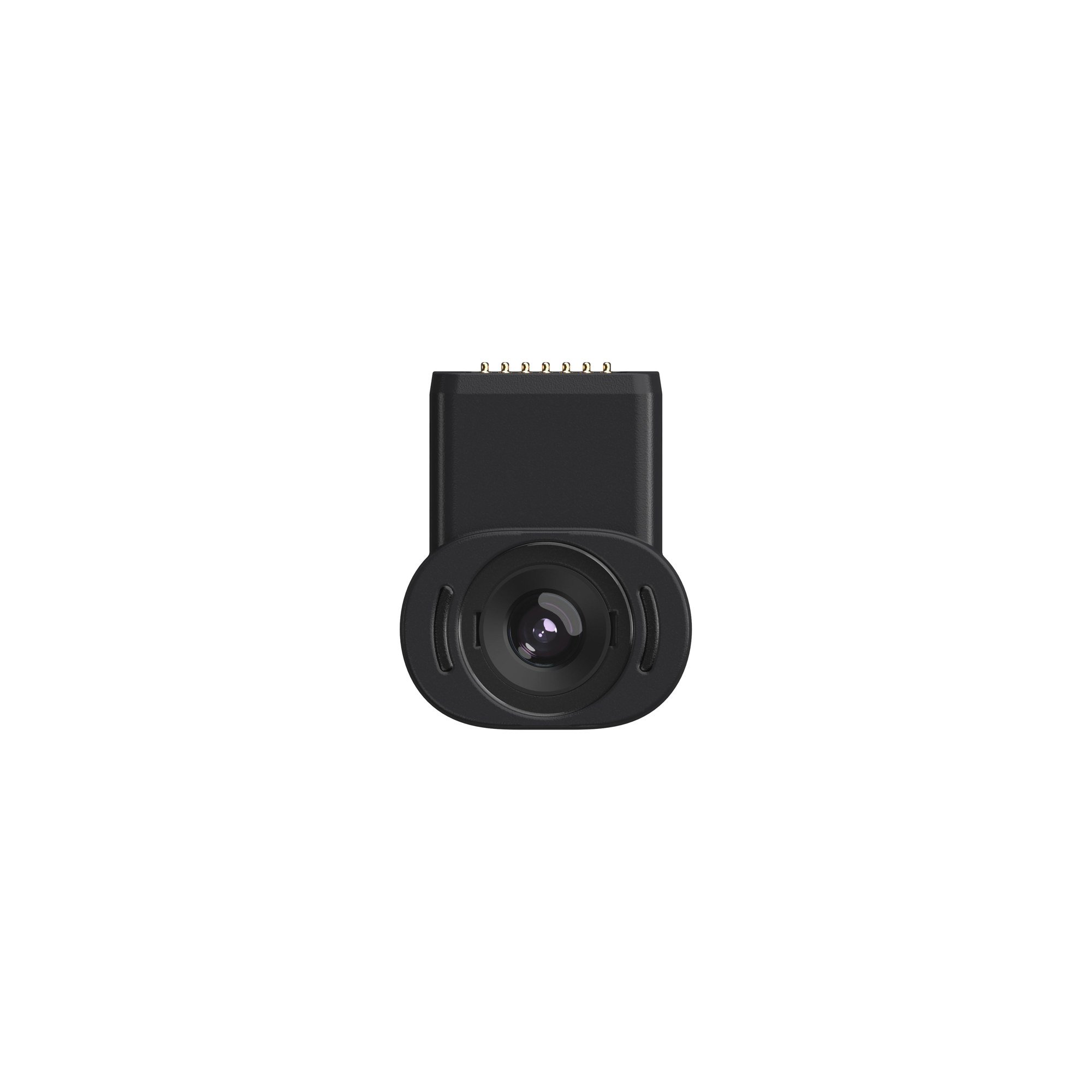
XREAL Eye is one of the smallest accessories XREAL sells and one of the most misunderstood. It looks like a tiny camera, and it is one, but its main job is tracking: it adds 6DoF (six degrees of freedom) spatial anchoring to XREAL One series glasses. This buyer's FAQ covers what the Eye does, what it does not do, which glasses it works with, the camera specs, and who should spend the $99.
Everything below comes from XREAL's own store listing, product page, user guide, FAQ, specification sheet and troubleshooting page, checked November 14, 2026. It is research-based, not a hands-on test.

XREAL Eye at a glance
| XREAL Eye | |
|---|---|
| Price (XREAL US store, Nov 14, 2026) | $99 |
| Model | X7011 |
| What it adds | Native 6DoF spatial anchoring, first-person photos and video |
| Camera | 12MP sensor, f/2.25 aperture |
| Photos | JPG, up to 2016 × 1512 |
| Video | MP4, 1600 × 1200, 30fps default (60fps optional) |
| First-person video with XREAL One | 1080p at 30 or 60fps |
| Clip length | 15s default, 30s or 60s optional; 2 minutes maximum |
| Storage | 2GB inside the glasses (the Eye has none) |
| Battery | None; powered through the glasses |
| Weight | 1.35g |
| Durability rating | At least 2,000 insertion cycles |
| Warranty | 1 year |
What does XREAL Eye actually do?
XREAL's user guide lists three things:
- An upgrade from "Anchor" mode to "Spatial Anchor" mode. This is the headline feature.
- "AR Screen Recording" that blends virtual content with the real world, when the glasses are connected to XREAL Beam Pro.
- One-tap photos and videos from your point of view.
XREAL adds that "more features are currently under development" and will arrive through glasses firmware updates.
3DoF vs 6DoF in plain English
XREAL One series glasses already have XREAL's X1 chip, which handles 3DoF tracking on its own. With 3DoF, the glasses know when you turn, tilt or nod your head, so a virtual screen can stay "anchored" in front of you as you look around. What 3DoF cannot track is your body moving through the room. Lean in, step sideways or walk across the room and the screen moves with you.
6DoF adds those three movement axes. XREAL's product page describes it as tracking "your movements in all directions," so "virtual screens stay fixed in your space, no matter how you walk, lean, or shift your view." In practice that is the difference between a screen that floats in front of your face and one that behaves more like a real monitor sitting in a fixed spot.
The Eye supplies the extra sensor input; the X1 chip in the glasses does the processing. XREAL quotes 3ms motion-to-photon latency for this setup and says that "any device with DP output works with your AR glasses instantly," with no extra app needed for spatial anchoring.

Which glasses work with XREAL Eye?
XREAL's specification sheet lists "XREAL One and XREAL One Pro Series AR Glasses," and the product page says 6DoF spatial anchoring is "Exclusive only to XREAL One Series." On the US store:
- XREAL One ($399) works with the Eye.
- XREAL One Pro ($599): the listing says to "pair with XREAL Eye to unlock 6DoF spatial tracking."
- XREAL 1S ($449): the listing says to "pair with XREAL Eye to unlock 6DoF spatial anchoring."
- XREAL 1 Pro+ ($599): XREAL sells a 1 Pro+ and XREAL Eye bundle for $648 (listed against a $698 compare-at price on November 14, 2026).
The Eye does nothing on its own; it has no battery and no storage, so it only works while plugged into a compatible pair of glasses. If you own older XREAL Air, Air 2 or Air 2 Pro glasses, the Eye is not listed as compatible. XREAL's Beam Pro listing makes the split clear: its 3DoF Anchor mode works with XREAL One, Air 2 Pro, Air 2 and Air, but "for 6DoF tracking, use both XREAL ONE and XREAL Eye."
Not sure which glasses you have or should buy? Our XREAL One vs One Pro vs 1S comparison breaks down the current lineup.
Camera specs: what to expect
XREAL lists a 12MP sensor with an f/2.25 aperture, plus EIS (electronic image stabilization), noise reduction and anti-aliasing. The spec sheet also mentions highlight suppression to prevent overexposure.
Two details are worth reading closely before you buy it mainly as a camera:
- Photo resolution tops out at 2016 × 1512. That is the figure XREAL publishes for saved photos, even though the sensor is described as 12MP.
- Video is short-form. Recording is 1600 × 1200 at 30fps by default, with 60fps optional. Clips default to 15 seconds, with 30- or 60-second options, and XREAL's FAQ says the maximum is 2 minutes, which makes it "less suitable for extended continuous recording sessions." Connected to XREAL One, it can record first-person video at 1080p at 30 or 60fps.
XREAL's spec sheet is unusually honest about what the Eye does not support: ultra-wide angle, night mode, macro, voice-controlled shooting, portrait mode, manual parameter adjustment, 3D video, gimbal stabilization, hot swap and continuous shooting are all listed as unsupported.

How do you take photos and videos?
With the Eye plugged in, capture uses the button on the glasses: XREAL's spec sheet says click for a photo and long-press for a video. Files are saved as JPG and MP4 to the glasses' 2GB of built-in storage, in an XREAL/DCIM/ folder, and you export them by connecting the glasses in data transfer mode.
Mixed-reality recording needs Beam Pro. The store listing notes that the Eye "can be used to take pictures with XREAL One Glasses, however XREAL Beam Pro is required to shoot a mixed-reality video" (the kind that shows your virtual screen layered over the real room). XREAL's spec sheet also lists first-person live streaming and AI video calls as features that work with Beam Pro, and a store image notes that this recording is "not compatible with DRM apps," so expect protected streaming video to be blocked from captures. Beam Pro starts at $199 on the US store.
If you are still working out what plugs into what, our guide to connecting XREAL glasses to iPhone, Switch, Steam Deck and PS5 covers cables and adapters.
Installing it and common problems
The Eye plugs into a dedicated port in the bridge of the glasses. XREAL rates it for at least 2,000 insertions, but the spec sheet lists hot swap as unsupported, so it is sensible to fit it before you start a session.
XREAL's troubleshooting page covers three issues, and all point back to the connection:
- The Eye feels loose after insertion: contact XREAL customer support.
- Photos or videos show 0 KB in the XREAL/DCIM/ folder: unplug and reinsert the Eye, make sure it is secure, then capture again.
- No display in Spatial Anchor mode, but the picture returns in Follow mode: reseat the Eye, then turn Spatial Anchor on again.
The Eye has no firmware of its own to update. XREAL says it depends on XREAL One system updates, delivered through xreal.com/ota.

Is XREAL Eye worth $99?
It comes down to how you use your glasses.
Probably worth it if:
- You use XREAL One series glasses as a laptop or desktop monitor and move around while working. Spatial anchoring lets you lean in, shift in your chair or stand up without the screen following your head.
- You want a pinned virtual screen from any DisplayPort-out device without installing software.
- You already own Beam Pro and want mixed-reality recordings or first-person streams.
- You are buying 1 Pro+ glasses anyway: the $648 bundle on November 14 was $49 more than the glasses alone.
Probably skip it if:
- You mainly watch movies or play games sitting still. Built-in 3DoF anchoring already keeps the screen steady when you turn your head.
- You want a wearable camera for long clips. The 2-minute cap and short default clips make it a quick-capture tool, not an action cam.
- You own Air-series glasses, which are not listed as compatible.
A courtesy note: XREAL's documentation does not mention a recording indicator light, so ask before you film people and respect venues that ban cameras.
Warranty and returns
The Eye has a 1-year warranty. XREAL's US store banner lists a 30-day return window and free shipping on orders over $100, which a lone $99 Eye falls just under. For the full rules on returns, refurbished units and where else to buy, see our XREAL shopping guide.
Quick answers
Does XREAL Eye work without glasses? No. It has no battery or storage and must be plugged into compatible XREAL One series glasses.
Does it add 6DoF to every app? XREAL says native 6DoF spatial anchoring works with any DP-output device without extra apps. It anchors the virtual screen; it does not turn regular apps into 3D experiences.
Can it record Netflix or other streaming apps? XREAL's store imagery says mixed-reality recording is not compatible with DRM apps.
Is it worth it for gaming? XREAL's materials pitch the Eye for spatial anchoring and capture, not gaming. If you play seated, 3DoF is usually enough. For gaming-focused glasses, see our ROG XREAL R1 review.
References
- XREAL US Shop: XREAL Eye product listing (price, in-box contents, Beam Pro note) — https://us.shop.xreal.com/products/xreal-eye
- XREAL: XREAL Eye product page (6DoF, 1.35g, 3ms M2P latency, 12MP) — https://www.xreal.com/eye
- XREAL Tutorials: XREAL Eye User Guide — https://tutorials.xreal.com/docs/accessories/eye/
- XREAL Tutorials: FAQ for Eye — https://tutorials.xreal.com/docs/accessories/eye/faq/
- XREAL Tutorials: XREAL Eye Specifications — https://tutorials.xreal.com/docs/accessories/eye/spec/
- XREAL Tutorials: Troubleshooting for XREAL Eye — https://tutorials.xreal.com/docs/accessories/eye/troubleshooting/
- XREAL US Shop: XREAL One Pro, XREAL 1S, XREAL 1 Pro+ & XREAL Eye Bundle and XREAL Beam Pro listings — https://us.shop.xreal.com/
Meet your guide
Lipeiguan
author
What to read next
 Wyze Window Bird Cam Launches at $69.98 With a Three-Month Bird Watch Trial Wyze's official November 24, 2026 blog post names that date as launch day for the Window Bird Cam at an MSRP of $69.98. The official product page, checked 2026-11-29T01:38:19Z, lis...
 Apple Store Black Friday Event 2026: Gift Cards up to $300 Through November 30 Official Apple Store Black Friday Event terms, checked 2026-11-29T01:38:19Z, run from November 27, 2026, at 12:00 a.m. PT through November 30, 2026, at 11:59 p.m. PT in the United... How to Set Up the Wyze Window Bird Cam and Bird Watch Official Wyze Window Bird Cam setup steps, box contents, and the difference between free camera features and the Bird Watch plan. The official product page, checked 2026-11-29T01:3...