
ROG XREAL R1 Review: Are 240Hz Gaming AR Glasses Worth $849?
A research-based review of ASUS and XREAL's ROG XREAL R1 gaming glasses: official specs, what the included dock does, what reviewers found about the 240Hz mode and audio, and who should buy it instead of the One Pro or 1S.
Disclosure: This page may contain affiliate links. They do not influence our editorial conclusions. Read the disclosure.
Our pick
- See price at XREAL
Top pick
XREAL
Maker of AR and XR display glasses, including the Android XR-based XREAL AURA.
Our verdict
Published reviews agree the ROG XREAL R1 has an excellent display and a genuinely useful dock, but at $849 it mainly suits ROG Ally and PC gamers who want 240Hz, while most buyers are better served by the cheaper XREAL One Pro or 1S.
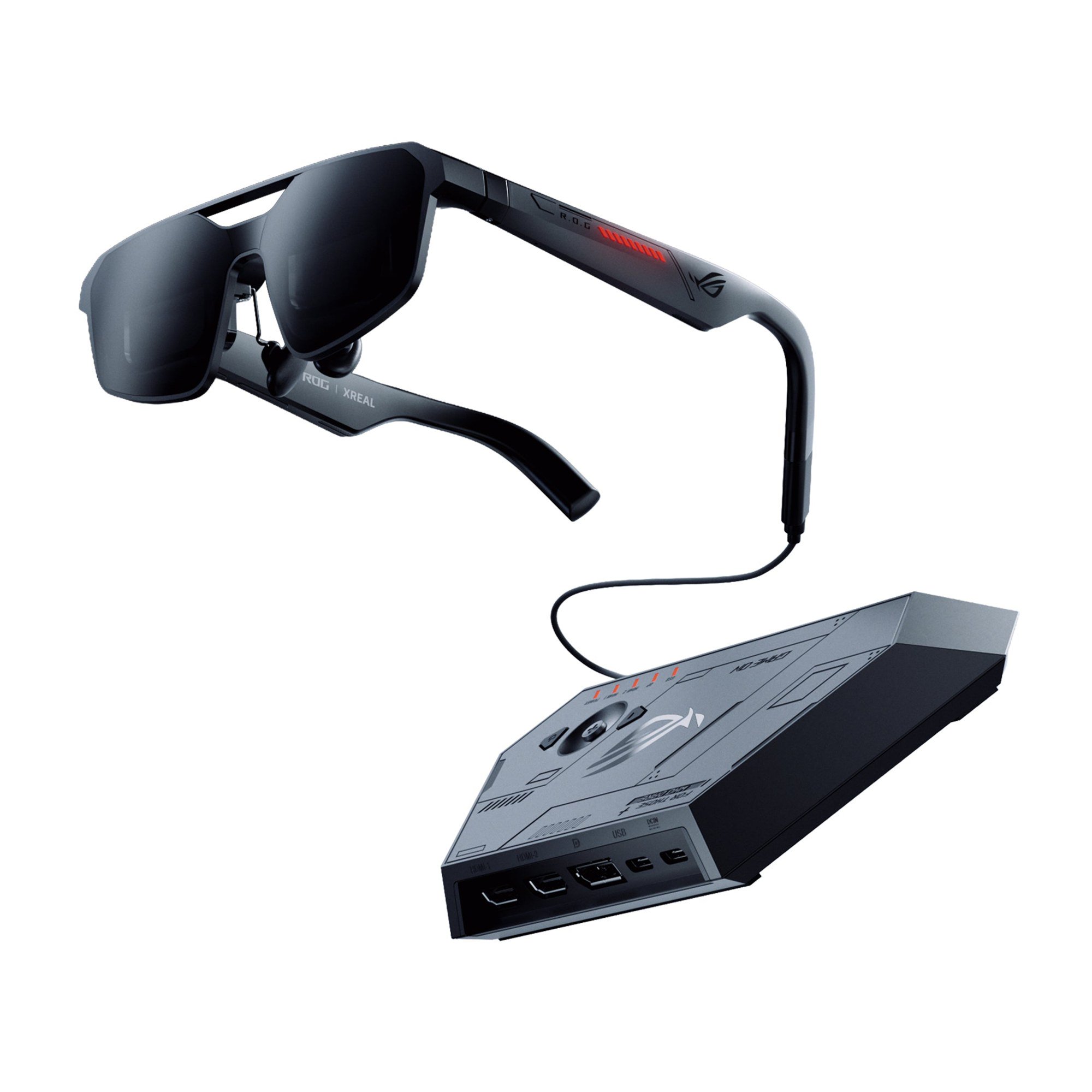
The ROG XREAL R1 is the first pair of display glasses built specifically for gamers by XREAL and ASUS's Republic of Gamers brand. Its headline is a 240Hz mode, which is double the refresh rate of other XREAL glasses, and it ships with a desktop dock that adds HDMI and DisplayPort inputs. It also costs $849, which puts it at the top of XREAL's lineup outside the Android XR-based Aura.
This review is research-based. We did not wear or test the R1 ourselves. The specs come from ASUS's official spec sheet and XREAL's US store listing as of November 3, 2026, and the performance notes come from published reviews by Tom's Hardware, Android Central and PC Guide, which we cite throughout. Prices change often, so check the current listing before you buy.

Quick verdict
The R1 has the fastest display in XREAL's lineup and the only included dock with HDMI and DisplayPort inputs. Reviewers agree the picture and build are excellent. They also agree that the price is hard to justify, because the 240Hz mode lowers image quality and cheaper glasses share most of the same core display features.
Price and what's in the box
On November 3, 2026, XREAL's US store listed the ROG XREAL R1 at $849.00 in two frame sizes, and ASUS's own store listed it at $849.99. The two sizes are not cosmetic. They match your interpupillary distance (IPD), the distance between your pupils:
- Narrow (N): IPD 57–66mm
- Broad (B): IPD 66–75mm
Measure your IPD before ordering, since picking the wrong frame can make the image harder to bring into focus. ASUS links to an IPD measuring guide on its product page.
ASUS lists these items in the box: the glasses, a carrying case, a USB-C cable, a cleaning cloth, a detachable prescription lens frame, nose pads, the ROG Control Dock, and two USB-A to USB-C cables. Android Central's review notes three nose-piece sizes in its retail box. Prescription lenses are sold separately. XREAL's store lists ROG XREAL R1 prescription lenses at $59.90.
Key specs
| Spec | ROG XREAL R1 (official) |
|---|---|
| Display | Dual 0.55-inch Sony Micro-OLED |
| Resolution | 1920 x 1080 per eye |
| Refresh rate | 120Hz; 240Hz with Frame Rate Boost |
| Response time | 0.01ms panel response, 3ms motion-to-photon latency |
| Brightness | Up to 700 nits |
| Color | 106% sRGB; dock supports HDR10 |
| Field of view | 57 degrees, 40 pixels per degree |
| Virtual screen | Up to 171 inches at 4 meters |
| Tracking | Native 3DoF (Anchor and Follow modes) |
| Dimming | Electrochromic, 3 tint levels |
| Audio | Speakers with Sound by Bose; noise-cancelling mic array |
| Port | 1 x USB-C (DisplayPort Alt Mode) |
| Weight | 0.09kg (XREAL and ASUS also cite 91g) |
Tom's Hardware measured its review unit at 87 grams, slightly lighter than the official figure.

Display: the main reason to buy
Every reviewer we read praised the R1's picture. Android Central called it "easily the best wearable monitor I've ever used," and PC Guide wrote that the 1080p micro-OLED displays "look excellent." Like XREAL's One Pro, the R1 uses a flat-prism lens design rather than the older "birdbath" optics. Tom's Hardware notes that this design puts less visual bulk near your eyes and gives the same 57-degree field of view as the One Pro.
The 240Hz claim needs some context. The glasses run at 120Hz natively, and 240Hz requires turning on Frame Rate Boost. Android Central lists 240Hz as available "when docked." Tom's Hardware lists the 240Hz mode as a reason to buy, but it also lists "240 Hz mode makes the image quality noticeably worse" as a reason to avoid, and calls the mode hit-or-miss depending on the person. In practice, treat 240Hz as an option for fast competitive games, not a free upgrade you leave on all the time.
The electrochromic dimming is useful in bright rooms. You can switch between three tint levels, and in Anchor Mode the lenses can change transparency automatically. Tom's Hardware counts the standard electrochromic dimming as a plus.
The ROG Control Dock
The included dock is what separates the R1 from XREAL's other glasses. Instead of needing a source device with a USB-C port that outputs video, you can connect consoles and desktop PCs over HDMI or DisplayPort. ASUS lists these dock ports:
- 2 x HDMI
- 1 x DisplayPort
- 1 x front USB-C (DisplayPort Alt Mode)
- 1 x USB-C data and power
- 1 x USB-C power input (5V)
The dock supports HDR10 plus ASUS's GamePlus and GameVisual features, and it weighs 0.23kg. Android Central's spec table lists the 240Hz mode as a docked feature, so the dock is also part of how you reach the top refresh rate. Reviewers described it as a real strength: PC Guide said the dock "opens up plenty of possibilities when using them with a PC or other devices."
If you only plan to plug into a phone, a laptop or a handheld, you may never need the dock. Our guide to connecting XREAL glasses explains which devices work directly over USB-C and which need an adapter.

ROG Ally integration
ASUS designed the R1 around its ROG Ally handhelds. With a single USB-C connection, the Ally's own screen stays on while the glasses show the game, and you can use that screen to change brightness, screen size, aspect ratio, tint level, Frame Rate Boost, the spatial anchor and 3D mode. If you already own an Ally, this is the most polished setup the R1 offers. PC Guide noted that the experience is more limited when you use the glasses with a phone.
Audio and comfort
The R1 has open-air speakers tuned with Sound by Bose and a noise-cancelling microphone array. Reviewers disagreed on the sound. A customer review quoted on ASUS's product page calls the Bose audio "amazing," while PC Guide said the built-in speakers "don't quite match the quality of the displays." Because the speakers are open, people near you can hear them, so plan on earbuds or a headset for travel and for competitive games.
For comfort, the temples adjust to three angles, and ASUS lists the frame at 15.3 x 4.9 x 16.6cm. PC Guide found the glasses "surprisingly comfortable once adjusted" but also called them slightly bulkier and heavier than some rivals. The arms carry Aura RGB accent lighting, which Tom's Hardware listed as a plus. PC Guide warned that the on-temple controls, two buttons and a rocker, take some time to learn.

How it compares with other XREAL glasses
Here is how the R1 sits against XREAL's other current models, using XREAL's US store prices on November 3, 2026:
| Model | XREAL store price | Notes |
|---|---|---|
| XREAL Air 2 Pro | $249 | Older model, 46-degree field of view |
| XREAL 1S | $449 | Android Central's pick for most people |
| XREAL One Pro | $599 | Same 57-degree field of view as the R1 |
| ROG XREAL R1 | $849 | 240Hz mode, dock included |
Tom's Hardware compared the R1 with the $599 One Pro and asked whether the R1 is worth $250 more. Its answer was "no." It reached the same answer against the cheaper RayNeo Air 4 Pro. Android Central was more positive about the R1 itself, but still said it would recommend the $450 XREAL 1S for most people and the R1 for "gamers seeking the highest-end solution." To see the differences between XREAL's mainstream models, read our XREAL One vs One Pro vs 1S comparison.
If you are less interested in gaming and more interested in replacing a laptop screen while traveling, XREAL's Aura is a different kind of product. Read our Aura launch coverage and our Aura vs laptop monitor guide.
Pros and cons
Pros
- Sony Micro-OLED displays that every review we read praised
- 120Hz standard and an optional 240Hz mode, the fastest in XREAL's lineup
- Included dock with 2 x HDMI and DisplayPort inputs and HDR10
- Electrochromic dimming with three tint levels as standard
- Deep ROG Ally integration with on-handheld controls
- Two frame sizes matched to IPD
Cons
- $849 is about $250 more than the XREAL One Pro
- Tom's Hardware found that 240Hz mode makes image quality noticeably worse
- PC Guide found the speakers weaker than the display
- Controls take time to learn
- Only 3DoF tracking built in
Who should buy the ROG XREAL R1?
Buy it if you play fast games on a PC, a console or an ROG Ally and want a large private screen with a dock that handles HDMI and DisplayPort without extra adapters. It makes the most sense for Ally owners, who get the deepest integration.
Skip it if you mostly watch video, browse or work. The XREAL 1S and One Pro use similar display features for less money, and reviewers consistently recommended them for most people. A good controller also matters for couch gaming. Our best EasySMX controllers guide covers affordable options for PC and Switch 2.
Before you order from XREAL's store, check the IPD size, XREAL's current return policy, and whether you need the $59.90 prescription lens insert.
References
- ASUS Republic of Gamers, "ROG XREAL R1 Tech Specs," rog.asus.com/us/glasses/rog-xreal-r1/spec/ (accessed Nov 3, 2026).
- ASUS Republic of Gamers, "ROG XREAL R1 Gaming AR Glasses," product page and customer reviews, rog.asus.com/us/glasses/rog-xreal-r1/ (accessed Nov 3, 2026).
- XREAL, "ROG XREAL R1" and current product listings, us.shop.xreal.com (accessed Nov 3, 2026).
- Tom's Hardware, "Asus ROG Xreal R1 Review: Gaming-focused AR glasses deliver 240 Hz performance and RGB style," tomshardware.com/peripherals/wearable-tech/asus-rog-xreal-r1-review.
- Android Central, "Xreal ROG R1 is crazy expensive, but it's easily the best wearable monitor I've ever used," androidcentral.com/wearables/xreal-rog-r1-review.
- PC Guide, "ROG XREAL R1: a rather premium but impressive-looking pair of gaming glasses," pcguide.com/vr/review/rog-xreal-r1/.
Meet your guide
Lipeiguan
author
What to read next
 Google Adds Computer Use to the Gemini App for Mac in the U.S. On November 19, 2026, Google said computer use is available in the Gemini app for Mac, in English in the U.S. Official requirements include an Apple Silicon Mac on macOS Sequoia 15... How to Use Gemini Computer Use on a Mac: Official Requirements, Permissions and Examples Official Google requirements for computer use in the Gemini app for Mac: an Apple Silicon Mac on macOS Sequoia 15.0 or later, a personal Google account for people 18 or older, a Go...
 How to Choose a SwitchBot Lock: Lock Pro vs Lock Ultra vs Lock Vision and Vision Pro A research-based guide to official SwitchBot Lock Pro, Lock Ultra, Lock Vision and Lock Vision Pro specs and November 20, 2026 U.S. prices, including batteries, hubs, keypads, comp...