
Anycubic Kobra S1 + ACE 2 Pro Combo Review: Specs, Multicolor, Noise and Who It Suits
A research-based look at Anycubic's enclosed CoreXY multicolor bundle: 250 mm build volume, 120°C bed, ACE 2 Pro drying and four-to-16-color expansion, plus its trade-offs and Black Friday price.
Disclosure: This page may contain affiliate links. They do not influence our editorial conclusions. Read the disclosure.
Our pick
- See price at Anycubic
Top pick
Anycubic
Shenzhen-based 3D printer maker founded in 2015, selling Kobra FDM printers, Photon resin printers, ACE multicolor filament units, wash-and-cure stations, filam...
Our verdict
On Anycubic's published specs the Kobra S1 + ACE 2 Pro Combo is a well-equipped enclosed multicolor printer with a 120°C bed, built-in filament drying and expansion to 16 colors, but it is heavy and, like all single-nozzle multicolor systems, spends time and filament on every color change.
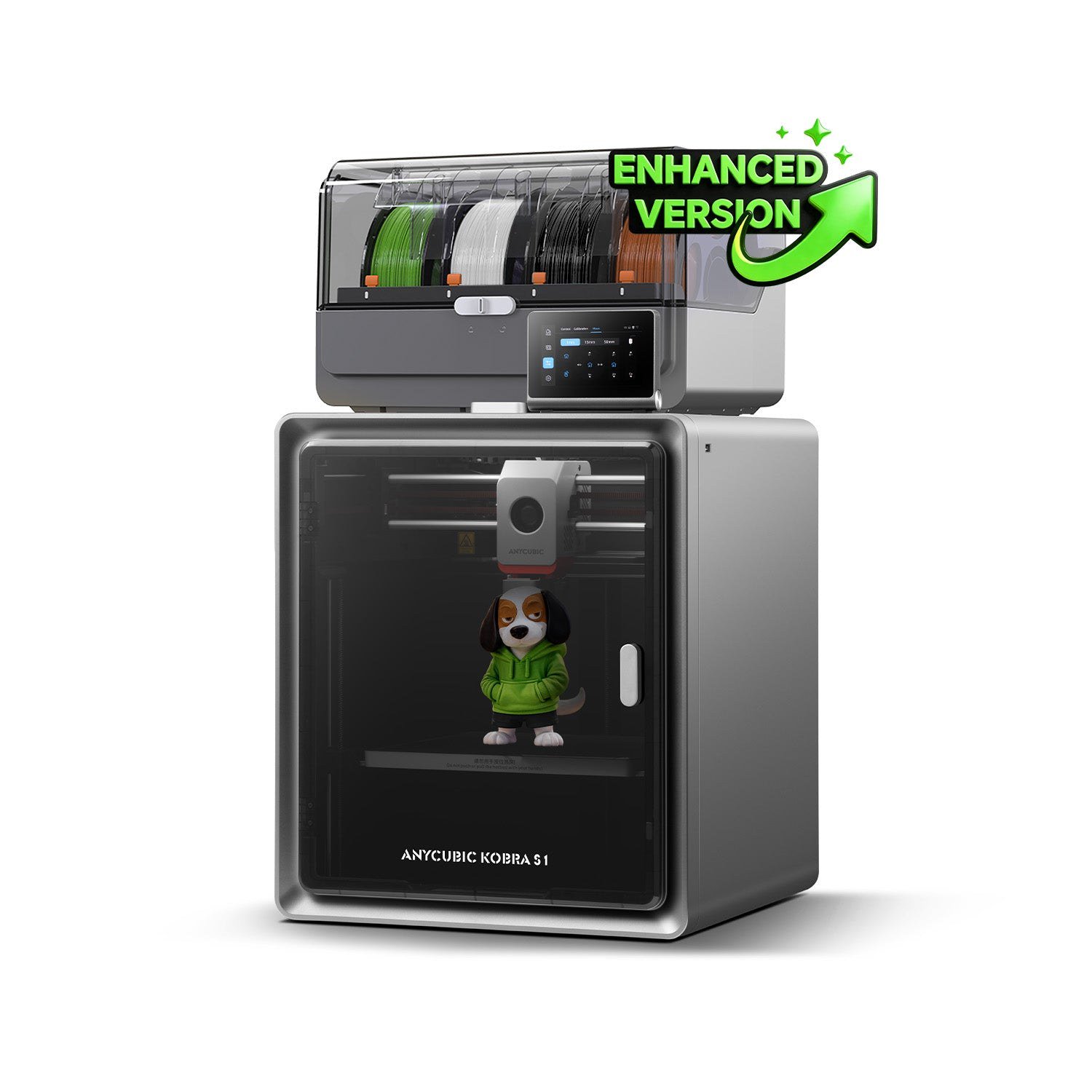
The Anycubic Kobra S1 + ACE 2 Pro Combo is Anycubic's enclosed, multicolor answer to the fast CoreXY printers that now dominate the mid-range. Anycubic's US store listed it at $429 during the 2026 Black Friday sale, against a regular $599. That puts it among the cheaper enclosed multicolor bundles on the market. This review is research-based. It draws on Anycubic's published specifications, policy pages and product materials as of November 3, 2026, and sets out who the machine suits and where its limits are.

What is in the combo
The bundle has two parts:
- Kobra S1. A fully enclosed CoreXY FDM printer.
- ACE 2 Pro. Anycubic's multicolor filament unit. It holds four spools, dries filament and feeds the printer automatically.
With one ACE 2 Pro, the Kobra S1 prints in four colors or materials. Anycubic says the system can expand to 16 colors by chaining additional ACE units. Anycubic markets the combo as an enhanced version and highlights a Red Dot award on its product page.
The parts list on the product page includes a spare power cord, PTFE filament tubes, a nozzle cleaner, grease, activated carbon for the enclosure filter and a filament sample.
Key specifications
| Spec | Kobra S1 (per Anycubic) |
|---|---|
| Structure | Fully enclosed CoreXY |
| Build volume | 250 × 250 × 250 mm |
| Print speed | 300 mm/s recommended, 600 mm/s maximum |
| Acceleration | 10,000 mm/s² recommended, 20,000 mm/s² maximum |
| Nozzle | 0.4 mm standard (0.25, 0.6, 0.8 mm optional), up to 300°C |
| Bed | PEI spring steel, up to 120°C |
| Extrusion | Short-distance (direct-style) extrusion |
| Leveling | LeviQ 3.0 automatic leveling and Z-offset |
| Multicolor | 4 colors base, expandable to 16 |
| Filament drying | Active drying up to 65°C in the ACE 2 Pro |
| Screen | 4.3-inch capacitive touchscreen |
| Camera | 480P |
| Noise | ≤46 dB standard, ≤44 dB in quiet mode |
| Weight | Kobra S1 18 kg; ACE 2 Pro 3.7 kg |
| Dimensions | Kobra S1 400 × 410 × 490 mm; ACE 2 Pro 368 × 291.5 × 236.5 mm |
Design: an enclosure for a reason
An enclosure does three practical jobs. It keeps the print chamber warm, which reduces warping and layer splitting with materials such as ABS and ASA. It keeps dust and drafts away from the print. It also contains some of the noise and fumes.
Anycubic's 120°C bed and 300°C nozzle limits fit that purpose. They cover PLA, PETG and TPU, and they give some headroom for ASA and carbon-fiber-filled blends. The included activated carbon suggests Anycubic expects users to print warmer materials. Still, a carbon filter is not a substitute for ventilation in a small room.
The trade-off is size and weight. At 18 kg for the printer alone, plus a 3.7 kg ACE 2 Pro that sits on top, this is a machine for a sturdy desk or shelf. You will not want to move it often. The shipping box weighs 25 kg according to Anycubic. That matters if you ever need to return it under the 14-day no-reason policy, where the buyer pays return shipping.

Multicolor with the ACE 2 Pro
Multicolor FDM printing on a single nozzle works by swapping filament mid-print. The printer cuts the current filament, retracts it, loads the next one and purges the old color before printing resumes. That purging wastes material and time. It is the main reason multicolor prints take longer and cost more than single-color ones.
The ACE 2 Pro handles the spool management and feeding. Its drying function, at up to 65°C, is useful in its own right: moisture-sensitive filaments such as PETG, TPU and nylon blends print more cleanly when dry. Anycubic's product page says you can start with one ACE 2 Pro for four colors and add more units as needed.
What to expect in practice:
- Purge waste. A single-nozzle system still purges on every color change. Prints with many color changes per layer produce more waste than those that change color only every few millimeters of height.
- Print time. Every swap adds time. A four-color model can take much longer than the same model in one color.
- Slicer settings matter. Anycubic Slicer Next is based on the open-source Orca slicer. It handles purge volumes and color assignment, and tuning these settings affects both waste and quality.
Speed and quality features
The Kobra S1's 600 mm/s maximum speed and 20,000 mm/s² acceleration are typical of current CoreXY printers. Anycubic's recommended figures, 300 mm/s and 10,000 mm/s², are a more realistic guide to everyday printing. Real-world speed depends on the material, the model and cooling.
Anycubic lists several features aimed at reliable unattended printing:
- Resonance compensation using a built-in accelerometer, to reduce ringing patterns
- Flow and pressure advance calibration
- Power loss resume
- Filament runout detection with auto-resume, and filament entanglement detection
- AI spaghetti detection through the camera
- Object skip and area-only bed leveling
These are now standard expectations at this price. Their presence matters more than any one of them individually. The 480P camera is adequate for spotting failures remotely, but it is not designed for high-quality timelapses.

Noise
Anycubic rates the Kobra S1 at 46 dB or lower in standard mode and 44 dB or lower in quiet mode. Manufacturer noise figures depend on how and where they are measured, and fan noise varies with material and cooling settings. The enclosure should help compared with open-frame designs. If the printer will sit in a bedroom or a shared office, look for independent noise measurements before relying on the headline number.
Warranty, returns and support
Bought from Anycubic's official US store, the Kobra S1 Combo carries:
- A 1-year whole-machine warranty
- 3 months on the print head, extruder and magnetic platform
- 6 months on the heated bed
- Lifetime free technical support
The return rules are a 14-day no-reason return from delivery (buyer pays shipping if the item is not defective), 7 days to report items not as described, and 30 days for quality problems. Our Anycubic shopping guide covers these in detail, including US shipping times.
Who it suits and who should skip it
Good fit if you:
- Want multicolor prints without stepping up to a much pricier machine
- Plan to print PETG, TPU or ASA and value built-in filament drying
- Want an enclosed printer for a home office or a shared space
- Prefer a ready-to-use system with auto-leveling and failure detection
Consider alternatives if you:
- Need a build volume larger than 250 mm. The Kobra S1 Max is Anycubic's larger option.
- Mainly print in one color and want the lowest cost. The Kobra S1 alone was listed at $349 during the sale.
- Want more colors in an open-frame design. The Kobra X Combo ships with seven-color capability. See our Kobra X Combo vs Kobra S1 Combo comparison.
- Need fine detail on small miniatures. A resin printer such as the Photon P1 is the better tool.
How it compares on price
At $429 during the sale, the Kobra S1 + ACE 2 Pro Combo sat below the Kobra X Combo ($469) and well below the Kobra S1 Max Combo ($799) on Anycubic's US store. It is also competitive with rival enclosed multicolor bundles. ELEGOO, for example, listed its Centauri Carbon 2 Combo at $369 in its own Black Friday sale; see our Centauri Carbon 2 Combo review. The two differ in maximum bed temperature, multicolor expansion and ecosystem, so compare the specs that matter for your projects rather than the headline price alone.
Verdict
On paper, the Kobra S1 + ACE 2 Pro Combo is a well-equipped enclosed multicolor printer. Its 120°C bed, 300°C nozzle, built-in filament drying and a path to 16 colors make it a flexible choice for hobbyists moving beyond single-color PLA. The main caveats are its weight and footprint, the short warranty on wear parts, and the time and filament overhead that every single-nozzle multicolor system carries. At the $429 Black Friday price, it is one of the more affordable ways to get an enclosed CoreXY printer with multicolor capability from a major brand.
References
- Anycubic. "Anycubic Kobra S1 + ACE 2 Pro Combo" product page and tech specs. us.anycubic3d.com/products/kobra-s1-combo. Accessed November 3, 2026.
- Anycubic. "Black Friday Deals." us.anycubic3d.com/pages/black-friday-deals. Accessed November 3, 2026.
- Anycubic. "Refund Policy." us.anycubic3d.com/policies/refund-policy. Accessed November 3, 2026.
- Anycubic. "Warranty Policy." us.anycubic3d.com/pages/warranty-policy. Accessed November 3, 2026.
- Anycubic via PR Newswire. "Anycubic Launches 2026 Black Friday and Cyber Monday Sale Across 13 Global Markets, with Up to $350 Off 3D Printers." November 3, 2026.
Meet your guide
Lipeiguan
author
What to read next
 Best Bose Earbuds 2026: QuietComfort Ultra vs QuietComfort vs Ultra Open vs Sport Open vs Wired All five Bose earbuds compared on Bose's published specs and prices, from the $299 QuietComfort Ultra Earbuds (2nd Gen) and Ultra Open Earbuds (2nd Gen) to the $99 Noise Cancelling...
 How to Set Up Bose QuietComfort Ultra Earbuds (2nd Gen): Pairing, Fit, Multipoint and Reset Step-by-step setup for Bose QuietComfort Ultra Earbuds (2nd Gen) from Bose's owner's guide: app and Bluetooth pairing, Fast Pair, eartip and band fit, touch controls, multipoint, c...
 Google Store Cuts Pixel 11 Pro to $799 and Pixel 11 to $699 Through November 8 The U.S. Google Store has the unlocked Pixel 11 Pro at $799 (was $1,099), the Pixel 11 at $699 (was $899) and $350 off the Pixel 11 Pro XL until November 8, 2026 at 11:59 PM PST, p...