
Apple Watch Hypertension Notifications: How It Works, Supported Models, Setup and Accuracy
Apple Watch hypertension notifications explained: how the 30-day optical-sensor analysis works, which watches and iPhones support it, who it's for, how to set it up, what to do after an alert and the accuracy figures from Apple's validation study.
Disclosure: This page may contain affiliate links. They do not influence our editorial conclusions. Read the disclosure.
Our pick
- See price at Apple
Top pick
Apple
Maker of iPhone, iPad, Mac, Apple Watch and related services, sold through its online and retail stores.
What this guide covers
High blood pressure rarely causes symptoms, which is why so many people have it without knowing. Apple Watch now has a feature aimed at exactly that gap: hypertension notifications, which can alert you if your watch sees consistent signs of chronic high blood pressure over a 30-day period.
It is easy to misunderstand what this feature does. It does not take blood pressure readings, it will not catch every case, and it is not meant for people who already have a diagnosis. This guide explains how it works, which watches support it, how to turn it on, what to do if you get an alert and how accurate Apple says it is. It uses Apple Support documents, Apple's newsroom announcement, Apple's published validation paper and CDC guidance as of November 12, 2026. It is a research-based explainer, not medical advice.

The short answer
- What it does: passively analyzes data from the watch's optical heart sensor in 30-day windows and sends a notification if it detects a pattern consistent with hypertension.
- What it doesn't do: it does not measure or display a blood pressure number, and Apple says not everyone with hypertension will get a notification.
- Supported watches: Apple Watch Series 9 or later and Apple Watch Ultra 2 or later on the latest watchOS, paired with an iPhone 11 or later. It is not available on Apple Watch SE.
- Who it's for: adults 22 and older who are not pregnant and have not been diagnosed with hypertension.
- If you get an alert: use a regular blood pressure cuff to log readings for seven days in the Health app, then share them with your healthcare provider.
How hypertension notifications work
Apple says the feature uses the optical heart sensor, which shines light into the skin to measure changes in blood volume (a technique called photoplethysmography, or PPG). An algorithm analyzes how your blood vessels respond to each heartbeat. Apple's validation paper says the analysis runs in the background during waking hours, needs no calibration and looks at data over separate 30-day periods. The first period starts on the day you set the feature up.
Apple's newsroom announcement says the algorithm was developed with machine learning and training data from studies with more than 100,000 participants, then validated in a separate clinical study of more than 2,000 people. Apple expects the feature to notify more than 1 million people with undiagnosed hypertension in its first year, while acknowledging it will not detect every case.
Which Apple Watch models support it
According to Apple Support, you need:
- An Apple Watch Series 9 or later, or an Apple Watch Ultra 2 or later, running the latest watchOS.
- An iPhone 11 or later on the latest iOS.
- Wrist Detection turned on.
- To be 22 or older, not pregnant and not previously diagnosed with hypertension.
There are a few caveats. The feature is not available on Apple Watch SE. It is only offered in countries and regions where it has been cleared, so check Apple's feature availability list. Apple's support page also says that, as of its latest update, the feature might not yet be available on Apple Watch Series 12 or Apple Watch Ultra 4 in some regions, because extra regulatory clearances for those models are still in process. If you are buying a new watch mainly for this feature, check availability for your exact model and country first.
How to turn it on

Setup happens on the iPhone, not the watch:
- Open the Health app on your iPhone.
- Tap your profile picture or initials in the upper corner.
- Under Features, tap Health Checklist, then Hypertension Notifications.
- Confirm your age and whether you have ever been diagnosed with hypertension, then tap Continue.
- Follow the prompts that explain how the notifications work, then tap Done.
You can turn the feature off from the same Health Checklist screen. If you have an active pregnancy logged in the Health app, you will not be able to turn it on.
One practical detail: if you use a second iPhone that is not paired with your watch, Apple says notifications are delayed until your primary iPhone is unlocked and finishes the analysis.
What to do if you get a notification
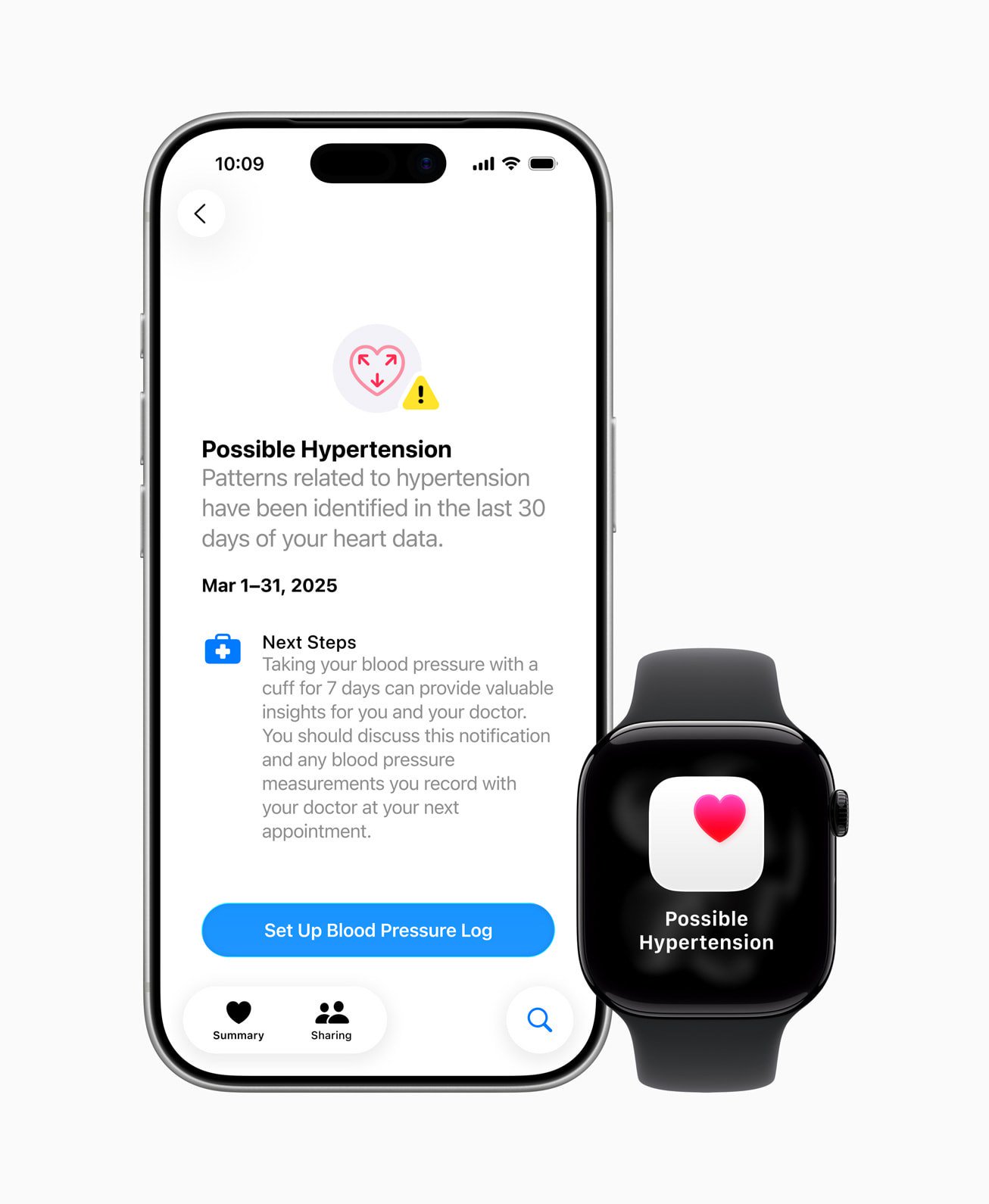
A notification means the feature found patterns related to hypertension in the last 30 days of your heart data. It is not a diagnosis. Apple's guidance, which matches the usual way hypertension is diagnosed, is to confirm with a blood pressure cuff:
- Get a third-party blood pressure cuff.
- In the Health app, go to Browse > Heart > Blood Pressure and tap Get Started under Blood Pressure Log.
- Schedule reminders. Apple suggests a reading after you wake up and another right before bed, every day for seven days.
- After each reading, tap Add a Measurement and enter the systolic and diastolic numbers.
- Share the resulting report with your healthcare provider at your next appointment.
Apple says the Health app's blood pressure log includes classifications based on local guidelines and creates a detailed report you can share with your provider.
For context, the CDC (citing American College of Cardiology and American Heart Association guidelines) defines normal blood pressure as under 120/80 mm Hg and high blood pressure as consistently at or above 130/80 mm Hg. The CDC also notes that most people with high blood pressure have no symptoms, so measuring is the only way to know.
The feature cannot detect a heart attack. Apple says that if you ever have chest pain, pressure or tightness, or think you are having a heart attack, you should call emergency services immediately. The CDC lists chest pain, shortness of breath, back pain, numbness, weakness, vision changes or difficulty speaking alongside a very high reading as signs of a hypertensive emergency that needs a 911 call.
How accurate is it?
Apple's September 2025 validation paper is unusually specific, and it shows why the feature is designed to be cautious. In the pivotal study, 2,229 people enrolled and 1,863 had enough usable data for the main analysis.
| Measure | Result in Apple's study |
|---|---|
| Overall sensitivity (people with hypertension who were notified) | 41.2% (241 of 585) |
| Sensitivity for Stage 2 hypertension | 53.7% (151 of 281) |
| Sensitivity for Stage 1 hypertension | 29.6% (90 of 304) |
| Overall specificity (people without hypertension who were not notified) | 92.3% (1,179 of 1,278) |
| Specificity for normal blood pressure | 95.3% (924 of 970) |
In practice, Apple tuned the feature to keep false alarms low rather than to catch everyone. Most people with normal blood pressure in the study did not get a notification. But fewer than half of the people with hypertension did, and only about three in ten of those with Stage 1. Not getting a notification does not mean your blood pressure is fine. Regular cuff readings and checkups still matter, especially if you have risk factors the CDC lists, such as diabetes, a family history, high sodium intake or long-term stress.
Limits to keep in mind
Apple's support page is clear about what the feature is not:
- It is not intended to diagnose, treat or help manage hypertension, or other conditions such as blood clots, stroke, atrial fibrillation, congestive heart failure or high cholesterol.
- It is not for people already diagnosed with hypertension, people under 22 or pregnant users.
- Not everyone with hypertension will receive a notification.
If you already have a hypertension diagnosis, the useful part of this update is the Blood Pressure Log in the Health app, which works with any cuff readings you enter.
Should you buy an Apple Watch for this?
For someone who already owns a Series 9, Series 10, Series 11 or Ultra 2 or later, turning the feature on costs nothing and may surface a problem they did not know about. For someone thinking of buying a watch mainly for blood pressure screening, the study numbers mean it is a nudge to get checked, not a substitute for a cuff. A basic validated cuff gives you actual readings.
Health tracking is now a big part of every wearable. For more on Apple's health tools, see our explainer on the redesigned Apple Health app and its Health Age insights and the related Health app beta news. If you are weighing Google's ecosystem instead, our Fitbit Edge vs Charge 6 vs Pixel Watch comparison and Google Health Premium review cover the alternatives. And if you are setting up health features on new AirPods too, see our guide to the AirPods Pro 3 Hearing Test and Hearing Aid features.
References
- Apple Support, Hypertension notifications on your Apple Watch: https://support.apple.com/en-us/117296
- Apple Watch User Guide, Receive hypertension notifications on Apple Watch: https://support.apple.com/guide/watch/receive-hypertension-notifications-apd7c37bb802/watchos
- Apple Newsroom, Hypertension notifications available today on Apple Watch (October 2025): https://www.apple.com/ca/newsroom/2025/10/hypertension-notifications-available-today-on-apple-watch/
- Apple, Hypertension Notification Feature on Apple Watch validation paper (September 2025): https://www.apple.com/health/pdf/Hypertension_Notifications_Validation_Paper_September_2025.pdf
- Apple Support, About watchOS 26 Updates: https://support.apple.com/en-us/123002
- Centers for Disease Control and Prevention, About High Blood Pressure (updated October 13, 2026): https://www.cdc.gov/high-blood-pressure/about/index.html
Meet your guide
Lipeiguan
author
What to read next
 Apple TV Will Be the Exclusive U.S. Home of F1 Academy Beginning in 2027 On November 19, 2026, Apple said F1 Academy will stream on Apple TV in the United States beginning in 2027, with every qualifying session and race included for U.S. Apple TV subscr... How to Watch F1 Academy on Apple TV in 2027: Official Calendar and Subscription Note Apple said U.S. Apple TV subscribers will get every F1 Academy qualifying session and race beginning in 2027. This guide records the official seven-round 2027 calendar graphic and...
 Google Adds Computer Use to the Gemini App for Mac in the U.S. On November 19, 2026, Google said computer use is available in the Gemini app for Mac, in English in the U.S. Official requirements include an Apple Silicon Mac on macOS Sequoia 15...