
Best Creality 3D Printers for Beginners (2026): Ender-3 V3 SE vs SPARKX i7 vs K2 SE 4C vs K1C vs K2
A research-based guide to the five Creality FDM printers that make the most sense as a first machine, with specs from Creality's own tables, current US store prices, what verified buyers say, store policies and a beginner's FAQ.
Disclosure: This page may contain affiliate links. They do not influence our editorial conclusions. Read the disclosure.
Our pick
- See price at Creality
Top pick
Creality
3D printer maker behind the Ender, K1, K2 and K3 FDM printers, Halot resin printers and CR-Scan 3D scanners, plus filament and Creality Cloud software.
Creality sells more than two dozen 3D printers on its US store, and its own 3D printers page steers newcomers toward three families: the SPARKX and Ender series for beginners and the K2 series for multicolor printing. That still leaves a lot of overlapping models. This guide narrows the choice to five filament (FDM) printers that make sense as a first machine, using Creality's spec tables and the prices its US product pages showed on November 4, 2026.
Everything below is based on Creality's published specifications, its store policies and the verified buyer reviews shown on its product pages. We didn't test these printers ourselves. If you already know you want Creality's new four-nozzle flagship, read our Creality K3 review instead.

Quick picks
| Printer | Best for | Build volume (mm) | Max speed | Multicolor | Price shown Nov 4 |
|---|---|---|---|---|---|
| Ender-3 V3 SE | Lowest-cost start | 220 × 220 × 250 | 250 mm/s | No | $199 |
| SPARKX i7 | Easiest open-frame upgrade path | 260 × 260 × 255 | 500 mm/s | With optional CFS Lite | $279 (options from $229) |
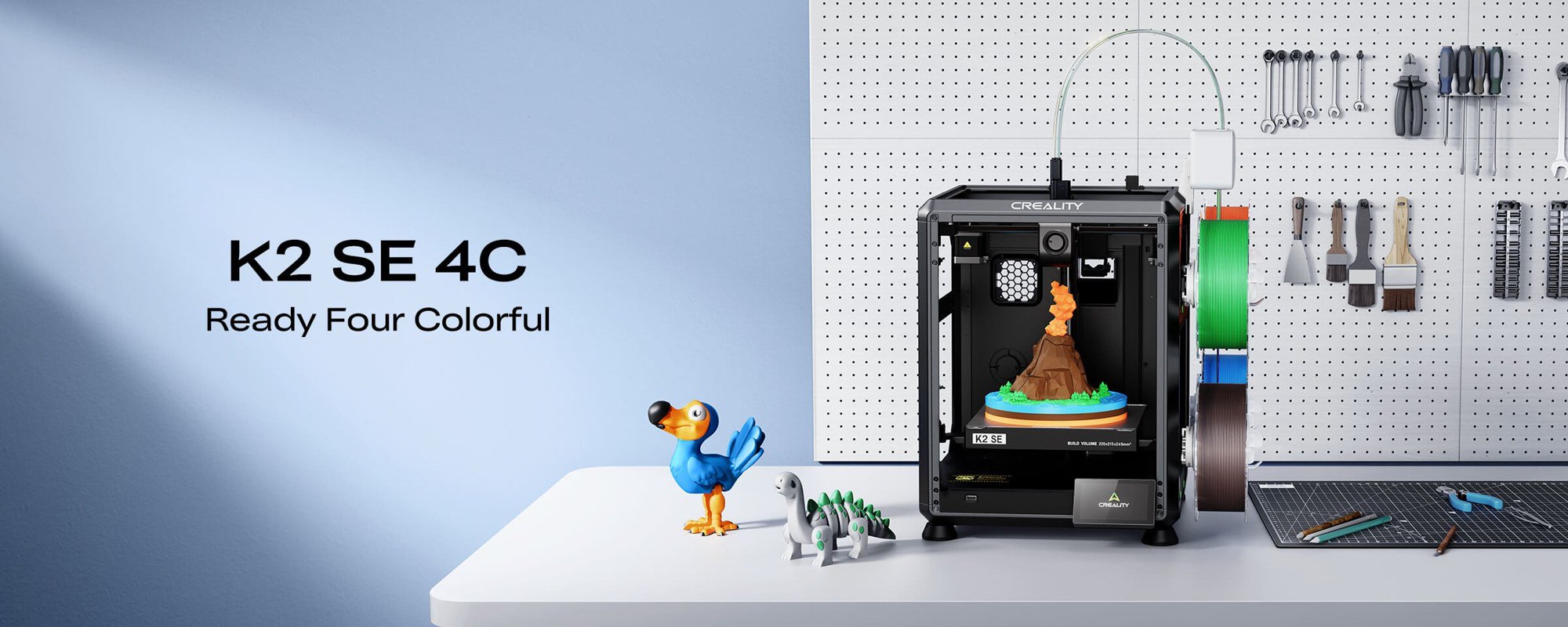
| K2 SE 4C | Four colors out of the box | 220 × 215 × 245 | 500 mm/s | Yes, 4 slots built in | $359 ($399 regular) |
| K1C | Enclosed, engineering filaments | 220 × 220 × 250 | 600 mm/s | No | $499 ($559 regular) |
| K2 / K2 Combo | Room to grow to 16 colors | 260 × 260 × 260 | 600 mm/s | Combo includes CFS | $399 / $549 |
Prices moved several times during Creality's holiday promotions, and the store's category page showed some different "from" prices than the product pages, so treat them as a snapshot. Speeds are Creality's maximum figures; typical speeds are lower. The K1C page, for example, gives a typical printing speed of 300 mm/s.
What matters most for a first 3D printer
Three things decide whether a beginner keeps printing or gives up.
- Automatic leveling and calibration. A badly leveled bed is the most common cause of failed first layers. Every printer here has automatic leveling; the K-series and SPARKX models go further with fully automatic calibration routines.
- Simple filament handling. Loading, unloading and run-out detection save frustration. Built-in or optional multicolor systems also handle spool swaps for you.
- Software and connectivity. Wi-Fi and an app make it easier to send jobs and watch progress. Of the five printers here, the Ender-3 V3 SE's spec sheet lists SD-card file transfer only.
Best budget pick: Ender-3 V3 SE
Creality pitches the Ender-3 V3 SE as "Perfect for Beginners," and at $199 it's the cheapest way into the brand's current lineup. Its 220 × 220 × 250 mm build volume handles most household parts, toys and gadgets. Leveling is automatic: a CR Touch sensor probes the bed and a strain sensor sets the Z offset. Creality also lists auto filament loading and unloading from the screen.

The spec sheet shows where the savings come from. It's an open bed-slinger design with a "Sprite" direct extruder, a 3.2-inch knob-controlled screen, PC spring steel build surface and SD-card file transfer. Supported filaments are PLA, PETG and TPU (95A), with a 260 °C nozzle limit. The maximum speed is 250 mm/s with a typical 180 mm/s.
The page showed a 4.8 average from 113 reviews. Verified buyers described it as user-friendly and good for budget beginners; one noted it's "a little loud," and another said a part arrived broken but was replaced for free after reporting it within days. It's the right choice if price matters most and you're fine with single-color printing.
Best value upgrade: SPARKX i7
The SPARKX i7 is the newest beginner line on Creality's site and was tagged "Best-Seller" on the 3D printers page. Creality's FAQ says it suits beginners because optimized profiles mean little tuning, and the product page claims setup takes under five minutes. It has a larger 260 × 260 × 255 mm build volume, full-auto leveling, a quick-swap hotend that needs no tools, and a dual-sided textured PEI plate.

It also brings features that used to be reserved for pricier machines. The spec table lists a 720p AI camera with spaghetti detection, build plate detection, air printing detection, filament tangle detection, Wi-Fi plus USB transfer, and a programmable RGB status light. Maximum speed is 500 mm/s with 10,000 mm/s² acceleration, and supported filaments are PLA, PLA-Silk, PETG, TPU and PLA-CF.
The important detail for beginners is upgradability. The i7 works with Creality's CFS Lite, a four-slot unit for multicolor printing with auto refill, or the two-slot CFS Mini, which refills automatically but doesn't do multicolor. The page listed the base i7 at $279, the i7 Color Combo with CFS Lite at $349, and an Autofill option at $229. The page showed a 4.85 average from 143 reviews.
Best multicolor starter: K2 SE 4C
If you want multicolor prints from day one, the K2 SE 4C is the cheapest route on Creality's store. It builds the four filament slots into the printer instead of using a separate box, and Creality says that takes 37% less space than a K2 SE Combo. It's a Core-XY machine rated at 500 mm/s and 20,000 mm/s² acceleration, with a die-cast aluminum alloy frame.

Its build volume is smaller than the others at 220 × 215 × 245 mm, and the filament list is shorter: PLA, PETG and PLA-CF. Creality lists run-out and tangle detection, auto filament relay, power loss recovery and "Skip Partial Failure," which carries on printing the rest of a plate if one model fails. Creality also suggests pairing PLA with PETG as breakaway support for cleaner surfaces. There's offline USB printing and Wi-Fi, and Creality says root access with Fluidd UI support comes standard.
It was $359 on November 4, down from $399.
Best enclosed pick: K1C
The K1C is the choice for beginners who want to move beyond PLA. Its enclosed chamber, 300 °C hotend and hardened steel-tipped "Unicorn" nozzle let it print a much longer filament list, which Creality gives as ABS, PLA, PETG, PET, TPU, PA, ASA, PC and carbon-fiber-filled PLA-CF, PA-CF and PET-CF. Enclosed printers keep the chamber warm, which helps with warp-prone materials like ABS and ASA.

Creality says it arrives assembled and tested, reaches power-on in about three minutes, and runs one-tap auto calibration covering leveling, Z offset and input shaping. A built-in AI camera supports spaghetti and foreign-object detection, timelapse and remote monitoring through Creality Print or the Creality Cloud app. Build volume is 220 × 220 × 250 mm.
The product page listed the K1C at $499 (regular $559), with a K1C Basic Combo at $439.99. The page also noted that the K1C 2025 is set to support multicolor printing with Creality's CFS, with launch details still to come.
Best long-term pick: K2 and K2 Combo
The K2 is the printer to buy if you think you'll grow into the hobby. Creality calls it "The Sales King," and its page showed a 4.84 average from 244 reviews. You get a 260 × 260 × 260 mm build volume, step-servo motors on the extruder and X/Y axes, up to 600 mm/s, smart auto leveling of only the print area and print failure detection. Creality also claims it runs "as quietly as typing on a laptop."

The bigger story is multicolor. The K2 Combo includes a CFS unit, and Creality says up to four CFS units can be connected for 16 colors, with automatic filament identification, multicolor slicing and auto-feeding. The K2 without CFS was $399 and the K2 Combo $549, both $150 off their regular prices.
Several verified reviewers on the page described it as their first 3D printer and said setup was easy. One mentioned that the CFS didn't work with the beginner spool Creality supplied, and that waiting about 10 minutes for bed leveling before a first print felt long.
Store policies to know before you buy
Creality's US product pages list a 14-day return and refund window, up to 12 months of warranty, and lifetime customer support. The K2 page specifically shows free shipping and a one-year warranty. Accidental damage protection from a third party is sold as an add-on. Our Creality shopping guide covers returns, warranty claims and shipping in detail.
Buyer's FAQ
What's the best Creality 3D printer for a complete beginner? On a tight budget, the Ender-3 V3 SE. If you can spend a little more, the SPARKX i7 adds Wi-Fi, an AI camera, a bigger bed and a path to multicolor.
Can a beginner start with multicolor? Yes. The K2 SE 4C and K2 Combo both handle filament switching automatically. Expect more filament waste and longer prints than with single-color jobs.
Do I need an enclosed printer? Only if you plan to print ABS, ASA or other warp-prone materials. For PLA and PETG, an open frame is fine.
How does Creality compare with Anycubic? Both cover beginner and multicolor machines. Our K3 vs Kobra X Combo comparison puts their multicolor flagships side by side.
Bottom line
For most beginners the SPARKX i7 is the best balance of ease of use, size and upgrade path. The Ender-3 V3 SE is the low-cost starter, the K2 SE 4C the cheapest four-color option, the K1C the pick for engineering filaments, and the K2 the one to grow into.
References
- Creality US Store, 3D Printers collection, accessed November 4, 2026. https://store.creality.com/collections/3d-printers
- Creality US Store, Ender-3 V3 SE 3D Printer product page and reviews, accessed November 4, 2026. https://store.creality.com/products/ender-3-v3-se-3d-printer
- Creality US Store, SPARKX i7 Series 3D Printer product page, specifications and FAQ, accessed November 4, 2026. https://store.creality.com/products/sparkx-i7-3d-printer
- Creality US Store, K2 SE 4C 3D Printer product page, accessed November 4, 2026. https://store.creality.com/products/k2-se-4c-3d-printer
- Creality US Store, K1C 3D Printer product page, accessed November 4, 2026. https://store.creality.com/products/k1c-3d-printer
- Creality US Store, K2 / K2 Combo 3D Printer product page and reviews, accessed November 4, 2026. https://store.creality.com/products/k2-combo-3d-printer
Meet your guide
Lipeiguan
author
What to read next
 Best Bose Earbuds 2026: QuietComfort Ultra vs QuietComfort vs Ultra Open vs Sport Open vs Wired All five Bose earbuds compared on Bose's published specs and prices, from the $299 QuietComfort Ultra Earbuds (2nd Gen) and Ultra Open Earbuds (2nd Gen) to the $99 Noise Cancelling...
 How to Set Up Bose QuietComfort Ultra Earbuds (2nd Gen): Pairing, Fit, Multipoint and Reset Step-by-step setup for Bose QuietComfort Ultra Earbuds (2nd Gen) from Bose's owner's guide: app and Bluetooth pairing, Fast Pair, eartip and band fit, touch controls, multipoint, c...
 Google Store Cuts Pixel 11 Pro to $799 and Pixel 11 to $699 Through November 8 The U.S. Google Store has the unlocked Pixel 11 Pro at $799 (was $1,099), the Pixel 11 at $699 (was $899) and $350 off the Pixel 11 Pro XL until November 8, 2026 at 11:59 PM PST, p...