
Best Keychron Mouse UK 2026: G3 HE vs G6 HE vs M7 vs M6 vs M3 vs M5
Which Keychron wireless mouse to buy in the UK: the G3 HE and G6 HE gaming mice and the M7, M6, M3 and M5 compared on weight, sensor, polling rate, battery life and Keychron UK prices.
Disclosure: This page may contain affiliate links. They do not influence our editorial conclusions. Read the disclosure.
Our pick
- See price at Keychron
Top pick
Keychron
Keychron makes mechanical and magnetic-switch keyboards, wireless mice and trackballs such as the Nape Pro and T1 HE. Keychron UK (keychron.uk) is its UK store,...
Keychron is best known for mechanical keyboards, but its UK store now sells a full line of wireless mice: two lightweight "HE" gaming mice with adjustable-actuation clicks, four M-series mice for work and play, and the Nape Pro trackball. They look similar in product photos, yet they differ a lot in weight, shape, battery life and price. This guide compares them using the specifications and prices Keychron UK listed on 16 November 2026. It's a research-based comparison: we haven't used these mice ourselves, so everything below comes from Keychron's own spec sheets and product pages, plus the customer reviews shown on them.

Quick comparison
| Mouse | Best for | Sensor | Max polling | Weight | Battery (Keychron's figures) | Keychron UK price |
|---|---|---|---|---|---|---|
| G3 HE 8K UltraLight | Light gaming mouse with adjustable clicks | PixArt 3955 | 8,000 Hz | 47 g | about 33 h at 8K (2.4 GHz), about 112 h on Bluetooth | £79.99 (Frosted Grey), £99.99 (Black carbon fibre) |
| G6 HE UltraLight | Competitive gaming, swappable battery | PixArt 3955 | 8,000 Hz | about 49 g wireless | up to 29 h at 8K, 171 h at 1K, 183 h on Bluetooth | £89.99 (swappable-battery version) |
| M7 | Light, everyday wireless mouse | PixArt 3395 or 3950 | 1,000 Hz or 8,000 Hz | 63 ± 3 g | up to 70 h | £54.99 (1K), £74.99 (8K) |
| M6 | Productivity, side scroll wheel | PixArt 3311, 3395 or 3950 | up to 8,000 Hz | 78 ± 3 g | up to 80 h | £49.99 to £74.99 |
| M3 | Compact all-rounder with RGB | PixArt 3395 or 3950 | 1,000 Hz or 8,000 Hz | 79 ± 3 g | up to 70 h (1K version) | £54.99 (1K RGB), £74.99 (8K) |
| M5 | Vertical ergonomic mouse | PixArt 3950 | 8,000 Hz | 95 ± 3 g | up to 140 h on Bluetooth, 120 h at 1K | £69.99 |
Prices are the regular prices on keychron.uk on 16 November 2026. Some variants showed automatic Black Friday discounts at checkout and several colours were backordered or sold out, so check the product page before you order.
How to choose a Keychron mouse
Gaming or work? The two G HE mice are built for gaming. Their headline feature is Keychron's MagOptic click switch, which Keychron says combines optical and magnetic sensing. That lets you set how far the main buttons travel before a click registers and turn on Rapid Trigger in the browser-based Keychron Launcher. The M-series mice use conventional Huano micro switches rated for 80 million clicks, and focus more on shape, extra buttons and long battery life.
Weight. Lighter mice are easier to flick quickly in games. The G3 HE (47 g) and G6 HE (about 49 g wireless) are far lighter than the M6 and M3 (about 78–79 g) and the vertical M5 (95 g). The M7 sits in between at 63 g.
Polling rate. Most M-series mice come in a cheaper 1K version (1,000 Hz) and a pricier 8K version (8,000 Hz with the PixArt 3950 sensor). Higher polling matters mainly to competitive gamers; for office work the 1K version is enough and is usually £15–£20 cheaper. On every model, Bluetooth runs at 125 Hz, so 8K speeds need the 2.4 GHz receiver or a cable.
Connectivity. All six support three modes: 2.4 GHz wireless, Bluetooth and a USB-C cable. Keychron says the M-series works on macOS and Windows, while the G HE mice are configured in Keychron Launcher, a web app that runs in Chrome, Edge or Opera on Windows, macOS and Linux.
Best lightweight gaming mouse: Keychron G3 HE 8K
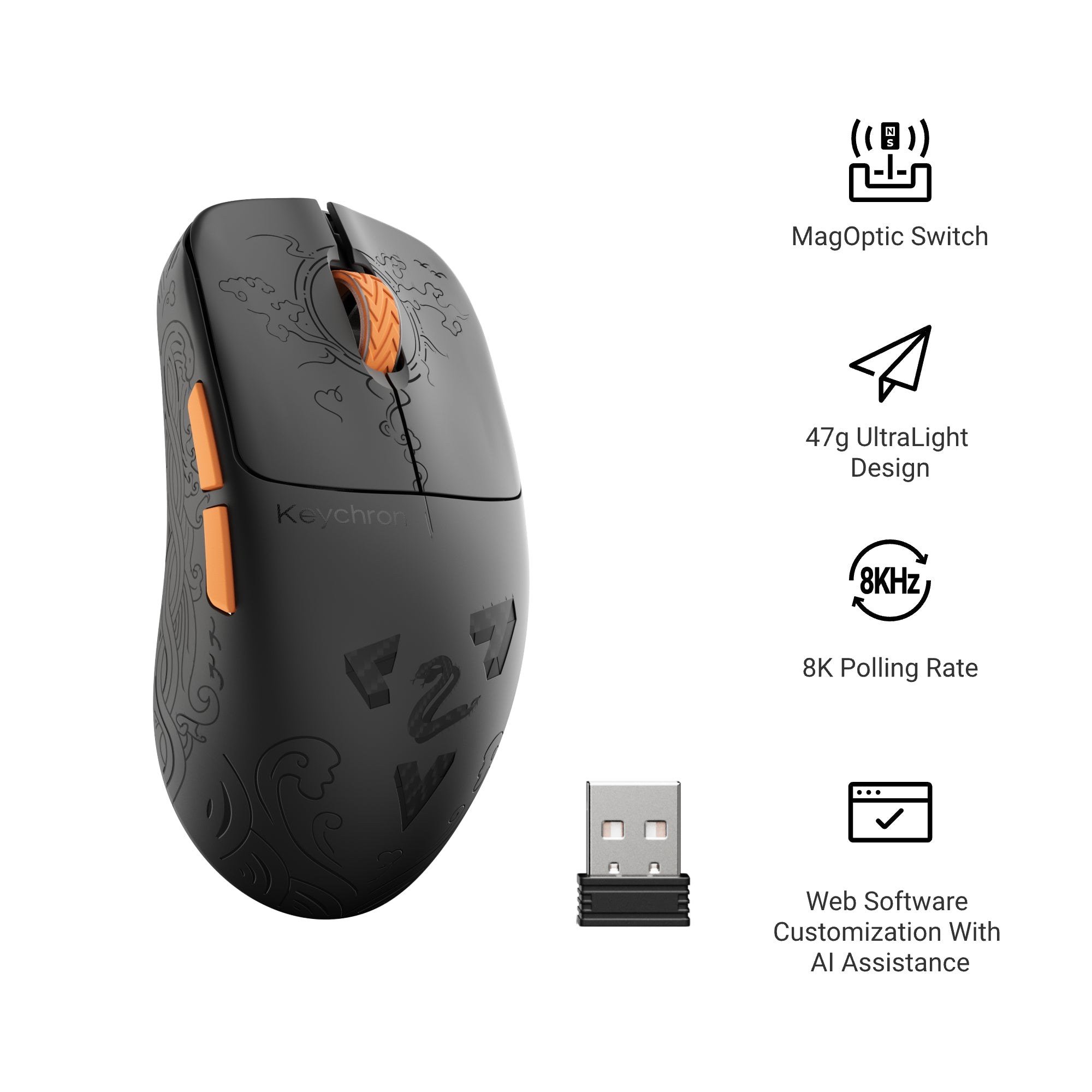
The G3 HE is the lightest Keychron mouse. Both colours weigh 47 g, according to Keychron, and the Black version adds a carbon fibre top cover engraved with a cloud, bird and wave pattern that Keychron says also improves grip. It uses PixArt's 3955 sensor (up to 40,000 DPI), polls at up to 8,000 Hz in both 2.4 GHz and wired modes, and adds Bluetooth 5.3.

The MagOptic switch gives you 12 actuation steps. Keychron's suggestion is to set it shallow for faster clicks or deeper to avoid accidental presses, then let Rapid Trigger reset the click as soon as you release. The body is 120 mm long, which Keychron pitches as suitable for both claw and palm grips, and there's a 24-step optical scroll wheel.
Battery life depends heavily on polling rate. Keychron says the 500 mAh battery lasts about 33 hours at 8K over 2.4 GHz, or about 112 hours over Bluetooth at 125 Hz. Choose the Frosted Grey version at £79.99 unless you specifically want the carbon fibre Black model at £99.99.
Best for competitive gaming: Keychron G6 HE
The G6 HE takes the same PixArt 3955 sensor and MagOptic switch and adds a feature none of the others have: a swappable battery. The swappable-battery version comes with the TurboLink 8K receiver, which doubles as a charging dock for the spare battery and has four customizable buttons of its own. Keychron says a battery swap takes about three seconds, so a flat battery doesn't force you to plug in mid-game.

It's a 123.7 mm symmetrical mouse designed mainly for palm and claw grip, with a fuller rear and a tapered waist. Weight is adjustable: Keychron lists about 41 g wired without the battery, about 49 g for wireless play, and about 56 g or 66 g with the optional 15 g and 25 g weight blocks. Keychron's battery figures are up to 29 hours at 8,000 Hz, 171 hours at 1,000 Hz, 248 hours at 125 Hz or 183 hours over Bluetooth 5.3.
Keychron also says that in its own latency testing the G6 HE reached 0.382 ms click latency over 2.4 GHz at 8K and 0.188 ms wired. Those are manufacturer figures rather than independent results. The swappable-battery version is £89.99 in seven colours. Keychron also mentions a built-in-battery version at about 42 g, which comes with a simpler UltraLink 8K receiver without charging or extra buttons.

Best everyday wireless mouse: Keychron M7
If you want a light wireless mouse for both work and casual gaming without paying for MagOptic switches, the M7 is the easiest pick. It weighs 63 ± 3 g, has an 800 mAh battery that Keychron rates at up to 70 hours, and a smooth curved top with a thumb rest. It has an extra macro button on the left side, and external buttons let you change DPI and polling rate without software.

The 1K version (PixArt 3395, 100–26,000 DPI) is £54.99 and the 8K version (PixArt 3950) is £74.99. One caution: Keychron's own Keychron Engine software for the M7 is listed for Windows 10 and 11 only, with a macOS version "available soon," so Mac users will rely on the on-mouse buttons for now.
Best for productivity: Keychron M6
The M6 is Keychron's office-focused mouse. Keychron highlights its dual scrolling modes and side scroll wheel, and it's the only mouse in the range offered with "Silent" and "All Silent" switch options. It weighs 78 ± 3 g and Keychron rates its 600 mAh battery at up to 80 hours. It's also the cheapest way into the range: the PixArt 3311 All Silent version is £49.99, the PixArt 3395 versions £54.99, and the 8K PixArt 3950 versions £69.99–£74.99.

The M6 is also the best-reviewed Keychron mouse on the UK store: 24 reviews, 17 five-star and 7 four-star. Reviewers praise its light weight and the second scroll wheel. One detailed reviewer found the thumb buttons poorly placed and sometimes pressed the front one by accident, so that's worth knowing if you rely on side buttons.
Best compact all-rounder: Keychron M3
The M3 is a compact mouse with an ergonomic curved shape and grip patterns on both sides. The 1K version comes with RGB lighting for £54.99 (PixArt 3395), while the 8K version drops the RGB and costs £74.99. It weighs 79 ± 3 g. Keychron rates its 600 mAh battery at up to 70 hours for the 1K version. Like the M7, it has external DPI and polling rate buttons.

Best ergonomic mouse: Keychron M5
The M5 is Keychron's vertical mouse. Its 47° vertical angle is designed, Keychron says, to ease wrist strain by holding your hand in a natural handshake position, with a thumb rest and a side thumb wheel that also scrolls horizontally through wide spreadsheets or video timelines. It uses the 8K PixArt 3950 sensor (up to 30,000 DPI) and Bluetooth 5.3, can track on glass at least 4 mm thick (at up to 1 kHz), and its 600 mAh battery is rated for up to 140 hours on Bluetooth or 120 hours at 1K.

At 95 ± 3 g it's the heaviest Keychron mouse, which is normal for a vertical design. It's £69.99, but both colours were listed as sold out when we checked.
What about the Nape Pro trackball?
If you'd rather not move a mouse at all, Keychron's Nape Pro (£84.99) is a 25 mm trackball designed to sit below your keyboard. We cover it in our Keychron Nape Pro review and our Keychron T1 HE vs Nape Pro comparison.
Buying from Keychron UK
Keychron UK says its orders are dispatched from the UK, delivery is free on orders over £30, and the mice carry a 24-month warranty. For returns and delivery details see our Keychron UK shopping guide. Pairing a mouse with a new keyboard? Our best Keychron keyboards for the UK roundup covers ISO-layout picks, and our guide to setting actuation and Rapid Trigger on Keychron HE keyboards explains the same Launcher tools the G HE mice use.
Bottom line
For gaming, the G3 HE is the lightest and simplest choice at £79.99, while the G6 HE is worth the extra £10 if you want a swappable battery and adjustable weight. For everyday use, the M7 is the light all-rounder, the M6 suits office work with its side wheel and silent switches, the M3 is a compact option with RGB, and the M5 is the one to buy if wrist comfort is your priority.
References
- Keychron UK, "Keychron G3 HE 8K UltraLight Wireless Mouse": https://www.keychron.uk/products/keychron-g3-he-8k-ultra-light-wireless-mouse
- Keychron UK, "Keychron G6 HE UltraLight Wireless Mouse": https://www.keychron.uk/products/keychron-g6-he-ultra-light-wireless-mouse
- Keychron UK, "Keychron M7 Wireless Mouse": https://www.keychron.uk/products/keychron-m7-wireless-mouse
- Keychron UK, "Keychron M6 Wireless Mouse": https://www.keychron.uk/products/keychron-m6-wireless-mouse
- Keychron UK, "Keychron M3 Wireless Mouse": https://www.keychron.uk/products/keychron-m3-wireless-mouse
- Keychron UK, "Keychron M5 Wireless Ergonomic Mouse": https://www.keychron.uk/products/keychron-m5-wireless-ergonomic-mouse
- Keychron UK, "Keychron Nape Pro Wireless Trackball Mouse": https://www.keychron.uk/products/keychron-nape-pro-wireless-trackball-mouse
Meet your guide
Lipeiguan
author
What to read next
 Google Adds Computer Use to the Gemini App for Mac in the U.S. On November 19, 2026, Google said computer use is available in the Gemini app for Mac, in English in the U.S. Official requirements include an Apple Silicon Mac on macOS Sequoia 15... How to Use Gemini Computer Use on a Mac: Official Requirements, Permissions and Examples Official Google requirements for computer use in the Gemini app for Mac: an Apple Silicon Mac on macOS Sequoia 15.0 or later, a personal Google account for people 18 or older, a Go...
 How to Choose an LG Monitor in 2026: UltraGear, UltraFine, UltraWide and Smart Models A research-based 2026 guide to choosing an LG monitor, using official LG.com specs and listed U.S. prices as of November 19, 2026, for UltraFine and UltraWide work displays, webOS...