
How to Join the Apple Health AI Usage Study: Eligibility, iPhone Requirements and Privacy Choices
Who can join Apple's Health AI Usage Study (US, 21+, iPhone 15 Pro or later on iOS 26+), how to download the free study app and enroll, what you can ask, the Visit Prep Summary, and which Health data and privacy choices to make first.
Disclosure: This page may contain affiliate links. They do not influence our editorial conclusions. Read the disclosure.
Steps in this guide
Apple's Apple Health AI Usage Study lets iPhone owners in the US try an AI health assistant inside a dedicated study app. It can answer everyday health questions, link to the medical sources behind each answer and use Apple Health data if you choose to share it. Because it's a research study, the app comes with eligibility rules, a cap on participants and its own privacy terms. This guide explains who can join, what you need, how to sign up, what you'll see in the app and which privacy choices to think about first. It's based on Apple's November 2026 announcement and the app's App Store listing.

What the study is
The Apple Health AI Usage Study is a virtual research study, so you take part from your iPhone rather than at a clinic. Apple says it's designed to learn how people use conversational health AI: what makes them trust it, how good and understandable the answers are, and what everyday health actions follow. The AI answers come from OpenEvidence, a clinical AI platform used by healthcare professionals. Apple says it draws on established medical sources such as the Journal of the American Medical Association. Apple designed the research app around it.
Apple says the results will guide how it and the wider industry design health AI responsibly. For participants, the draw is early access to an AI health assistant that shows its sources and can be personalized with your own Health data.
Step 1: Check that you're eligible
Before you download anything, make sure you meet every one of Apple's requirements:
| Requirement | What Apple says |
|---|---|
| Country | United States only |
| Age | 21 or older (the app is rated 18+ on the App Store, but the study requires 21+) |
| iPhone | An Apple Intelligence-enabled iPhone, which Apple defines as iPhone 15 Pro or later |
| Software | iOS 26 or later |
| Capacity | Up to 200,000 eligible participants |
The device rule rules out a lot of iPhones. Models older than the iPhone 15 Pro can't join, and neither can the standard iPhone 15 or iPhone 15 Plus, because they don't support Apple Intelligence. If you're between phones, our guide on Apple's education pricing, trade-in and upgrade options explains Apple's ways to pay less for a newer model.
Step 2: Update your iPhone
The study app needs iOS 26.0 or later. To check your version, open Settings > General > About. To update, go to Settings > General > Software Update. Back up your iPhone before a major update.
Step 3: Download the study app
Search the App Store for Apple Health AI Study App, or follow the link in Apple's Newsroom announcement. Apple publishes the app, it's free, and it's about 30 MB. The listing says it's iPhone-only and English-only.
Step 4: Read about the study and enroll
The app's welcome screen, shown in Apple's announcement, has an About the Study link and a Get Started button. Apple says you can learn about the study in the app and then decide whether to enroll. Read the study details before you join. They explain what's collected and how it's used, and you're agreeing to take part in research, not just installing an app.

Step 5: Decide what Health data to share
This is the most important choice you'll make. Apple says you control whether to share any HealthKit data. It gives resting heart rate, activity, sleep and lab results as examples. You also control whether to share survey responses. Sharing more data lets the app put answers in the context of your own numbers, which is one of the things the study is testing. Sharing nothing is also an option.
Things to consider:
- Start small. You could share only the data types that matter for the questions you plan to ask, such as sleep data for sleep questions.
- Lab results are sensitive. Only share them if you're comfortable with them being part of a research study.
- Your choices can be personal. Apple's announcement stresses that participants keep control over what they share.
Step 6: Ask questions and rate the answers
Apple's screenshots show conversation suggestions such as "Summarize my vitals," "How can I get better sleep?" and "Help me prepare for a medical visit." The App Store listing says you can use the app to:
- understand symptoms or conditions
- put your personal Health data in context
- prepare for a medical visit
- build a personalized exercise or meal plan
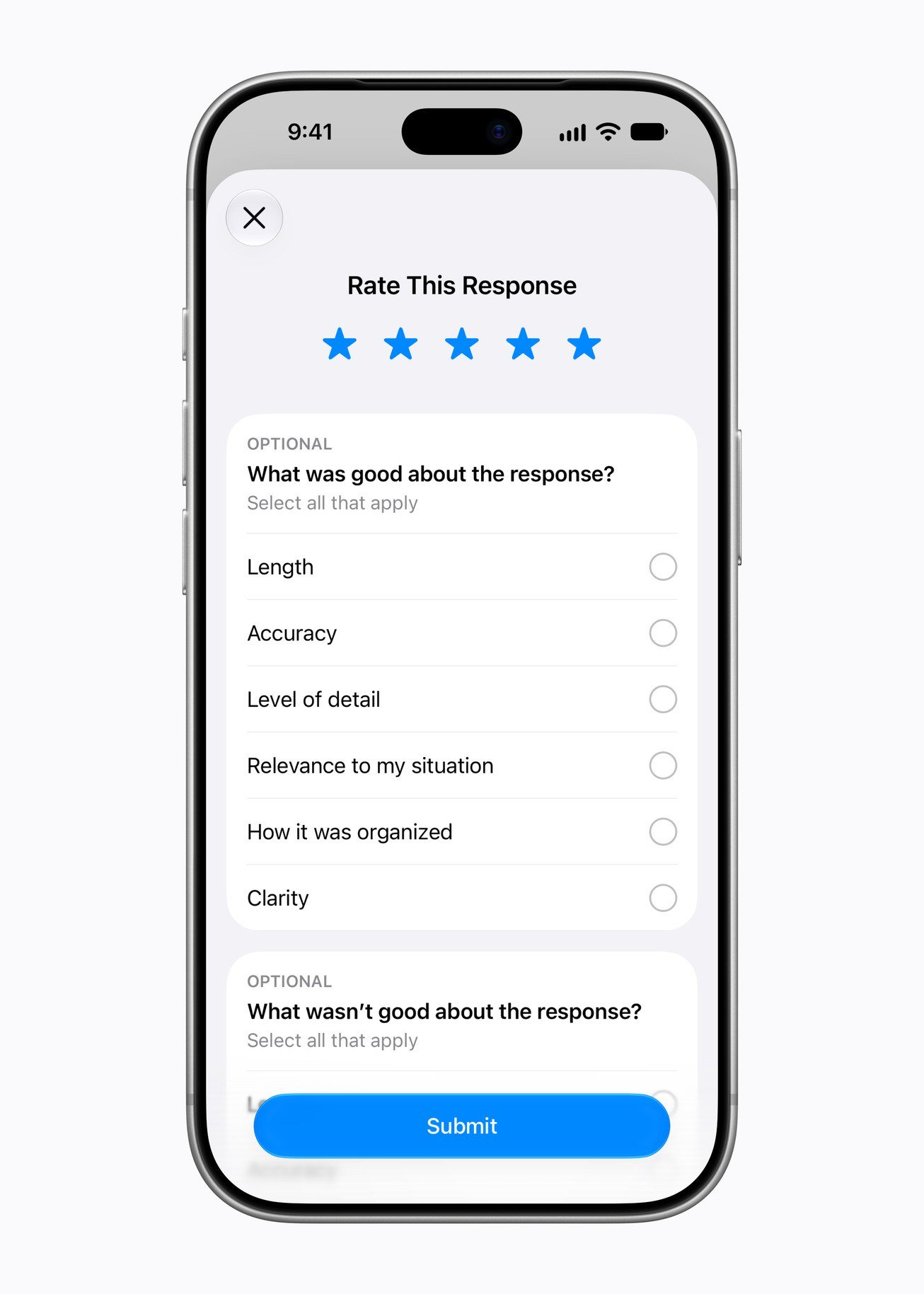
Each answer links to the peer-reviewed clinical sources behind it. Because the study is about what makes AI answers useful, the app may ask you to rate them. Apple's screenshots show a Rate This Response screen with star ratings and optional checkboxes for length, accuracy, level of detail, relevance to your situation, organization and clarity.
Step 7: Use visit prep, not self-diagnosis
One of the app's most practical features is a Visit Prep Summary. Apple's example sorts a health concern into what's been going on, what you've tried and questions to ask your doctor. Apple says the study will look at whether health AI can help people prepare better for appointments.
Apple is firm about the limits. The app isn't meant to diagnose or treat any condition or to replace medical advice. Check health concerns and medical information with a doctor or clinician. The app also has safety guardrails that try to spot certain worrying questions and point you to a provider or other resources. In an emergency, call 911 rather than asking an app.

Privacy: what Apple says it does with study data
- No model training: Apple says study data won't be used to train AI models.
- Your choice to share: HealthKit data and survey answers are shared only if you choose to.
- Security: Apple says it has security measures to protect the study data it keeps and the confidentiality of participants' information.
- App Store privacy label: Apple's label says the app may collect identifiers (a user ID) linked to you for analytics and app functionality, plus diagnostics and performance data not linked to you.
Apple also says health tools built on large language models can give incomplete or unclear answers, and that this is part of why it's studying them. Treat answers as a starting point for a conversation with your clinician, not a final word.
How it fits with Apple's other health features
The study app is separate from the Health app and Apple Watch features, but it can draw on the same Health data if you allow it. If you want to understand the data it might use, our Apple Health app redesign explainer covers the newer Health insights. Our Apple Watch hypertension notifications guide explains one of the watch's health alerts. Read the news story on Apple's launch of the study.
Frequently asked questions
Does it cost anything? No. The Apple Health AI Study App is a free download from Apple on the App Store.
Can I join from outside the US? No. Apple says the study runs in the United States and is open to eligible participants there.
Does it work on iPad or Apple Watch? The App Store listing says the app is only for iPhone.
What if the study is full? Apple caps enrollment at up to 200,000 eligible participants. Apple hasn't said what happens once the cap is reached, so if you're interested and eligible, it makes sense to enroll sooner rather than later.
Quick checklist
- You're in the US and 21 or older.
- You have an iPhone 15 Pro or later on iOS 26 or later.
- You've downloaded the free Apple Health AI Study App.
- You've read About the Study before tapping Get Started.
- You've picked which HealthKit data, if any, to share.
- You understand it's research, not medical care.
References
- Apple Newsroom, "Apple launches research study to explore the use of AI for health," November 2026: https://www.apple.com/newsroom/2026/11/apple-launches-research-study-to-explore-the-use-of-ai-for-health/
- App Store, "Apple Health AI Study App": https://apps.apple.com/us/app/apple-health-ai-study-app/id6800060365
- Apple Support, "Update your iPhone or iPad": https://support.apple.com/en-us/118575
Meet your guide
Lipeiguan
author
What to read next
 Apple TV Will Be the Exclusive U.S. Home of F1 Academy Beginning in 2027 On November 19, 2026, Apple said F1 Academy will stream on Apple TV in the United States beginning in 2027, with every qualifying session and race included for U.S. Apple TV subscr... How to Watch F1 Academy on Apple TV in 2027: Official Calendar and Subscription Note Apple said U.S. Apple TV subscribers will get every F1 Academy qualifying session and race beginning in 2027. This guide records the official seven-round 2027 calendar graphic and...
 Google Brings the Gemini App to Eligible Android Go and Lower-Memory Phones On November 18, 2026, Google said the Gemini app is available on eligible Android (Go edition) devices after a re-architecture for lower-memory phones. Official help adds a 2GB RAM...