
Sonos Era 100 vs Era 300: Which Speaker Should You Buy?
Era 100 ($219) vs Era 300 ($499) compared on drivers, Dolby Atmos, size, connectivity, home theater use and value, based on Sonos's official specs.
Disclosure: This page may contain affiliate links. They do not influence our editorial conclusions. Read the disclosure.
Our pick
- See price at Sonos
Top pick
Sonos
Santa Barbara, California audio company making wireless Wi-Fi speakers, soundbars, subwoofers, headphones and amplifiers controlled from the Sonos app.
If you are choosing between the Sonos Era 100 and the Era 300, the short answer comes down to one question: do you want great stereo sound in a small footprint, or do you specifically want spatial audio with Dolby Atmos? The Era 100 costs $219 at Sonos.com and does the first job very well. The Era 300 costs $499 and is the only one of the two built with an upward-firing driver for Atmos content. Everything else, from WiFi 6 and Bluetooth 5.3 to the USB-C line-in and voice options, is nearly identical.
This comparison is based on Sonos's official product pages and spec sheets as checked on November 10, 2026, plus the public customer rating summaries shown on those pages. We have not tested either speaker hands-on, so we focus on what the specs and policies actually tell you and where each one fits.

Era 100 vs Era 300 at a glance
| Sonos Era 100 | Sonos Era 300 | |
|---|---|---|
| Price at Sonos.com (Nov 10, 2026) | $219 | $499 |
| Amplifiers | 3 class-D | 6 class-D |
| Drivers | 2 angled tweeters, 1 midwoofer | 4 tweeters (1 forward, 2 side, 1 upward-firing in a horn), 2 woofers |
| Dolby Atmos Music | No | Yes, over WiFi from supported services |
| Size (H x W x D) | 7.19 x 4.72 x 5.14 in | 7.28 x 10.24 x 6.30 in |
| Weight | 4.45 lb (2.02 kg) | 9.85 lb (4.47 kg) |
| WiFi / Bluetooth | WiFi 6, Bluetooth 5.3 | WiFi 6, Bluetooth 5.3 |
| Line-in | USB-C with Sonos Line-In Adapter (sold separately) | USB-C with Sonos Line-In Adapter (sold separately) |
| Voice | Sonos Voice Control and Amazon Alexa | Sonos Voice Control and Amazon Alexa |
| Recycled plastic | 48% | 40% |
| Customer rating shown on Sonos.com | 4.6/5 from 2,732 reviews | 4.7/5 from 1,555 reviews |
Both come in black or white with a matte finish, and both list the same quad-core 1.9 GHz processor, the same 6 ft power cable and the same 1.8 W idle power figure.
Sound: stereo in a small can vs sound from every direction
The biggest difference is the driver layout, and it explains most of the price gap.
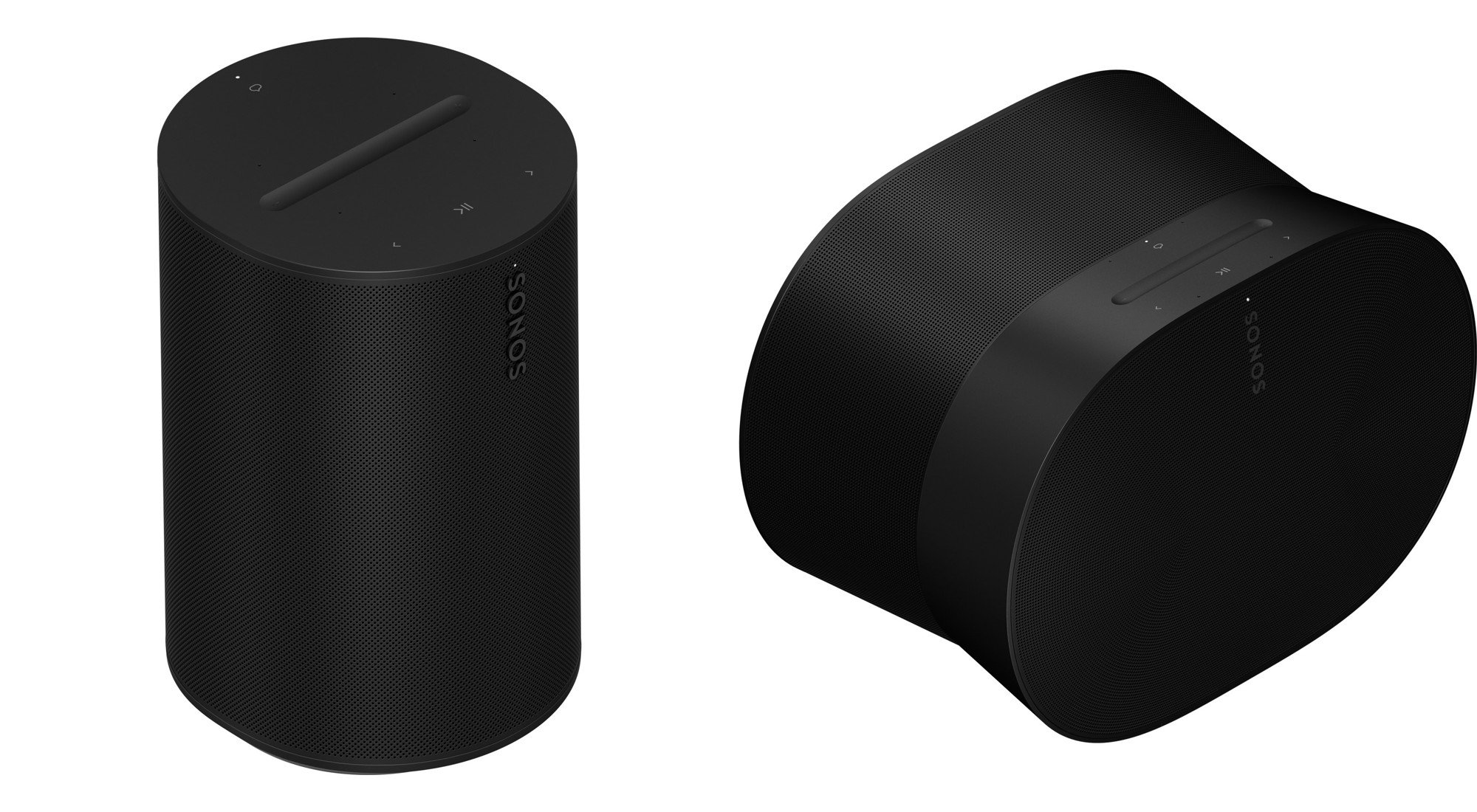
The Era 100 uses three amplifiers driving two angled tweeters and a single midwoofer. Sonos says the angled tweeters create stereo separation from one cabinet, and the midwoofer handles vocals and bass. That makes it a true stereo speaker in a body less than five inches wide, which is why Sonos pitches it for bookshelves, kitchen counters, desks and nightstands.

The Era 300 doubles the amplification to six channels and spreads its drivers around the cabinet. A forward-firing tweeter anchors the center image, two side-firing tweeters push sound left and right, and an upward-firing tweeter sits in a directional horn to bounce sound off the ceiling when you play Dolby Atmos content. Two woofers are angled left and right for stereo bass. Sonos describes the goal as projecting sound "from wall to wall and floor to ceiling."
What that means in practice:
- If most of what you play is regular stereo music, podcasts and radio, the Era 100 covers the job, and you can add a second one later for a wider stereo image.
- If you subscribe to a service that streams Dolby Atmos Music and you want that spatial effect from a single speaker, the Era 300 is the one built for it. Sonos notes that Atmos Music streams over WiFi only, with a supported service and supported content.
Both speakers support Trueplay, Sonos's room-tuning software, which measures the room and adjusts EQ. Sonos lists the Era 100 and Era 300 as compatible with Trueplay on both iOS and Android devices, and you can also adjust bass, treble and loudness in the Sonos app.
Size and placement
The Era 100 is small: 7.19 inches tall, 4.72 inches wide and just under 4.5 pounds. It fits almost anywhere you would put a lamp.
The Era 300 is about as tall but more than twice as wide at 10.24 inches, and it weighs 9.85 pounds. Its oval, angled shape is designed so the side and top drivers can do their job, so it needs a bit of open space around it. A deep bookshelf cubby is not ideal for a speaker that fires sound sideways and up.

If the speaker is going on a nightstand, a narrow desk or a kitchen counter, the Era 100's footprint is the practical choice. If it is going on a credenza, a media console or a stand with room above it, the Era 300 has space to work.
Connectivity and features are nearly identical
You do not give up much by choosing the cheaper speaker. Per Sonos's spec sheets, both models:
- Connect over WiFi 6 (any 802.11a/b/g/n/ac/ax 2.4 GHz or 5 GHz router) and Bluetooth 5.3, with a button on the back for Bluetooth pairing.
- Work with Apple AirPlay 2 on iOS 11.4 and later.
- Have a USB-C port that accepts a 3.5 mm source, such as a turntable with a built-in preamp, through the Sonos Line-In Adapter, or a wired Ethernet connection through the Sonos Combo Adapter. Both adapters are sold separately, and Sonos says this line-in connection is not intended for TV audio.
- Include a far-field microphone array for Sonos Voice Control and Amazon Alexa, plus a physical switch that cuts power to the microphones.
- Use capacitive touch controls on top for play, pause, skip, volume and grouping.
- Are listed as humidity resistant.
Both must be set up on WiFi with the Sonos app before they will play audio, so neither is a plug-and-play Bluetooth speaker out of the box. If you want a speaker without microphones at all, Sonos also sells the Era 100 SL for $189, which drops voice control; we cover that choice in our Era 100 vs Era 100 SL comparison.
Home theater: rears for different soundbars
Both speakers can serve as rear surrounds in a Sonos home theater, but Sonos positions them differently.
- The Era 100 page says a pair can be used as rear speakers with Ray, Beam, Arc Ultra or Amp.
- The Era 300 page says pairing two with Arc or Beam (Gen 2) delivers surround sound in which the lateral and overhead channels add to the Dolby Atmos effect. Atmos home theater content requires a compatible TV with HDMI eARC or HDMI ARC, according to Sonos.

As rears, a pair of Era 100s costs $438 at list price, and a pair of Era 300s costs $998. If you already own an Atmos soundbar and want height effects from behind your seat, the Era 300 pair is the premium option. If you mainly want to fill in the back of the room for movies and games, Era 100 rears cost less than half as much. Sonos also sells an Immersive Set with Beam Ultra, Sub Mini and two Era 100s, listed at $1,556 (down from $1,636) on the Era 100 page on November 10. For full planning help, see our guide to building a Sonos surround sound system and our roundup of the best Sonos soundbars.
Price and value
At $219 versus $499, the Era 300 costs $280 more. You could buy two Era 100s for $438 and still spend less than one Era 300. That pair would give you true left and right stereo separation, which Sonos says creates "an even wider stereo soundstage" than a single speaker.
So which is better value depends on what you want:
- Two Era 100s make sense if you want stereo music in a living room or office and do not care about Atmos height effects.
- One Era 300 makes sense if you want spatial audio from a single box, or if you plan to use a pair as Atmos rears with an Arc or Beam (Gen 2).
Customer ratings on Sonos.com are close: 4.6 out of 5 for the Era 100 from 2,732 reviews and 4.7 out of 5 for the Era 300 from 1,555 reviews as of November 10. Neither score points to a clear quality gap. The difference is mostly about features and room fit.
Buying from Sonos directly includes free shipping and a 30-day return window, and Sonos says it will match a lower price, subject to terms. You can find the details in our Sonos shopping guide.
Who should buy which
Buy the Era 100 if:
- You want a compact speaker for a bedroom, kitchen, office or bathroom.
- You plan to start with one speaker and add a second for stereo later.
- You need rear surrounds for a Ray, Beam or Arc Ultra setup on a budget.
- You mostly listen to standard stereo streaming, radio or podcasts.
For a deeper look at the smaller speaker alone, read our Sonos Era 100 review.
Buy the Era 300 if:
- You stream Dolby Atmos Music and want that effect from one speaker.
- You have open space around and above where the speaker will sit.
- You want Atmos height channels from rear speakers paired with Arc or Beam (Gen 2).
- You are building a main living-room music speaker and the extra $280 fits your budget.
Frequently asked questions
Is the Era 300 louder than the Era 100? Sonos does not publish loudness or wattage figures for either model. What it does publish is driver count: the Era 300 has six drivers and six amplifiers versus three each in the Era 100, and it is designed to fill more of the room with sound.
Can I pair an Era 100 with an Era 300 as a stereo pair? Sonos's own wording is that matching Sonos products bond as a stereo pair, so a stereo pair needs two of the same model.
Do both speakers work with Bluetooth? Yes. Both support Bluetooth 5.3 streaming, but each must first be set up on WiFi with the Sonos app.
Can I connect a TV with the USB-C line-in? Sonos says the USB-C line-in connection is not intended for TV. For TV sound, use a Sonos soundbar and add either speaker as rears.
References
- Sonos, "Era 100" product page and specifications, https://www.sonos.com/en-us/shop/era-100 (accessed November 10, 2026).
- Sonos, "Era 300" product page and specifications, https://www.sonos.com/en-us/shop/era-300 (accessed November 10, 2026).
- Sonos, "Era 100 SL" product page, https://www.sonos.com/en-us/shop/era-100-sl (accessed November 10, 2026).
- Sonos Support, "Listen to Dolby Atmos on Sonos," https://support.sonos.com/article/listen-to-dolby-atmos-on-sonos (accessed November 10, 2026).
Meet your guide
Lipeiguan
author
What to read next
 Google Adds Computer Use to the Gemini App for Mac in the U.S. On November 19, 2026, Google said computer use is available in the Gemini app for Mac, in English in the U.S. Official requirements include an Apple Silicon Mac on macOS Sequoia 15... How to Use Gemini Computer Use on a Mac: Official Requirements, Permissions and Examples Official Google requirements for computer use in the Gemini app for Mac: an Apple Silicon Mac on macOS Sequoia 15.0 or later, a personal Google account for people 18 or older, a Go...
 How to Choose a SwitchBot Lock: Lock Pro vs Lock Ultra vs Lock Vision and Vision Pro A research-based guide to official SwitchBot Lock Pro, Lock Ultra, Lock Vision and Lock Vision Pro specs and November 20, 2026 U.S. prices, including batteries, hubs, keypads, comp...