
Which Xfinity Internet Speed Do You Need? 300 Mbps vs 500 Mbps vs 1 Gig
Xfinity's 300 Mbps, 500 Mbps and 1 Gig plans are only $5 to $10 a month apart. Using Xfinity's own speed guidance and its FCC broadband labels, here is which tier fits your household, and why upload speed depends on your address.
Disclosure: This page may contain affiliate links. They do not influence our editorial conclusions. Read the disclosure.
Our pick
- See price at Xfinity
Top pick
Xfinity
Comcast's U.S. consumer brand for home internet, TV, streaming and Xfinity Mobile, selling no-contract internet plans with a 5-Year Price Guarantee for new memb...
What this guide covers
Xfinity sells four main home internet speeds in November 2026: 300 Mbps, 500 Mbps, 1 Gig and 1.2 Gig. The price gap between them is smaller than many people expect, just $5 to $10 a month between the first three, so it is tempting to buy the fastest plan you can afford. This buyer's FAQ uses Xfinity's own speed guidance, current plan prices and the FCC broadband labels Xfinity publishes to help you choose a tier that fits your household without paying for speed you won't use.

What do the plans cost right now?
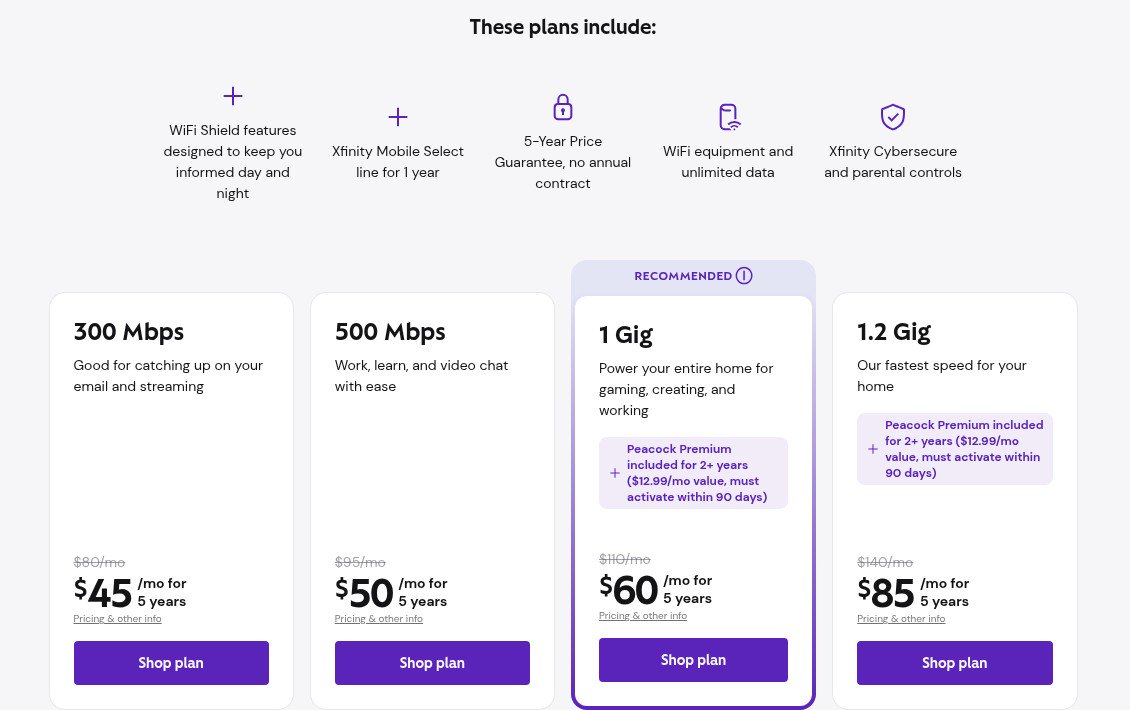
According to Xfinity's internet page, new customers on November 11, 2026 see these prices, each locked for five years under the 5-Year Price Guarantee:
| Plan | Price with guarantee | Crossed-out price | What Xfinity says it's for |
|---|---|---|---|
| 300 Mbps | $45/mo | $80/mo | "Catching up on your email and streaming" |
| 500 Mbps | $50/mo | $95/mo | "Work, learn, and video chat with ease" |
| 1 Gig | $60/mo | $110/mo | "Power your entire home for gaming, creating, and working" (marked Recommended) |
| 1.2 Gig | $85/mo | $140/mo | "Our fastest speed for your home" |
The prices include a $10 per month discount for autopay and paperless billing, and taxes and fees are extra. All plans include WiFi equipment, unlimited data and an Xfinity Mobile Select line free for one year. The 1 Gig and 1.2 Gig plans also include Peacock Premium for two years, which has to be activated within 90 days. The offers are listed as ending December 1. There is also a one-year price of $40 a month on 300 Mbps if you would rather not commit to the five-year rate.
Our Xfinity shopping guide explains how the price guarantee works when you move or change plans.
How much speed does one activity use?
Xfinity's speed test page gives these rough per-device figures:
- Sending and receiving email: 1 Mbps
- Browsing the web: 3 Mbps
- Streaming HD video: 5 Mbps
- Streaming 4K video: 25 Mbps
Its streaming guide gives a little more headroom: 10 to 15 Mbps recommended per HD stream and 25 Mbps or more per 4K stream, plus 10 to 20 Mbps for background devices. The point is that a single activity rarely needs much. What fills a connection is many activities at once, plus large downloads such as game updates.
How much speed does a whole household need?
Xfinity's internet speed explainer suggests these ranges:
| Speed tier | Good for | Typical household |
|---|---|---|
| 25 to 100 Mbps | Browsing, email, HD streaming on one or two devices | 1 to 2 people, light streaming |
| 100 to 300 Mbps | Multiple streams, video calls, gaming | Small families, remote work |
| 300 to 600 Mbps | 4K streaming on several screens, large downloads | Busy households, smart homes |
| 1 Gbps and up | Everything at once | Power users, large households |

Its streaming guide reaches similar conclusions: about 100 Mbps for a couple with two 4K streams, 200 to 300 Mbps for a family of three or four, and 500 Mbps to 1 Gbps for large households that stream 4K on several screens while gaming and making video calls.
For context, the FCC's benchmark for high-speed fixed broadband, raised in 2024, is 100 Mbps download and 20 Mbps upload, as Xfinity's explainer notes. Every Xfinity tier sold today is well above that for download.
So which tier should I pick?
Using those figures, here is a practical way to choose.
300 Mbps ($45) is enough for most one- to three-person homes. Two 4K streams, a video call and phones in the background add up to well under 100 Mbps. 300 Mbps leaves plenty of room, and it is also the only tier with a one-year price option.
500 Mbps ($50) suits a busy family of four or more. For $5 more, it gives headroom when several people stream, game and work at the same time, and big downloads finish faster. Xfinity's own household table puts busy households and smart homes in the 300 to 600 Mbps range.
1 Gig ($60) is worth it for heavy downloaders and big households. If someone in the house regularly downloads large game files or works with big video files, or if you have many people online at peak times, the extra $10 over 500 Mbps buys real time savings. Peacock Premium for two years is also included. If you would subscribe to Peacock anyway, that softens the price difference.
1.2 Gig ($85) is hard to justify for most homes. It costs $25 a month more than 1 Gig for a 20% faster download tier. Look closely at the upload speed on its broadband label (see below) before choosing it.
Gamers can also look at our Xfinity review, which covers Xfinity's gaming features. Xfinity's own gaming guide says 50 to 100 Mbps download and at least 10 Mbps upload is enough for competitive play, and that 300 Mbps or more mainly helps homes with many active devices.
Why does upload speed matter, and what will I get?
Upload speed matters for video calls, sending large files, backing up to the cloud, and livestreaming. Xfinity's gaming guide recommends 35 Mbps or more upload for heavy households.
Upload speed on Xfinity depends on the network at your address more than on the plan you choose. Xfinity publishes FCC "broadband facts" labels for every plan, and its machine-readable label file shows three patterns for the 300 Mbps, 500 Mbps and 1 Gig tiers:
- 35 Mbps upload (about 41 Mbps typical), found on many labels;
- 100 Mbps upload (about 117 Mbps typical), the most common pattern in the file for these tiers;
- Upload matching download (for example, 500 Mbps up on 500 Mbps, or 1,000 Mbps up on 1 Gig) on some labels.
The 1.2 Gig labels in the same file almost all list 35 Mbps upload (about 41 typical). In other words, at many addresses the most expensive tier has slower uploads than a cheaper 1 Gig plan.
Typical idle latency on these labels ranges from about 6 to 16 milliseconds.
What to do: before ordering, open the broadband facts label shown for your address at checkout. Xfinity's label support page says labels list the plan, price, fees and typical download and upload speeds and latency. If uploads matter to you, compare tiers using the label for your own address, not the marketing headline.
Will I actually get the speed I pay for over WiFi?
Not always on every device, and Xfinity says so. Its speed test page explains that speed tests measure the speed reaching one device, which is often lower than the plan speed because of WiFi conditions and the device itself. Signal strength drops as you move away from the gateway, and older phones and laptops may not support the fastest WiFi standards. Its speed explainer also lists router placement, number of devices and network congestion as common reasons for slower results.

Before upgrading because the internet "feels slow," try these steps, which come from Xfinity's guides:
- Run a speed test next to the gateway, then in the rooms you use most.
- Test from a computer connected by ethernet to rule out WiFi.
- Move the gateway to a central, open spot, away from cabinets and thick walls.
- Run tests at different times of day to spot peak-hour slowdowns.
If the wired test is close to your plan speed but WiFi in a far room is slow, a faster plan won't fix it. Better placement or more WiFi coverage will. Our guide to Xfinity's speed boost and home WiFi tips walks through those steps in more detail.
Can I change tiers later?
Yes. Xfinity's FAQ says you can upgrade or switch plans at any time without penalties or fees, though pricing may change depending on the offers available then. There is no annual contract and no early termination fee. In practice, starting on 300 or 500 Mbps and moving up only if you hit limits is a low-risk approach. Ask how a change affects your guaranteed rate before you switch.
Quick picks
- Single person or couple: 300 Mbps.
- Family of three or four: 300 or 500 Mbps.
- Large household, frequent big downloads, or several gamers: 1 Gig.
- Uploads matter (creators, cloud backups): pick the tier whose label at your address shows the best upload speed, which may be 1 Gig rather than 1.2 Gig.
If you're comparing providers, our Xfinity vs AT&T Fiber comparison sets Xfinity's tiers against fiber plans with matching upload speeds.
References
- Xfinity. Xfinity Internet: Home Internet Service (plans and FAQ). Retrieved November 11, 2026, from https://www.xfinity.com/learn/internet-service
- Xfinity. Mbps meaning? Kbps vs Mbps? Internet Speeds Explained. Retrieved November 11, 2026, from https://www.xfinity.com/hub/internet/internet-speed
- Xfinity. Best Internet Speed for Streaming Movies and TV. Retrieved November 11, 2026, from https://www.xfinity.com/hub/internet/internet-speed-for-streaming
- Xfinity. What Is A Good Internet Speed For Gaming? Retrieved November 11, 2026, from https://www.xfinity.com/hub/internet/internet-speed-for-gaming
- Xfinity. Xfinity Speed Test. Retrieved November 11, 2026, from https://speedtest.xfinity.com/
- Xfinity. Xfinity Broadband and Mobile Facts labels. Retrieved November 11, 2026, from https://www.xfinity.com/support/articles/broadband-mobile-facts-labels
- Xfinity. Machine-readable broadband labels file (residential, USA). Retrieved November 11, 2026, from https://www.xfinity.com/.well-known/broadband-labels/2026-02-03-0003768165-USA-RESIDENTIAL.csv
Meet your guide
Lipeiguan
author
What to read next
 Google Brings the Gemini App to Eligible Android Go and Lower-Memory Phones On November 18, 2026, Google said the Gemini app is available on eligible Android (Go edition) devices after a re-architecture for lower-memory phones. Official help adds a 2GB RAM... How to Use the Gemini App on Android Go and Other Lower-Memory Phones Official Google steps for the Gemini app on eligible Android (Go edition) devices with 2GB of RAM or more: update Google Search or install Gemini from Play, start a chat with a lon...
 Google Wallet Is Now Available on iOS in the U.S.; Tap-to-Pay Is Not Included On November 17, 2026, Google said Wallet is available to iOS users in the United States, with Gmail sync, loyalty-card scanning, payment-card management for online Google Pay check...